


Dynamics GP
Public Group
Active 8 hours ago
Dynamics GP
Organizer:
- JOSE Organized by
-
-

Vendor with multiple remit to addresses
-
Vendor with multiple remit to addresses
Posted by DSC Communities on August 21, 2019 at 9:52 am-

Elaine German
MemberAugust 21, 2019 at 9:52 AM
?I have a telephone company that has multiple remit to addresses. I have added each address into the vendor card and when I enter an invoice I select the correct address for that particular invoice. However, when I go to print the checks, it combines all invoices onto one check and using one of the addresses. Is there a way to get multiple checks to print to the same vendor at each address I have selected for the invoices for this one vendor and not every vendor in the check batch? We are on GP2018. Thank you!?I have a telephone company that has multiple remit to addresses. I have added each address into the vendor card and when I enter an invoice I select the correct address for that particular invoice. However, when I go to print the checks, it combines all invoices onto one check and using one of the addresses. Is there a way to get multiple checks to print to the same vendor at each address I have selected for the invoices for this one vendor and not every vendor in the check batch? We are on GP2018. Thank you!
?I have a telephone company that has multiple remit to addresses. I have added each address into the vendor card and when I enter an invoice I select the correct address for that particular invoice. However, when I go to print the checks, it combines all invoices onto one check and using one of the addresses. Is there a way to get multiple checks to print to the same vendor at each address I have selected for the invoices for this one vendor and not every vendor in the check batch? We are on GP2018. Thank you!——————————
Elaine German
Accounting Specialist
Des Moines Area Regional Transit Authortity
Des Moines IA
—————————— -
Nancy Edwards
MemberAugust 22, 2019 at 9:40 AM
Hi Elaine,We have the same situation with vendors, but when we print it does separate checks for each address. We do change the address in both the Address ID and the Remit To ID in the Payables Transaction Entry screen. I don’t know if there are settings somewhere else to make this work, sorry I’m not more help on this one, but I did want you to know that it is possible so don’t give up hope.
Good luck!
——————————
Nancy Edwards
Director of Operations
H&W Computer Systems, Inc
Boise ID
——————————
——————————————- -
Elaine German
MemberAugust 22, 2019 at 9:52 AM
Hi Nancy,
Thanks for responding. Question – do you put in the remit to address after the build payment batch step by going into edit vendor payment?
Elaine German, Accounting Specialist
DART, Des Moines Area Regional Transit Authority
620 Cherry Street, Des Moines, IA 50309
Direct: 515-283-8133
Fax: 515-283-8135 | ridedart.com
Enriching Lives, Connecting Communities, Expanding Opportunities
——Original Message——
Hi Elaine,
We have the same situation with vendors, but when we print it does separate checks for each address. We do change the address in both the Address ID and the Remit To ID in the Payables Transaction Entry screen. I don’t know if there are settings somewhere else to make this work, sorry I’m not more help on this one, but I did want you to know that it is possible so don’t give up hope.
Good luck!
——————————
Nancy Edwards
Director of Operations
H&W Computer Systems, Inc
Boise ID
—————————— -
Nancy Edwards
MemberAugust 22, 2019 at 10:00 AM
Hi Elaine,No, we select both the Address ID and the Remit To ID when originally entering the Transaction in the Payables Transaction Entry. We haven’t ever used the edit vendor payment after the build payment batch step (didn’t know it existed).
——————————
Nancy Edwards
Director of Operations
H&W Computer Systems, Inc
Boise ID
——————————
——————————————- -
Elaine German
MemberAugust 22, 2019 at 10:34 AM
Unfortunately we do not enter all payables directly in to GP. We use a system called Workplace for this type and then that feeds into a batch in GP that I post. I am going to try the Edit Transaction Information option to see if I can change the Remit To there. I just noticed that option so I’ll try it��
Thank you!
Elaine German, Accounting Specialist
DART, Des Moines Area Regional Transit Authority
620 Cherry Street, Des Moines, IA 50309
Direct: 515-283-8133
Fax: 515-283-8135 | ridedart.com
Enriching Lives, Connecting Communities, Expanding Opportunities
——Original Message——
Hi Elaine,
No, we select both the Address ID and the Remit To ID when originally entering the Transaction in the Payables Transaction Entry. We haven’t ever used the edit vendor payment after the build payment batch step (didn’t know it existed).
——————————
Nancy Edwards
Director of Operations
H&W Computer Systems, Inc
Boise ID
—————————— -
Nancy Edwards
MemberAugust 22, 2019 at 10:51 AM
That is a lot different. Good luck, hope it works! Let us know how it goes.——————————
Nancy Edwards
Director of Operations
H&W Computer Systems, Inc
Boise ID
——————————
——————————————- -
Hi
The answer to your issue is simple, but might be a pain in the you-know-what.
Since Workplace creates a batch that you then go post, you can EDIT the transactions for the phone company BEFORE you post the batch and this will solve the issue.
Before you post, run an edit list and see if there are any Phone Company transactions in the batch. If so, open them up in Payables Transaction window and change the necessary addresses, save them, then post the batch.
Otherwise, I would speak with whomever configured your Workplace to see if this is a field that can be added to that so that the transactions are correct BEFORE they get into GP.
You might also try ensuring that there is NO default Remit To Address setup in the Vendor Card.?
——————————

——————————
——————————————- -
Tiffany Ziegler
MemberAugust 22, 2019 at 11:47 AM
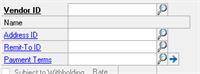
– assuming you are using the Payables Transaction Entry screen to enter your invoice, are you putting the correct address in the Remit-To ID field (as opposed to the Address ID field)? This is the field that would trigger the payment address.I haven’t tested this, but I suspect that might be your issue.?
——————————
Tiffany Ziegler
Vice President & Controller
Velcor Leasing Corporation
Madison WI
——————————
——————————————- -
Hi Elaine:
We have the same issue with a telephone company and a few other vendors. Our organization is purchase order driven so we begin our transactions in Purchase Order Entry. When entering a PO you can select the correct Remit To address under Vendor ID by selecting the blue arrow. If your PO encompasses several different line items for different bills, you can also select the correct Remit To address in the Receivings Transaction Entry screen by selecting the blue arrow next to Vendor ID. From there select the correct Remit To address for your transaction. This will allow you to be able to print more than one check to the same vendor with multiple addresses in one check batch.
I hope this helps!
Angie Boyle
Fiscal Coordinator
Valley Regional Fire Authority
1101 D Street N.E.
Auburn, WA 98002
253-288-5808 Direct
253-288-5800 Tel. /253-288-5900 Fax
——Original Message——
?I have a telephone company that has multiple remit to addresses. I have added each address into the vendor card and when I enter an invoice I select the correct address for that particular invoice. However, when I go to print the checks, it combines all invoices onto one check and using one of the addresses. Is there a way to get multiple checks to print to the same vendor at each address I have selected for the invoices for this one vendor and not every vendor in the check batch? We are on GP2018. Thank you!?I have a telephone company that has multiple remit to addresses. I have added each address into the vendor card and when I enter an invoice I select the correct address for that particular invoice. However, when I go to print the checks, it combines all invoices onto one check and using one of the addresses. Is there a way to get multiple checks to print to the same vendor at each address I have selected for the invoices for this one vendor and not every vendor in the check batch? We are on GP2018. Thank you!
?I have a telephone company that has multiple remit to addresses. I have added each address into the vendor card and when I enter an invoice I select the correct address for that particular invoice. However, when I go to print the checks, it combines all invoices onto one check and using one of the addresses. Is there a way to get multiple checks to print to the same vendor at each address I have selected for the invoices for this one vendor and not every vendor in the check batch? We are on GP2018. Thank you!——————————
Elaine German
Accounting Specialist
Des Moines Area Regional Transit Authortity
Des Moines IA
—————————— -
Sandy Righi
MemberAugust 27, 2019 at 10:49 AM
I don’t know if this applies – but on the Select Payables Checks screen there is a setting called “One Check Per:” that usually defaults to “Vendor”. If you change that to “Invoice” for the vendors you need separate checks for, then change it back to “Vendor” for the rest of the check run, does that help?——————————
Sandy Righi
Senior Programmer Analyst
Howard Hanna
Mayfield Heights OH
——————————
——————————————- -
Bruce Strom
MemberSeptember 5, 2019 at 9:18 PM
Did the other suggestions work for you?
If you want to explore a Dexterity enhancement to automate this, please let me know.
If the logic is fairly simple, this could be in the $500- $1,000 range.——————————
Bruce Strom
Programmer Analyst
Associated Grocers of Florida / Supervalu
Sunrise FL
——————————
——————————————-
DSC Communities replied 6 years, 7 months ago 1 Member · 0 Replies -
-
0 Replies
Sorry, there were no replies found.
The discussion ‘Vendor with multiple remit to addresses’ is closed to new replies.
