


Dynamics GP
Public Group
Active a day ago
Dynamics GP
Organizer:
- JOSE Organized by
-
-

Slowdown issues with GP
-
Slowdown issues with GP
Posted by Unknown Member on March 16, 2022 at 1:45 pm-
This may be a bit too far into the IT side for this board, but i’ll give it a shot.
We keep running into issues where our GP application starts throwing errors/crashing and generally running extremely slowly. Unfortunately, we don’t have a DBA on staff, so we’re kind of grasping at straws. We’ve looked at some memory usage metrics on our SQL Server and it seems to be pulling a lot of memory (30+ gigs), which is fine for the server itself (that’s 50 gig) but the max for the SQL application is set to 40 gigs. Digging further i can see that the buffer pool seems large (22 gigs) but i have no idea what is in an acceptable range for either metric. We slowed to a crawl last week and rebooted the SQL server, and that seemed to temporarily fix things. but we are back where we started. I assume there is some kind of memory leak, but without a DBA, i’m not sure how to triage and fix the problem.
we plan on rebooting again tonight, and i’ll try to keep an eye on the usage to see if it’s gradually building up, or happens all at once due to a specific process (or something), but does anyone have any tips on how to troubleshoot this?
——————————
Mike Bresnan
Arabella Advisors
Washington MD
—————————— -
Is the SQL box a Virtual Machine? VMware or Hypervisor?
If so, commit/reserve all the RAM for the SQL box. Only allow SQL to consume up to 75% of the available ram.
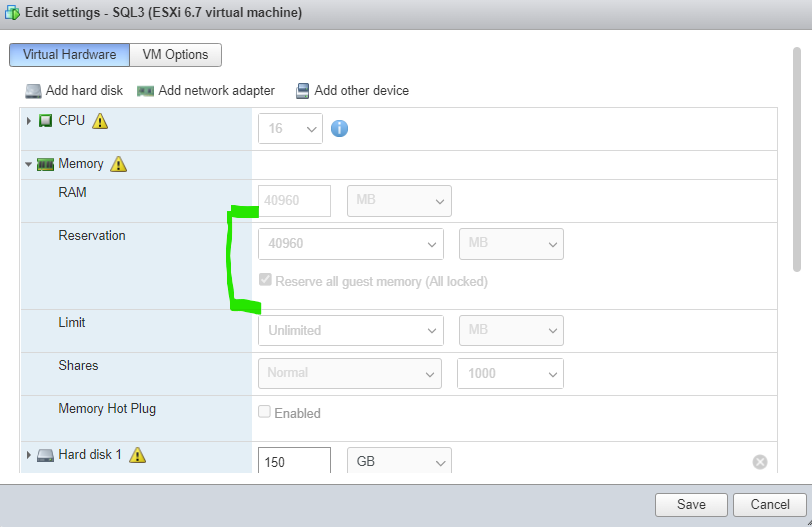
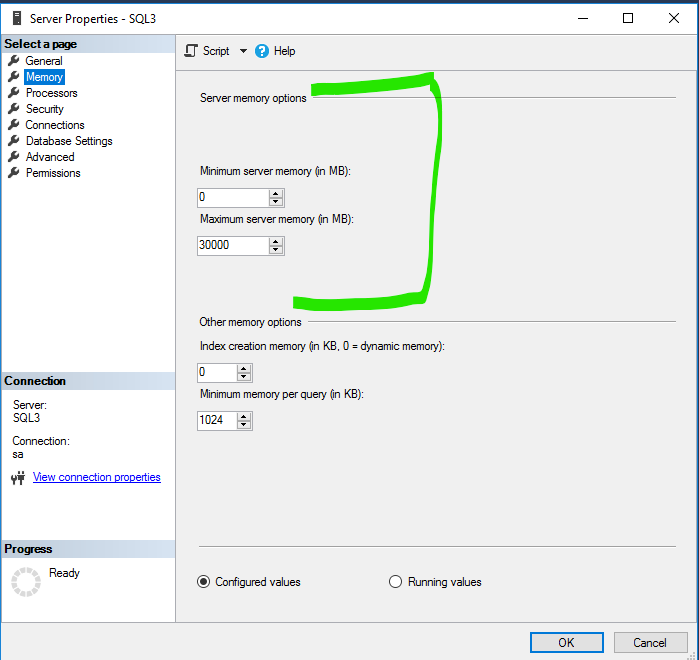
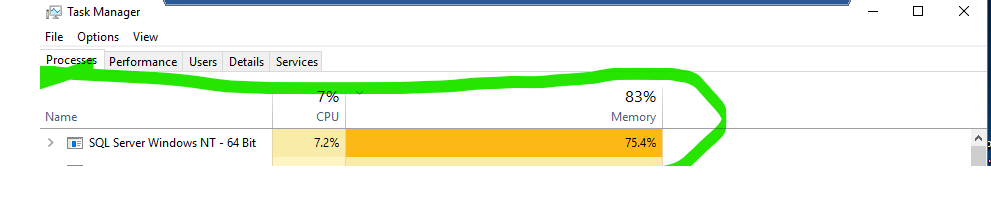
If you notice I have a committed 40GB worth of the RAM to the SQL Vm. But I only allow SQL to consume up to 30GB, leaving 10GB for the operating system. SQL by and large will consume and hold as much RAM as you let it. If these values arent tuned to the server specs you will have resulting occasional bouts of sluggishness and poor performance.SQL is also messy and releasing consumed RAM. Even with the adjustments I made it is still taking about 75% of the available RAM but the performance is good. This is a result of a limiting what SQL can use. As the DB grows, you can make adjustments accordingly. For example, I am about to allocate 8GB more worth of RAM to the OS. In turn I will bump SQL Server’s availabiltiy to about 36GB worth of RAM.
Hope this makes sense.
——————————
Ron Bolinsky
The Kerner Group, Inc
——————————
——————————————- -
our SQL server is set to the max (i think) for the maximum server memory, could that be a problem? it’s only using 32 Gig at the moment, but wondering if it will eventually hit th
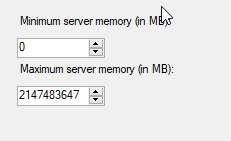 This is what i get when i query via TSQL (not sure how/where that target is set, or what happens as we get closer to it?)
SQLServer_Start_DateTime SQL_current_Memory_usage_mb SQL_Max_Memory_target_mb OS_Total_Memory_mb OS_Available_Memory_mb 3/13/2022 31,996 40,967 49,151 11,329 our task manager usage stats are right on par with yours so i guess that ratio of free vs used memory isn’t the problem…
——————————
Mike Bresnan
Arabella Advisors
Washington MD
——————————
——————————————- -
No I think that is the problem. If SQL is not limited to about 75% of the available RAM it will start taking chunks at the virtual memory which as you know is not nearly as fast as actual RAM. That wont be represented on the task manager. Drop back the availability of RAM within SQL.
A Sysadmin’s Guide to Microsoft SQL Server Memory (brentozar.com)
[SOLVED] Microsoft SQL server high memory usage -constant. Help (spiceworks.com)
“If maximum memory is set too high, the OS may not have enough memory to operate properly and will start paging to disk, which slows everything down – including SQL Server.”
——————————
Ron Bolinsky
The Kerner Group, Inc
——————————
——————————————- -
interesting, i’ll request this change from IT and hopefully we’ll get some relief. Thanks for your help!!
——————————
Mike Bresnan
Arabella Advisors
Washington MD
——————————
——————————————- -
Hi Mike,
We love digging into the IT side of things as it is one of our specialties. We complete SQL Health Assessments and SQL Performance reviews for any size of customer regardless of whether there are any DBAs on staff or not.
Please check out our website for additional information: https://najaxasoftware.com/sqlserver/.
Feel free to send me a private message if you want to discuss.
Thank you!
——————————
Jamie Evenson
CEO
Najaxa Software
Fargo, ND
——————————
——————————————- -
Do you know if anything has been setup to perform routine SQL maintenance on your databases such as rebuilding your indexes and checking for database integrity?
——————————
Greg Wahl
IT Applications Supervisor
Owensboro Municipal Utilities
Owensboro KY
——————————
——————————————- -

Windi Epperson
MemberApril 12, 2022 at 10:31 AM
I might look at this from inside of GP as well. I’d be curious if specific functions are causing the slow downs and lock ups. We see issues in RDP environments all the time where people are trying to print from GP directly to a local printer and GP gets lost trying to find the printer and either bogs everything down or closes windows.
We also see a lot of slowness and bogging related to people running large MR or Excel reports against GP data at the same time as say the AP person is posting a large batch of invoices. And sometimes it’s an ISV that isn’t playing nicely.Checking SQL is always good and we have had customer who had to “throttle” SQL in order to keep it from killing the machine.? But don’t discount what’s happening inside GP.
Thanks
Windi——————————
Windi Epperson
Customer Support Manager
Njevity, Inc
Norman OK
720-870-9700 x104
——————————
——————————————- -
Beat Bucher
MemberApril 12, 2022 at 1:48 PM
Hi Mike,
Lots of good advices so far.. Memory settings are a bit of a delicate settings, since by default SQL will always try to grab as much as it can from the physical memory that is available.
Some excellent place to start : Brent Ozar Unlimited – SQL Server Consulting and Training
Brent has been providing free tips and tricks for years and many of this good material is accessible on his blog or video collection.
At some point when you operate Dynamics GP system, you sooner or later have to get acquainted with SQL Server Management, and the sooner you start, the better 🙂
Download this book for free: Troubleshooting SQL Server: A Guide for Accidental DBAs | Redgate (red-gate.com)
here is more training : Accidental DBA Series | SQLskills
And finally, for most of my clients I’m helping out, I install the SQL Database Health Monitor which is free to download and try out. It wi
ll provide you a good overview in no time with very few performance impact to your system : Does Your SQL Server Have Performance Issues? – Database Health Monitor
This tools has been proved invaluable to me as it can quickly pinpoint bottlenecks in your system and other maintenance issues.——————————
Beat Bucher
Business Analyst, Dynamics GP SME
Montreal QC/Canada
@GP_Beat http://www.gp-geek.com
Montreal QC GPUG Chapter Leader
MBS MVP (2015-2018)
——————————
——————————————-
Unknown Member replied 4 years ago 1 Member · 0 Replies -
-
0 Replies
Sorry, there were no replies found.
The discussion ‘Slowdown issues with GP’ is closed to new replies.
