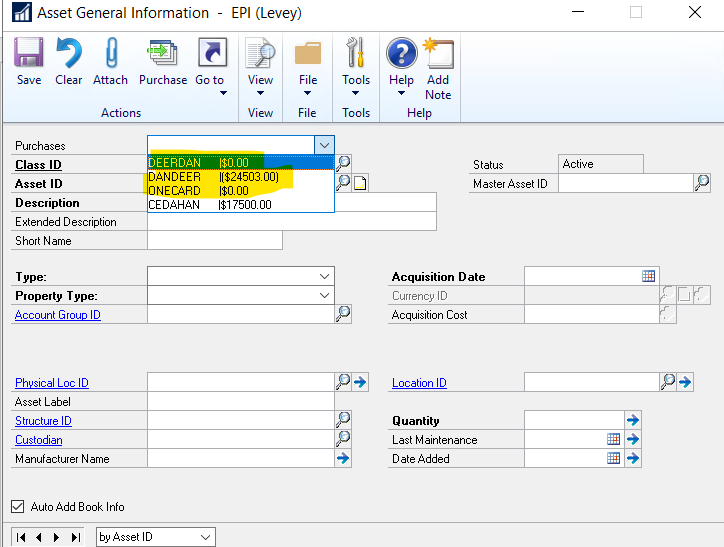
How do I remove these from the dropdown??Ā The asset for 24503 has already been assigned to an asset, but is still there.Ā I also want to get rid of the zero items.Ā I read somewhere that I can click on them and hit the delete key, but that doesn’t work.
—————————— Lisa Levendusky Exceptional Persons, Inc. Waterloo IA ——————————
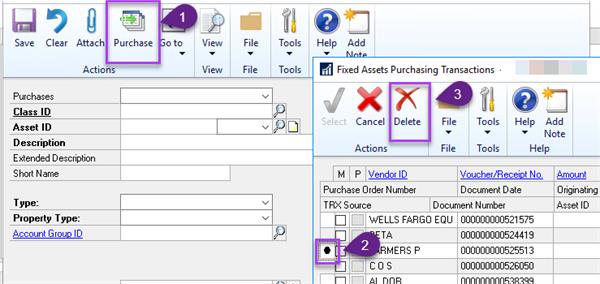
To delete purchases that are not showing 0 as the unapplied amount, instead of selecting the purchases from the dropdown use the big Purchase button in the ribbon.Ā That will open up the list of all purchases available for attaching that were charged to the fixed asset purchase posting accounts.Ā From there you can select and delete them using the Delete button in the ribbon (one by one, ticking the boxes to try to delete in bulk does not work).
—————————— Tori Channell Huntsville AL —————————— ——————————————-
Please note:
This action will also remove this member from your connections and send a report to the site admin.
Please allow a few minutes for this process to complete.
Report
You have already reported this .
Welcome to our new site!
Here you will find a wealth of information created for peopleĀ that are on a mission to redefine business models with cloud techinologies, AI, automation, low code / no code applications, data, security & more to compete in the Acceleration Economy!