


Dynamics GP
Public Group
Active 3 hours ago
Dynamics GP
Organizer:
- JOSE Organized by
-
-

Log Out vs Close Out of GP
-
Log Out vs Close Out of GP
Posted by DSC Communities on November 14, 2017 at 4:13 pm-

Heather Huston
MemberNovember 14, 2017 at 4:13 PM
So, I’ve seen a few different threads addressing this issue, but nothing recent…
We have discovered that, for some users, merely clicking the “X” in the top right hand corner of the GP window does not actually log them out of GP. We recently upgraded to 2016R2 and we run GP via Remote Desktop for Windows. Most of the threads I had seen referenced older versions and suggested that it was a bug that might be worked out in future versions. And, again, this is only limited to certain users not all of us.
Is anyone else still experiencing this issue or have thoughts on how to rectify it? It’s not a huge issue, but can be a bother when all our seats are filled and we need to contact an SA to boot someone out whose been logged in since the day before. I’m not very tech-y as far as our system setups, etc. but I can reach out to our IT support guy if there’s a need for additional info on that front.
TIA
——————————
Heather Huston
heather.huston@batdorf.com
Accounting Lead
Batdorf & Bronson Coffee Roasters
Olympia WA
—————————— -
Windi Epperson
MemberNovember 14, 2017 at 6:20 PM
Heather,
One thing we’ve seen is people clicking the wrong X and closing the RDP session and not the GP session. So if they always click MS Dyn GPExit from w/in GP then they know they’ve closed it properly.
Thanks
Windi——————————
Windi Epperson
President/GP Senior Consultant
Advanced Integrators, Inc.
Norman OK
405-946-1774 Ext 102
——————————
——————————————- -
Hi Heather.
I solved this issue by adding the Exit button to the top menu bar. Asking people to click on Microsoft Dynamics GP then Exit was just to hard of a concept for them.
To add this to the top menu bar just right click in the blank space highlight below and click on customize. I also added the Close All Windows button which comes in handy.
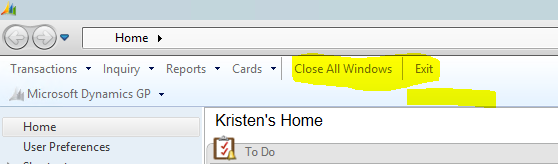
I added a bar in between the two buttons I added; see below. This is fairly easy to do if you write up instructions and send to your users then they can do it themselves and also learn a little bit about modify their menu bar in the process.
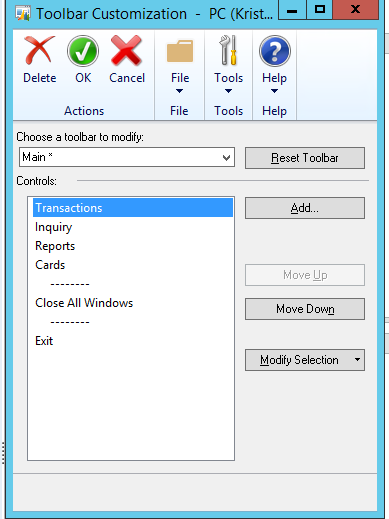
——————————
Kristen Hosman
Accounting Manager
PlatinumCode
Pine CO
——————————
——————————————- -
Technically there should be no difference between closing the application and selecting File >> Exit.
That said, there does appear to be evidence that there is a difference and that using the X does not fully shutdown the application in some circumstances.
It would be nice if we could work out how to make it fail to close properly with 100% of the time. Then we have something to go to Microsoft support/development with.
recently asked me about this as well.
David
?——————————
David Musgrave MVP, GPUG All-StarManaging Director
Winthrop Development ConsultantsPerth, Western Australia
http://www.winthropdc.com
——————————
——————————————- -
Rob Klaproth
MemberNovember 15, 2017 at 1:28 AM
Any time you have a terminal server environment, you’re going to have users clicking the wrong button to close GP. I see it happen all the time. The best way to solve it is to have an idle timeout on your terminal server that logs users out after a certain amount of inactivity, which will properly close GP as well, but if they have a transaction window open in GP, this could result in an uncleared lock.Really it’s best to train the users, and I agree with putting an “Exit” shortcut on your menu bar and then training the users to click this, we set this up for our clients all the time.
Rob
——————————
Rob Klaproth
Dynamics Certified Professional
(GP Install & Configure)
Sr. GP Consultant
Armanino, LLP
San Diego, CA
——————————
——————————————- -
Kristen Kim
MemberNovember 15, 2017 at 8:28 AM
Does anyone know if the changes remains intact after an upgrade?Thanks!
——————————
Kristen Kim
International Data Group
Framingham MA
——————————
——————————————- -
Beat Bucher
MemberNovember 15, 2017 at 8:45 AM
Hi Kristen,
Yes it should.. it’s part of the saved user preferences when customizing the menu bar..——————————
Beat Bucher
Business Analyst, Dynamics GP MVP
Ultra-Electronics Forensic Technology Inc.
Montreal QC/Canada
@GP_Beat http://dyngpbeat.wordpress.com/
Montreal QC GPUG Chapter Leader
GP2013R2 / MR2012 CU14
——————————
——————————————- -
T W
MemberNovember 15, 2017 at 11:15 AM
hmm my gut wonders if this is connection being lost to database in TS environment and thus GP closes, but does not clean up the activity records and the connection has gone.Tim
——————————
Tim Wappat @timwappatUnited Kingdom
Dynamics Code Blocks:
http://timwappat.info/
——————————
——————————————- -
?@Tim Wappat, I suspect that this could be what we are seeing here. We have Citrix and GP 2013R2. If I log in and check activity at the end of a day, there are always 10+ users still showing in the activity log. But Citrix tools show they are not in Citrix anymore.
Our Citrix has a 1 hour timeout and we send out a “please log out this way” email quarterly, so I really would like to get to the bottom of this. Just one of those little things that bug, especially when doing a late night patch.
I know I close out from the menu exit and so does my other GP team member. I haven’t seen us “stuck”, so at least there is some anecdotal evidence of a behavior difference. I have also seen some recent improvement after suggesting users close using @David Musgrave ?GP PowerTools “Exit after Process”. Fewer on the nightly list after that recent change, which makes me suspect there could be a small timing difference between closing with the upper left corner X and the Menu exit.
Just some thoughts and observations, I haven’t had time to dig into it too deeply.
——————————
David Morinello
Senior Dynamics GP Systems Architect
Ascend Learning, LLC
Leawood KS
——————————
——————————————- -
Rob Klaproth
MemberNovember 16, 2017 at 10:02 AM
David,I’m not sure about Citrix but with MS Terminal server there are two different ways to close the connection. There is a disconnect which just closes their connection but leaves them logged into any apps they have open. Then there is the logout which force logs them out of the TS and closes all their programs. In my experience if you force logout the user their GP closes and they do not show in activity so there may be another setting in Citrix for the way it resets their connection.
——————————
Rob Klaproth
Dynamics Certified Professional
(GP Install & Configure)
Sr. GP Consultant
Armanino, LLP
San Diego, CA
——————————
——————————————- -
Beat Bucher
MemberNovember 16, 2017 at 10:51 AM
Hi ,
This is a perfect case for the Rockton Toolbox and the session timeout feature..
Will save you tons of headaches.. Of course, your timeout limit shoudl be set in the Rockton tools at a value that is lower than the one on the Citrix side to close the user’s session..
IMHO a 1-hour limit is quite short, if it’s the logoff of the session.. Citrix (and TS) normally allow for 2 values to be set, the disconnect timout and the logoff timeout.. The 1st only closes the connection to the workstation, but leaves the apps & session running on the server, allowing the user to reconnect.. until the 2nd timeout kicks in and logs off the user session completly from the server, leaving the ACTIVITY tracking uncleared.. as GP is closed the hard way and not gracefully.
The Rockton toolbox timeout feature makes sure that there is no pending ‘save’ action on the GP user’s session.. thus it will never kill a session that is busy..
The tool has save thousands of dollars of expensive user licenses in our company (and I know of others much larger than us, with hundreds of users, but only a fraction of concurrent licenses).
Good luck.??——————————
Beat Bucher
Business Analyst, Dynamics GP MVP
Ultra-Electronics Forensic Technology Inc.
Montreal QC/Canada
@GP_Beat http://dyngpbeat.wordpress.com/
Montreal QC GPUG Chapter Leader
GP2013R2 / MR2012 CU14
——————————
——————————————- -
Tim Andaya
MemberNovember 16, 2017 at 12:30 PM
Hi Heather,I have run across several issues this year with some customers who have embraced the cloud without proper planning and some general misunderstandings about how Dynamics GP works with respect to how much interaction between the client and the SQL server really goes on.
Here is my shortlist of things I look at and/or recommend clients do to address various issues that have turned up:
Performance tuning for Dynamics GP (solves all kinds of issues)
Optimizing and Maintaining Performance for Microsoft Dynamics GP – Microsoft Dynamics CustomerSourceCreate a batch file to load GP on terminal server for printing problems (sets and keeps users printer)
Default Printers using GP RDP Via Terminal Servers – Microsoft Dynamics GP Community ForumWhen using Terminal Server published application features some pop-up windows are hidden
https://support.microsoft.com/en-us/help/2580346/some-pop-up-windows-of-a-remote-desktop-services-terminal-services-remDisconnects from the database (FP can’t close table)
https://support.microsoft.com/en-us/help/2019355/-fp-can-t-close-table-error-when-accessing-windows-or-reports-in-microAnd for orphaned sessions, an enhanced clean up I ran across whose author is not getting proper credit (mia culpa)
/**
SQL server maintains a record of active user sessions in the table SYSPROCESSES from the MASTER database,
inside sysprocesses there is a column named “login name” and we base our script on sysprocesses to
clear the ACTIVITY table from the DYNAMICS database.
Once ACTIVITY table has been cleaned out we are ready to clean 2 tables from the TEMP database first we
clean DEX_SESSION and then DEX_LOCK in order to eliminate locks and processes in temp tables.
The next step is to clean batch activity (SY00800) and resource activity (SY00801) in order to have a valid
session clean up.
Reeferencces
A batch is held in the Posting, Receiving, Busy, Marked, Locked, or Edited status in Microsoft Dynamics GP
(KB 850289)
https://mbs.microsoft.com/knowledgebase/KBDisplay.aspx?scid=kb;en-us;850289
How to remove all the inactive sessions from the DEX_LOCK table in the TempDB database when you use
Microsoft Dynamics GP together with Microsoft SQL Server
(KB 864411)
https://mbs.microsoft.com/knowledgebase/KBDisplay.aspx?scid=kb;en-us;864411
How to remove all the inactive sessions from the DEX_SESSION table in the TempDB database when you use
Microsoft Dynamics GP together with Microsoft SQL Server
(KB 864413)
https://mbs.microsoft.com/knowledgebase/KBDisplay.aspx?scid=kb;en-us;864413
**/
/** Delete orphans from Dynamics **/
delete from DYNAMICS..ACTIVITY
where USERID not in
(select loginame from master..sysprocesses)
delete from tempdb..DEX_SESSION
where session_id not in
(select SQLSESID from DYNAMICS..ACTIVITY)
delete from tempdb..DEX_LOCK
where session_id not in
(select SQLSESID from DYNAMICS..ACTIVITY)
delete from DYNAMICS..SY00800
where USERID not in
(select USERID from DYNAMICS..ACTIVITY)
delete from DYNAMICS..SY00801
where USERID not in
(select USERID from DYNAMICS..ACTIVITY)——————————
Tim Andaya
Strategic Systems Group
“There are no stupid questions.”
——————————
——————————————- -
Guillaume Simard
MemberNovember 20, 2017 at 1:56 PM
Hi,
With Rockton GP Toolbox, you pay for much more than the Inactivity timeout feature.
That’s one the reasons why we have a developed an alternative product to answer that specific need.
Our License Manager will allow you to configure a disconnect timeout where we will properly close GP and a kill timeout in cases where it wasn’t possible to do otherwise. The kill will remove the user from all tables that Tim has mentioned.
Our product also includes the possibility to reserve and limit the number of licenses granted to group of users.
And you also get some detailed reports on user activity to help you optimize licenses usage.
We haven’t made any public promotion yet but several of our customers are very satisfied about it.
You can contact me for more details.
——————————
Guillaume Simard
Negotium Technologies Inc.
Montréal QC
——————————
——————————————-
DSC Communities replied 8 years, 4 months ago 1 Member · 0 Replies -
-
0 Replies
Sorry, there were no replies found.
The discussion ‘Log Out vs Close Out of GP’ is closed to new replies.
