


Dynamics GP
Public Group
Active a day ago
Dynamics GP
Organizer:
- JOSE Organized by
-
-

GP 2013 Word Templates Invoices/Returns
-
GP 2013 Word Templates Invoices/Returns
Posted by DSC Communities on April 21, 2020 at 1:45 pm-

Rebecca Rodgers
MemberApril 21, 2020 at 1:45 PM
Hi,
I’m having a couple of problems with the word templates in GP 2013.
I have a template set up for our sales returns as the default, but the system is not using it.
It looks like the standard form is defaulting in the report destination.
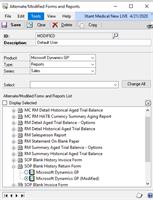
I have changing the Alternate /modified forms and reports to modified for our returns form. (It was set to original and this did not fix it, so I put it back)
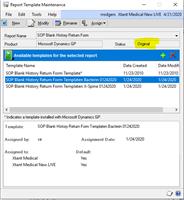
I have also checked the template maintenance and it is set as the default, but I think something is wrong with how we make reports available.
My second issue is how do I modify templates and add them back in correctly.
I can modify a report and click the green add button and it saves it to a temporary file. I can’t get the new template back in to the report template maintenance window. I have watched a lot of videos and I seem to being missing a couple pieces.
I would appreciate any direction you have.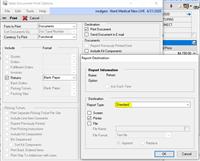
——————————
Thank you,
Rebecca Rodgers
Xtant Medical
Belgrade MT
—————————— -
Aref Karam
MemberApril 21, 2020 at 3:19 PM
Hi Rebecca,For the first issue, you just need to use the Template Configuration Manager window to enable the default templates.
For the second issue, did you highlight the existing template and then clicked on the green plus sign above it. From here, you can select your updated Word template.
If the change made was related to adding a new data field, then you will need to make that change in Report Writer first, before you can use it in the new template.——————————
Aref Karam
Data Consultant
LTI Information Technology
Ann Arbor MI
——————————
——————————————- -
Ryan Galang
MemberApril 21, 2020 at 4:54 PM
Hi Rebecca,In case you don’t have this yet:
- Chapter 35 -39: Using Word Templates
- Chapter 40: Word Templates Troubleshooting
Report Writer User’s Guide——————————
Ryan Galang
BTP Technologies LLC
CHANTILLY VA
——————————
——————————————- -
Ray Phelan
MemberApril 22, 2020 at 3:49 AM
Hi RebeccaYou issue may also be your environment – re you running GP locally on a PC or from some client/server environment.
Word Templates are tricky to get right – I’d suggest reading the links given above – re: report writer and Word templates. Also check out these 2 links – very informative
https://www.erpsoftwareblog.com/2016/02/creating-word-template-microsoft-dynamics-gp/
http://dynamicsconfessions.blogspot.com/2016/07/quick-and-dirty-checklist-for-modifying.html
Thanks
——————————
Ray Phelan
FRS Network Ltd
Ireland
——————————
——————————————- -
Hi ,
All of the answers are very helpful here. I will give you a step-by-step of what I do always when turning on Word Templates. I am assuming here that we are doing some modification to the report to cover for that as well.
- ?Verify that the particular template is enabled in the Template Configuration Manager (Administration > Reports > Template Configuration)
- Modify the report in report writer, to add any fields needed.
- Make sure your user (and any user that needs this report) has security to the correct report (original or modified). You may want to just assign security to you during development and testing, and do the other users later, but in my experience this is a step that is easy to forget. If you do not grant security to the correct report, the users will not see the template because the template is triggered by the correct report and no other. This is done via the Modidied/Alternate Forms and Reports maintenance in combination with the User Security Setup. Both setups can be found under Administration > System.
- Use the Template Maintenance (Administration > Reports > Template Maintenance) to:
- Select the report you want to create a template for (use the “More Reports” option if needed) to get to it. Make sure to select the original or modified. In this example, we would use the “modified” version since that is the one that has the additional fields I added on (2) above.
- Use the “New” button to Add a new template. You would want to use the “From Existing Template” option and select the built-in template. This is the tricky part here. You need to first modify the report in report writer so the new template will include the new fields you added. If you change the report in Report Writer after this step, you will not get the additional fields you added to the report.
- Once the report is added there, you can “Modify” the template using the button provided. This will open the template in word and you can make your changes (such as placing the additional fields in the right place). Manipulating fields in Word is tricky but once you do it a few times, you learnwhat to do and not do. For this to work properly you need:
- To have installed the Word Add-In. This is done with the Dynamics GP Installer.
- To show the “Developer” menu in Word. This is done via File > Options > Customize Ribbon. This will show a “Dynamics Fields” menu that will allow you to “see” any fields on the Report Writer Report to add to the Template.
- Once I am done modifying the word report, I save a copy with a version number on the name. This is a VERY important part. Just saving the report will not save your changes to the database. You need to save it to disk somewhere. It is also good if you mess up and you can quickly restore the previous version.
- Close word. Back in the Template Maintenance window, you now click on the “+” button, browse to your word report and open it. You will get a warning that you are replacing the existing report template and this is OK.
- The last step here is to assign the template as the default template for the company(ies) you want. This is done via de Assign button. You can assign a template to specific customers as well, meaning you could have different look reports for different customers.
- At this point you should be able to test print your template. When printing the report, the print dialog box should default to “Template” instead of “Default”. This would be your indication that the default setups are correct for your user.
If you don’t need to modify the report, you can skip steps 2, 4c-4e.
Hope this helps!
——————————
Thomas Garcia
ICON Business Consulting, LLC | Miami FL
ICON, SRL | Santiago, Dominican Republic
954-804-2140
——————————
——————————————- -
Rebecca Rodgers
MemberApril 27, 2020 at 12:11 PM
Thank you. this was very helpful. I was able to update my first template.——————————
Rebecca Rodgers
Xtant Medical
Belgrade MT
——————————
——————————————-
DSC Communities replied 5 years, 11 months ago 1 Member · 0 Replies -
-
0 Replies
Sorry, there were no replies found.
The discussion ‘GP 2013 Word Templates Invoices/Returns’ is closed to new replies.
