


Dynamics GP
Public Group
Active 6 days ago
Dynamics GP
Organizer:
- JOSE Organized by
-
-

File Attachments – any widgets to move them out of the database?
-
File Attachments – any widgets to move them out of the database?
Posted by zgidwani@dynamicbudgets.com on January 22, 2019 at 1:55 pm-
Ok file attachments seemed like a good idea at first until one of our customers ran with it aggressively for the last 7 years.
The GP database is now about 60GB in Size, only 1.5 GB relates to GP ERP data, and the other 58GB is just file attachments (stored as blobs in the database).Has anyone else run into this issue, any way to migrate the files externally to a network drive rather than embedded within the database?
They don’t want to lose the history of the attachments but want to migrate it elsewhere…Thanks in advance.
——————————
Zubin Gidwani
Dynamic Budgets
San Francisco-Bay Area CA
—————————— -
Hi
I am not aware of a solution, but if you don’t find anything that will work, I am open to brainstorming to see if one could be built.
A few data points:
1. I developed a basic tool that can extract Doc Attach files ?from GP and save them to disk. So this type of tool could potentially be used to extract doc attachments older than X days.
https://blog.steveendow.com/2018/12/bulk-export-dynamics-gp-document.html
2. I’m about to start work on an API that will allow eConnect / SmartConnect integrations to import a file to Doc Attach, so I’ll be reverse engineering the Doc Attach tables and processes.
3. I don’t know that it would be practical to modify the GP Doc Attach window(s) to point to a file share instead of SQL, but maybe it would be possible archive older attachments and replace them with a note or pointer that would direct the user to the location and file name for the attachment?
My thought is to preserve the standard GP Doc Attach functionality, but allow customers to archive older files to allow them to save space in the database.
——————————
Steve Endow, Microsoft MVP
Precipio Services
Los Angeles, CA
steveendow (at) gmail (dot) com
——————————
——————————————- -
I’m going to try testing this technique
https://www.jitendrazaa.com/blog/sql/sqlserver/export-documents-saved-as-blob-binary-from-sql-server/maybe dump the file attachments out locally on the SQL server, via
noteindex named folders.
move those files to a file share.
then insert a Filepath URL link as a text comment in place of each file attachment?——————————
Zubin Gidwani
Founder
Dynamic Budgets
San Francisco-Bay Area CA
——————————
——————————————- -
Is there any option to move it out to SharePoint somehow?
We were very hesitant to start using Document Attach because of this exact scenario. Before Doc Attach existed, we used some simple VBA and a small scanning program to scan the documents right into a SharePoint document library based on the transaction, customer record, etc. These could be linked to workflows too.
Joe
——————————
Joseph Markovich
President and CEO
Okaya Electric America
Valparaiso IN
——————————
——————————————- -

Mark LeRette
MemberJanuary 22, 2019 at 4:10 PM
If you can get the attachment files out of GP and into a directory structure, our solution for attachments has been to create an Extender form that includes the ability to assign that directory link to the record and allow the user to access it. In our case, the HR department accesses these records off the Employee Card, but I would think you could create this type of solution for just about any card/record you’re looking to track document history for.——————————
Mark LeRette
Application System Analyst II
Muscatine Power and Water
Muscatine IA
——————————
——————————————- -
Beat Bucher
MemberJanuary 23, 2019 at 9:28 AM
Hi ,
I think no matter how you try to challenge the current way of Doc Attachment in GP (since OLE Notes are gone, which used to store files on Disk level, but was prone to errors and corruption)?, the actual solution wasn’t probably meant to be a paperless solution and store everything within GP.. As you found out, when 90% of the SQL DB size is used up by blob binary objects, than something is wrong here..
Two things come to my mind:
1. The scanned documents must be a hell of a numbers, since most single scanned letter page usually accounts for less than 50kb (unless they were scanned in 300dpi full color)
2. GP’s doc attachment has no option of storing the files outside of the GP company DB.. other than ‘s suggestion of using an extender field with an external URL/UNC storage reference, I can only see the use of 3rd party solutions like KwikTag or the like, that would store effectively all the scanned / attached documents in a separate database or location (and optimize the search of the documents, since (again) GP wasn’t meant for that either).
Microsoft tried to get around all the issues related to OLE Notes, but I think the solution wasn’t that well thought out, at least not with such a volume in mind.
??——————————
Beat Bucher
Business Analyst, Dynamics GP SME
Montreal QC/Canada
@GP_Beat http://www.gp-geek.com
Montreal QC GPUG Chapter Leader
MBS MVP (2015-2018)
——————————
——————————————- -
Beat Bucher
MemberJanuary 23, 2019 at 9:33 AM
Hey ,
I like that approach.. Scanner software like the one provided by Epson for its ES- line of product can do that automatically too (saving to SharePoint, or any external cloud storage solution), but lacks the ability (probably) to decide where to store based on some other criteria. ?Epson scanner are TWAIN & WIA compatible and they are very cost effective for small businesses.
Would you mind to share how you handle the destination based on the document source (or customer) ?——————————
Beat Bucher
Business Analyst, Dynamics GP SME
Montreal QC/Canada
@GP_Beat http://www.gp-geek.com
Montreal QC GPUG Chapter Leader
MBS MVP (2015-2018)
——————————
——————————————- -
Hi !!
I hope you’ve been well!
?So, it is pretty simple. Depending on the type of transaction in GP, it uses the unique ID of the record or transaction to create a folder in a SharePoint document library.
It follows how D365 uses SharePoint as the document management — there is a document library based on the entity and then a folder based on each record. I followed the same principle with GP.
Right now we have it set up for RM, PM, GL, Fixed Assets, RMAs, RTVs. Eample: payables transactions. There is a document library out on SharePoint called “PM.” When the user clicks a button on the screen called “Attachments”, it opens a program we found online called ScantoPDF which lets us use command line switches to open the program, use the Epson drivers to scan the document (one or two sided), get the voucher number from the screen, create a folder of that voucher number and scan the document(s) into that folder.
We use the approvals workflows in GP too. When the user gets the email with the transaction details, there is a link to that folder for the transaction in the SharePoint document library to view the attachments.
We’ve been using this since GP 2010 (I think).
Joe
——————————
Joseph Markovich
IT Manager
Okaya Electric America
Valparaiso IN
——————————
——————————————- -
Beat Bucher
MemberJanuary 23, 2019 at 4:08 PM
Thanks Joe!
That sounds like a great idea and a solid solution based mostly on existing products and very little cash investment (aside of time). This could be worth a blog post 🙂——————————
Beat Bucher
Business Analyst, Dynamics GP SME
Montreal QC/Canada
@GP_Beat http://www.gp-geek.com
Montreal QC GPUG Chapter Leader
MBS MVP (2015-2018)
——————————
——————————————- -
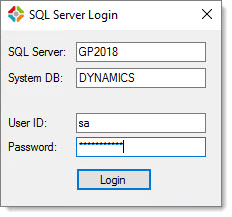
While only a partial solution for ‘s request, I have updated my Save Doc Attach Files solution to add a SQL login dialog and a configuration file that allows you to add additional record types.Version 1.20: https://1drv.ms/u/s!Au567Fd0af9TpRUtDRq_heyOh50p
(Version 1.20 fixes a bug that Zubin identified)
Updated blog post: https://blog.steveendow.com/2018/12/bulk-export-dynamics-gp-document.html
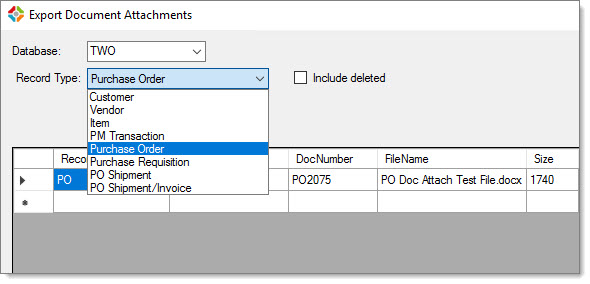
Add additional record types in the configuration file:
If anyone has the need to archive older attachments, I could look into adding a date filter and include the ability to remove the attachments from SQL to save space.
And if anyone thinks of any way to add a pointer or link or note in Doc Attach that could point to a file share where the exported file is located, I could try to add that capability to remove the imported file and replace it with the pointer / reference.??
——————————
Steve Endow, Microsoft MVP
Precipio Services
Los Angeles, CA
steveendow (at) gmail (dot) com
—————————— -
Jonathan Cox
MemberJanuary 23, 2019 at 1:47 PM
Have you examined using Stretch Database in SQL? I feel like that might be an option here. https://docs.microsoft.com/en-us/sql/sql-server/stretch-database/enable-stretch-database-for-a-table?view=sql-server-2017 58GB feels like it would be a ton of work to export and store on a file share, and then have to deal with the security of the network shares.——————————
Jonathan Cox
Frontier Tubular Solutions, LLC
Oklahoma City OK
——————————
——————————————- -
Jonathan Cox
MemberJanuary 23, 2019 at 3:26 PM
And one other thought I had was, if you are able to get the documents out it’s worth noting that the database would still be 60gb in space. So a shrink operation would be needed and that might produce some really gnarly results ?with fragmentation. Here is a post by Brent Ozar that outlines it.
https://www.brentozar.com/archive/2017/12/whats-bad-shrinking-databases-dbcc-shrinkdatabase/The only way around this that I can think of would be to use SSIS to export all the data into a new fresh database.
——————————
Jonathan Cox
Frontier Tubular Solutions, LLC
Oklahoma City OK
——————————
——————————————- -
Beat Bucher
MemberJanuary 23, 2019 at 4:05 PM
Hi ,
To me that “Stretch”?? feature seems to be available on Azure only.. not on premise SQL, and it would probably only apply on very recent releases. Possibly not an option for an existing on-premise older SQL version.
I agree that extracting all the documents from the blob storage is only the 1st part of the job.. Finding a solution to provide secure and controlled access is whole more work, unless it’s something that can be linked to GP.——————————
Beat Bucher
Business Analyst, Dynamics GP SME
Montreal QC/Canada
@GP_Beat http://www.gp-geek.com
Montreal QC GPUG Chapter Leader
MBS MVP (2015-2018)
——————————
——————————————-
zgidwani@dynamicbudgets.com replied 7 years, 2 months ago 1 Member · 0 Replies -
-
0 Replies
Sorry, there were no replies found.
The discussion ‘File Attachments – any widgets to move them out of the database?’ is closed to new replies.
