I discovered an Asset that has been recorded twice under two separate FA ID #’s.Ā I need to reverse the depreciation and delete the duplicate asset.Ā Can someone tell me the best way to do this?Ā ?
—————————— Diane Fangman Accounting Manager Meridian Technologies Jacksonville FL ——————————
If the intention is to delete the asset (via Delete Asset Utility*), then GL adjustments need to be entered. * This just erases the asset records from the Fixed Assets module only, and does not reverse the entries made in GL
On a side note, you may opt to go through the following as these will simplify the GL reversal: 1. Undo Depreciation 2. Retire the Asset
Once done, before deleting the asset, make sure to run the FA-GL Posting routine to generate the FATRX batch in GL.
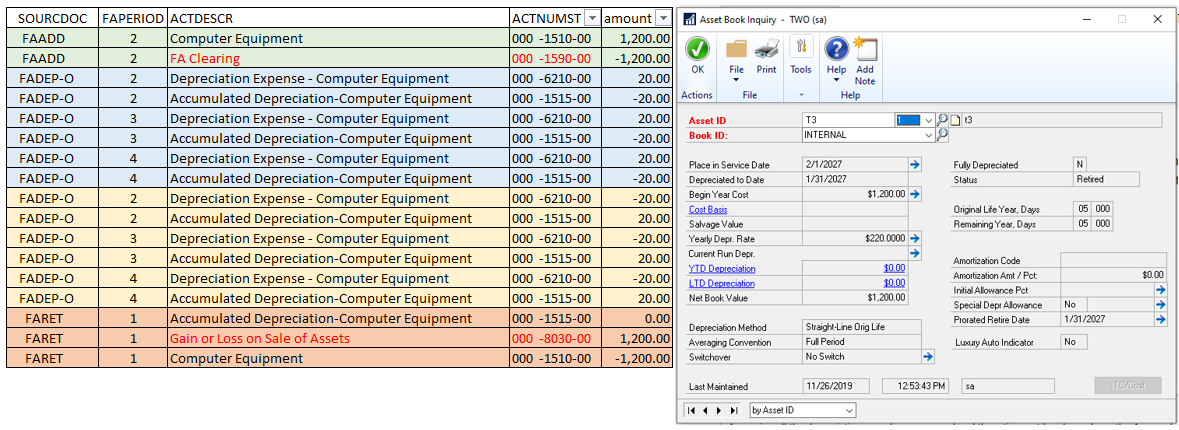
Assuming all the depreciation records are reversed and the retirement has been done, the Depreciation, Accumulated Depreciation and Asset Cost entries will be reversed. The adjustment will be between the FA Clearing and the Gain/Loss accounts.
For reference, here is the data for a ‘simple’ asset: 1. Added the asset on 2/1/2027 2. Depreciated the asset until 4/30/2027 3. Backed out depreciation to 2/01/2027 4. Retired the asset on 2/1/2027
Please note:
This action will also remove this member from your connections and send a report to the site admin.
Please allow a few minutes for this process to complete.

Report
You have already reported this .
Welcome to our new site!
Here you will find a wealth of information created for peopleĀ that are on a mission to redefine business models with cloud techinologies, AI, automation, low code / no code applications, data, security & more to compete in the Acceleration Economy!