


Dynamics GP
Public Group
Active a day ago
Dynamics GP
Organizer:
- JOSE Organized by
-
-

Default print option “Standard”
-
Default print option “Standard”
Posted by Unknown Member on January 14, 2019 at 4:07 pm-
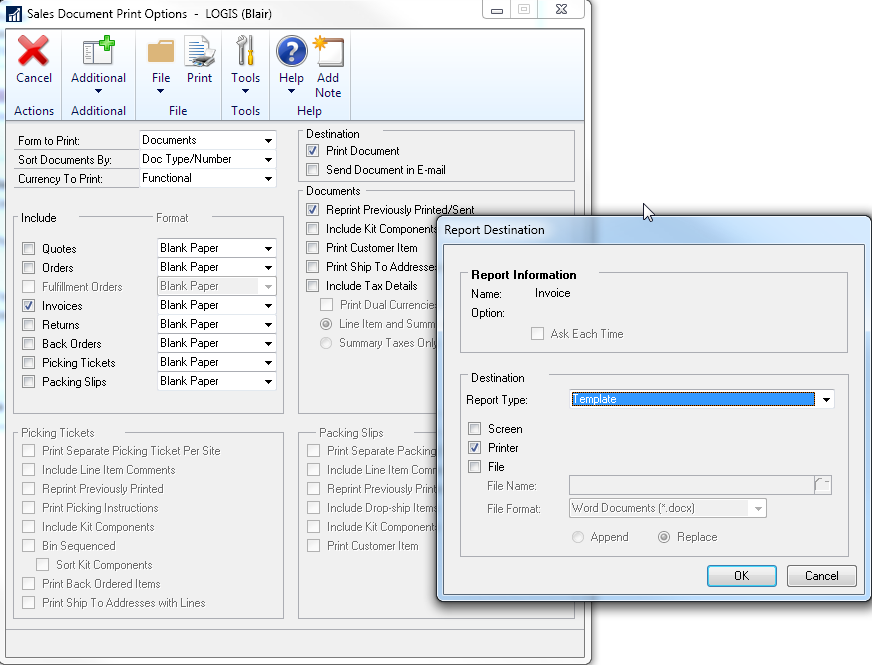 We just upgraded from 2013R2 to 2018 and in one company we print invoices from unposted Sales Batches. Something in the upgrade changed the default which confused me and my users until I figured out what was going on. When you go to print, it now defaults to “Template” rather than to “Standard”. Since no Word Templates have been set up for this report, it comes out all a single font and single font size and looks predictably bad. How can we go about setting the default back to “Standard” rather than “Template”?
——————————
Blair Christensen
Database Administrator
Oppenheimer Companies, Inc.
Boise ID
—————————— -
Hi
Just change the template maintenance settings so that there are no templates enabled for that company, then it will default back to Standard.
Regards
David?
——————————
David Musgrave MVP, GPUG All-StarManaging Director
Winthrop Development ConsultantsPerth, Western Australia
http://www.winthropdc.com
——————————
——————————————- -

Barbara Gavron
MemberJanuary 15, 2019 at 8:59 AM
,To build on what Dave replied, you will need to go to Reports>?Template Configuration and from there you can choose which reports in each series you want to print the Template for. By unchecking the boxes you will revert back to Standard.
——————————
Barbara Gavron
Atlantic Beach / Jacksonville FL
904-536-0129
——————————
——————————————- -
?I’m having a hard time finding this. Is this from within Report Writer or in GP itself?
——————————
Blair Christensen
Database Administrator
Oppenheimer Companies, Inc.
Boise ID
——————————
——————————————- -
Barbara Gavron
MemberJanuary 15, 2019 at 11:26 AM
,It is within GP itself. Go to Reports ?on your main toolbar, click the dropdown and it will be near the bottom of the list. If you still can’t find it, please feel free to give me a call and I will assist you further.
——————————
Barbara Gavron
Atlantic Beach / Jacksonville FL
904-536-0129
——————————
——————————————- -
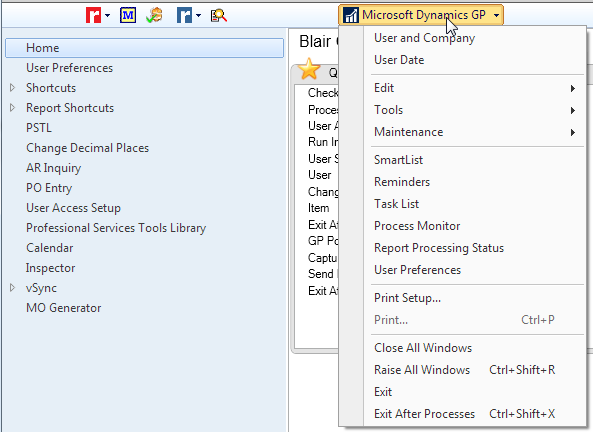 ?I must be looking at something different than you are. This is what I see. There is no option for “Reports”.
?——————————
Blair Christensen
Database Administrator
Oppenheimer Companies, Inc.
Boise ID
——————————
——————————————- -
Beat Bucher
MemberJanuary 15, 2019 at 2:19 PM
Hi
What Barbara is referring to is this menu :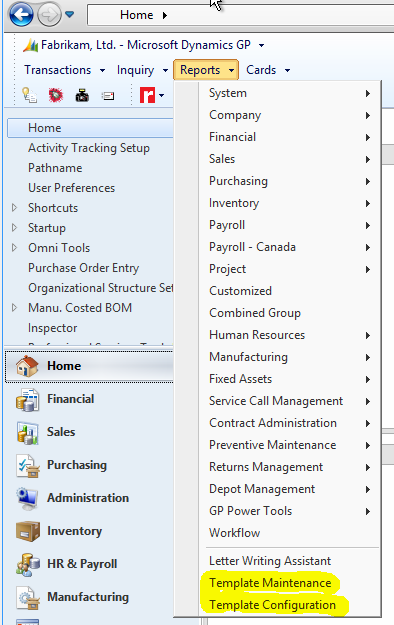
If you don’t see the ‘Report?s’ menu in you GP menu bar, then it was either disabled or moved somewhere else.
Or you could navigate to the Administration page : Administration > Reports > Template Configuration.——————————
Beat Bucher
Business Analyst, Dynamics GP SME
Montreal QC/Canada
@GP_Beat http://www.gp-geek.com
Montreal QC GPUG Chapter Leader
MBS MVP (2015-2018)
——————————
——————————————- -
?Knew I was missing something obvious. Thanks !?
——————————
Blair Christensen
Database Administrator
Oppenheimer Companies, Inc.
Boise ID
——————————
——————————————-
Unknown Member replied 7 years, 2 months ago 1 Member · 0 Replies -
-
0 Replies
Sorry, there were no replies found.
The discussion ‘Default print option “Standard”’ is closed to new replies.
