I am wanting to attach our vendor forms ( W9’s) to the vendor card in GP 2015. Can anyone explain the process of doing this? Any help would be appreciated
Thank you
Ben Micek
—————————— Ben Micek Accounts Payable Outlook-Nebraska, Inc. Omaha NE ——————————
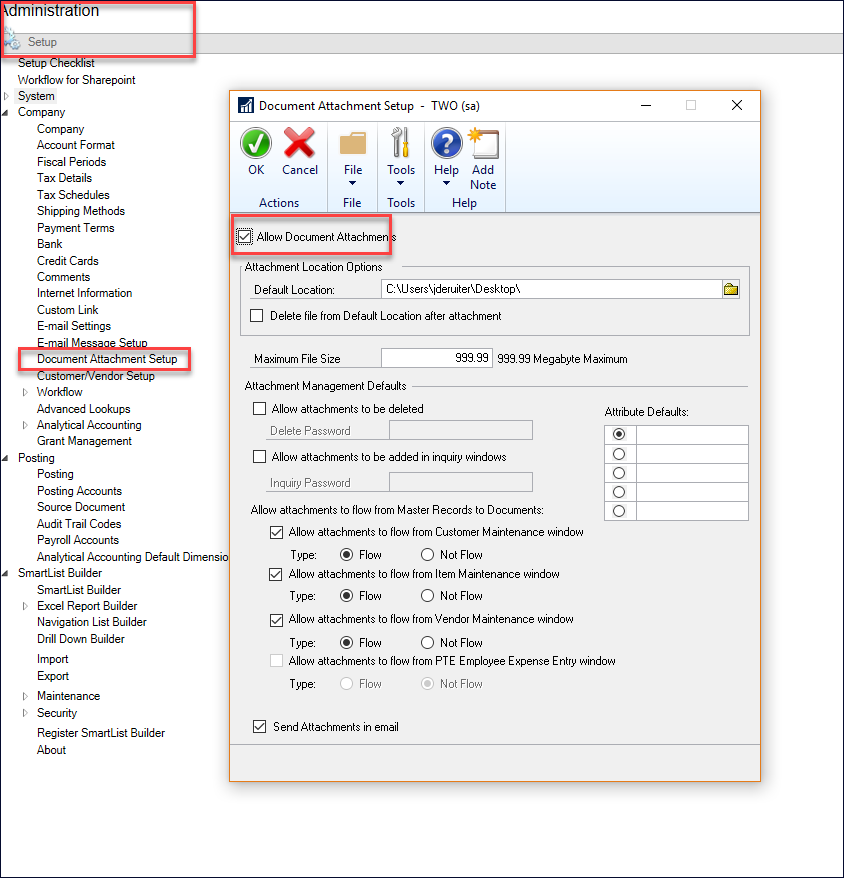
To be able to use the document attachment you first have to configure doc attach in the system settings.
Here is a quick screenshot and the window will look different – I’m using GP2018, but ?the settings are pretty self explanatory.Ā If you have any questions, with the window open click on help (on the window) and “about this window”
After you configure this you will be able to attach documents in the vendor card.Ā A little blue paper clip will appear and you click on that and you can attach.
Additionally, if you do not want to use the doc attach, in some versions you could attach files at the Note level – you open a note and there is an attach document button.
—————————— Kindest Regards,
Jo deRuiter “That GP Red Head” Senior Financial Systems Consultant Advanced Credentialed Professional-Dynamics GP Heartland Business Systems, LLC Milwaukee, WI 770-906-4504 (Cell) —————————— ——————————————-
Please note:
This action will also remove this member from your connections and send a report to the site admin.
Please allow a few minutes for this process to complete.
Report
You have already reported this .
Welcome to our new site!
Here you will find a wealth of information created for peopleĀ that are on a mission to redefine business models with cloud techinologies, AI, automation, low code / no code applications, data, security & more to compete in the Acceleration Economy!