


Dynamics GP
Public Group
Active a day ago
Dynamics GP
Organizer:
- JOSE Organized by
-
-

AP Check Run – EFT Pmt
-
AP Check Run – EFT Pmt
Posted by DSC Communities on April 7, 2021 at 8:03 am-

Bari Fulton
MemberApril 7, 2021 at 8:03 AM
??We run AP Checks weekly. We have two companies and therefore we have to run 4 batches (2 batches for checks and 2 batches for EFT’s). We have had a change in personnel and I am wondering if there is a way to run one batch that would generate a check batch and an EFT batch? We have been running a smart list to identify the EFT vendors and then go to edit check batch to pick only those to determine which ones are EFT payments. Is there another way to do this? We enter vendors every week so this list changes all the time.Thanks
——————————
Bari Fulton
Controller
CWI Logistics, Inc
Winter Haven, FL
—————————— -
Hi Bari,
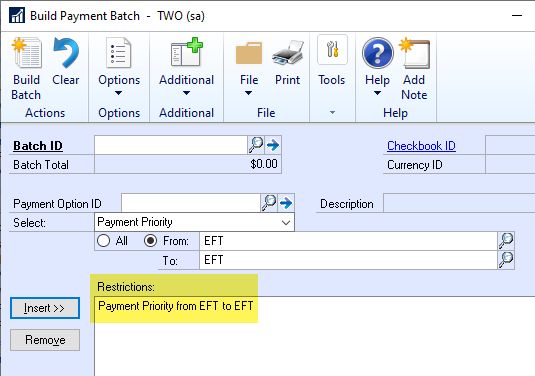
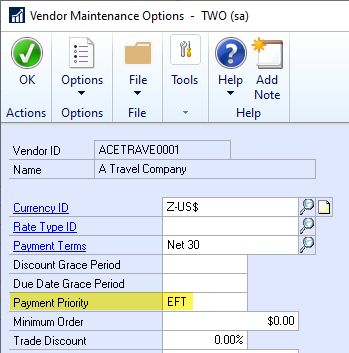
Here is what I recommend to my customers. On the Build Payment Batch (formerly Select Checks) window, you can specify a range of “Payment Priority”. On all of your EFT vendors, set the Payment Priority to “EFT” in Vendor Maintenance Options. Then when you build your batch, set your restrictions to “Payment Priority from EFT to EFT”. Run your EFT batch first, then run your second batch without using Payment Priority.
Hope that helps,
——————————
Mark Wiley
Dynamics Credentialed Professional
Senior Solutions Architect
GraVoc
Ohio Office
——————————
——————————————- -
Carol Cross
MemberApril 8, 2021 at 9:35 AM
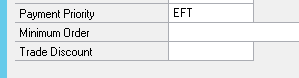
Hi,What we have done is enter the payment type in the Payment Priority on the Options tab of the Vendor Maintenance
Then when you are running the payment batch it should pull just the EFT or the Checks and it will also show the Payment Priority in the Edit Payment Batch if you check the Payment Priority column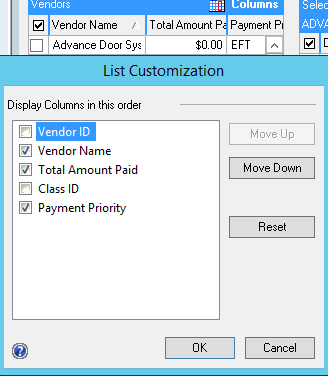
I hope this helps!——————————
Carol Cross
Controller
Fries Tallman Lumber (1976) Ltd
REGINA SK
——————————
——————————————- -
Hi
Checks and EFT cannot be paid in the same batch as they call different functionality.
However, it is not as difficult as all that has been written here. You do not have to create payment priorities nor any other way to call out whether a check is paid by EFT or Check. GP already knows that.
The EFT functionality is inherently kept at the REMIT to address-level in the transaction. IF the REMIT TO address on any transaction has EFT information on it, then it will NOT be able to appear in a batch that was not built with EFT selected.
In other words, if you go to Build Payment Batch (Select Checks) and ?enter the batch ID and choose that it is a ‘Check’ payment method:
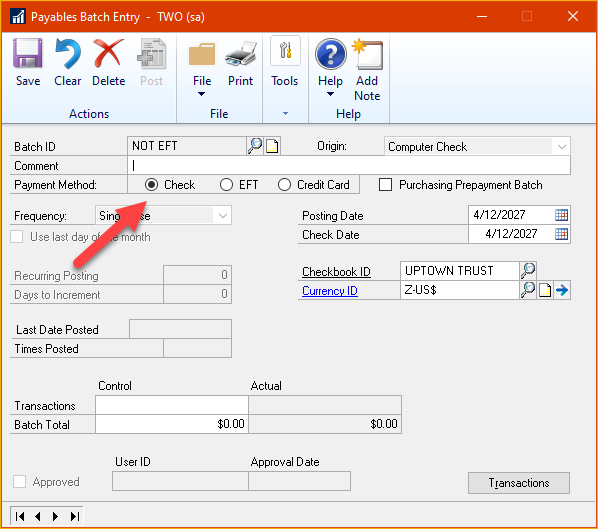
Then GP won’t even pull in the transactions that used an EFT Remit-to Address.Conversely, if you are choosing to build an EFT Batch, you do not have to filter it, just run the whole thing and it will ONLY pull in transactions that used a REMIT TO address that had EFT info on it.
However, it will STILL be two batches per database. Now, if you look into Mekorma’s Payment hub you can actually do all of the db’s at once. You should discuss this functionality with your partner!
——————————
Jo deRuiter
?? GPUG ALL STAR
??Granite Award Winner
Atlanta Chapter Leader
Aisling Dynamics Business Solutions
Business Applications Practice Manager
jo.deruiter@aislingdynamics.com
9518674366
aislingdynamics.com
——————————
——————————————- -
Hi Jo,
So a long time ago, GP would let you build a batch with both, so you had to take steps to avoid that. Nice to know they fixed it.
Back in Microsoft Dynamics GP 10.0 – If you build the check batch first, both the check and eft invoices will pull in. The work-around is to build the EFT batch first and then the check batch can be built last.
Later, in Microsoft Dynamics GP 10.0 SP2 – The system will read and use the REMIT TO Address ID saved on the Vendor Maintenance card. Unfortunately, it does not read the Address ID actually keyed on the specific invoice. This was logged as quality issue #64038.
Microsoft Dynamics GP 2010 RTM and later versions (last tested on GP 2018) – If a vendor has both a check and EFT type invoice keyed, then nothing will pull in if you build the check batch first. You must build the EFT batch first and then the check batch.
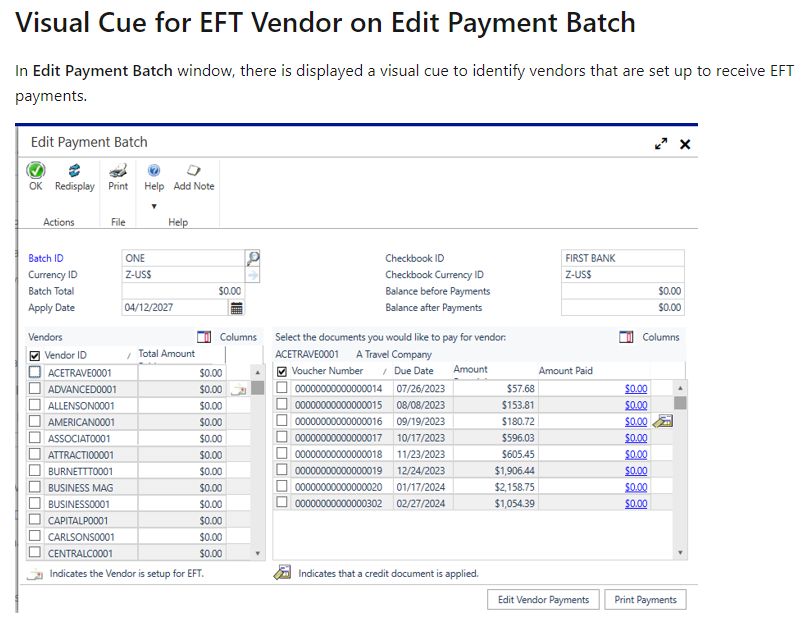
So I learned something new. LOL – I have been using this work-around for a long time. I also found out that in the October 2019 release, they added a visual clue for vendors that have EFT setup:
——————————
Mark Wiley
Dynamics Credentialed Professional
Senior Solutions Architect
GraVoc
Ohio Office
——————————
——————————————- -
Hi Bari
Not sure I fully understand your question.
In GP, you can have one payables batch to include both your EFT vendors and paper check vendors.
When you build a payment batch, GP gives you a radio button option where you need to pick if the payment batch is a check batch or EFT or credit card.
The default radio button option is check. When you switch the radio button to eft, GP will know fill that batch with only the EFT vendors.The Standard operating procedure is to create one payables batch post the vouchers batch, followed by building a checks payment batch, and a subsequent payment batch (with the EFT radio button checked).
Given a day you will have 1 voucher batch, 1 checks batch and 1 eft batch. If the eft batch yields a zero count and total, that should tell you there are no EFT vendors that day.
Repeat this for the second company.Hope this helps,
——————————
Dynamics GP Credentialed Pro (Install)
Ven Sharma
Finance and Admin Systems, Administration
American Public University System (APUS)
Charles Town WV
——————————
——————————————-
DSC Communities replied 5 years ago 1 Member · 0 Replies -
-
0 Replies
Sorry, there were no replies found.
The discussion ‘AP Check Run – EFT Pmt’ is closed to new replies.
