


Dynamics GP
Public Group
Active 2 days ago
Dynamics GP
Organizer:
- JOSE Organized by
-
-

Accounts Payable
-
Accounts Payable
Posted by Unknown Member on October 24, 2017 at 8:41 am-
Good morning group.
I am a fairly new user to Great Plains and still trying to feel my way around. I went the GPUG summit and heard that when you are processing invoices for payment you could put all invoices in one batch and then create individual batches for the payment types-for example hard checks, online checks and eft payment methods.
Is anyone using the accounts payable in this manner that I could call and ask additional questions?
——————————
Linda Alsop
Fredericksburg Area Association of Realtors
Fredericksburg VA
—————————— -
?Good Morning
Are you asking if once you build a batch can you then parse that batch into separate types of payment?
To separate different types of payments you can assign Class IDs to your vendors and then create check batches by Class ID (which is how we are set up), or you can create Payment Priorities and build check batches according to those. The system recognizes the difference between physical checks and EFTs so you can also pull all of those into one batch that will process them according to vendor set up.
There is multi-batch processing (I went to a session on that during Summit) that allows you to process more than one batch at a time. This is in Mekorma and lets you assign how you want a batch to process, including printing and generating an EFT file, but does not work with manually numbering your payments. Might this be what you’re thinking of?
——————————
Shari Bruno
Accounting Operations Manager
Bible League International
Crete, IL
——————————
——————————————- -
Shari,
I think this is what I am looking to do. Can I call you to discuss?
——————————
Linda Alsop
Fredericksburg Area Association of Realtors
Fredericksburg VA
——————————
——————————————- -
?
I would happy to talk with you. Send me a message and we can set up something.?
——————————
Shari Bruno
Accounting Operations Manager
Bible League International
Crete, IL
——————————
——————————————- -

Susan Larson
MemberOctober 25, 2017 at 9:18 AM
How does one set up an EFT payment method? I only have “check” and “direct deposit” options.——————————
Susan Larson
Accounting Assistant
Neuropsychiatric Research Institute
Fargo ND
——————————
——————————————- -
?
There is an Electronic Banking manual to walk you through EFT set up:
(Sorry about the size of the URL, I borrowed this from another thread)
You also need to contact your bank to find out their file format so that you create a file they can use.
——————————
Shari Bruno
Accounting Operations Manager
Bible League International
Crete, IL
——————————
——————————————- -
Gina Fabiani
MemberOctober 25, 2017 at 2:54 PM
?Hi,We have just started paying a vendor through their website and need to post invoices as ach and would love some assistance with this as well.
Thank you,
Gina——————————
Gina Fabiani
Shamin Hotels
Virginia Beach VA
——————————
——————————————- -
?
We post our online payments the same as we do physical checks but with a different numbering system. Our EFT payments use banking information from the vendor record to create a NACHA file the bank uses to deposit funds into those vendor accounts.
What is your process for paying the vendor through their website?
——————————
Shari Bruno
Accounting Operations Manager
Bible League International
Crete, IL
——————————
——————————————- -
Gina Fabiani
MemberOctober 25, 2017 at 3:40 PM
?Thanks for responding. Would it be possible for me to have my a/p clerk call you??
——————————
Gina Fabiani
Shamin Hotels
Virginia Beach VA
——————————
——————————————- -
Tiffany Ziegler
MemberOctober 26, 2017 at 10:20 AM
If you are paying a bill online, you’re probably not needing the EFT Module (this is where you would submit a file to the bank and pull funds from your vendors’ bank accounts). Instead, there are a few options to enter the cash payment. You can enter the invoice, and the payment at the same time on the Payables Transaction Entry window – you would just enter the payment amount in the “Cash” box. ?Then in the Payables Cash Entry screen that pops up, enter a document number – this is the document number you will see come through the Bank Reconciliation module if you utilize it. We generally use the Vendor Name, followed by the Invoice Number we are paying.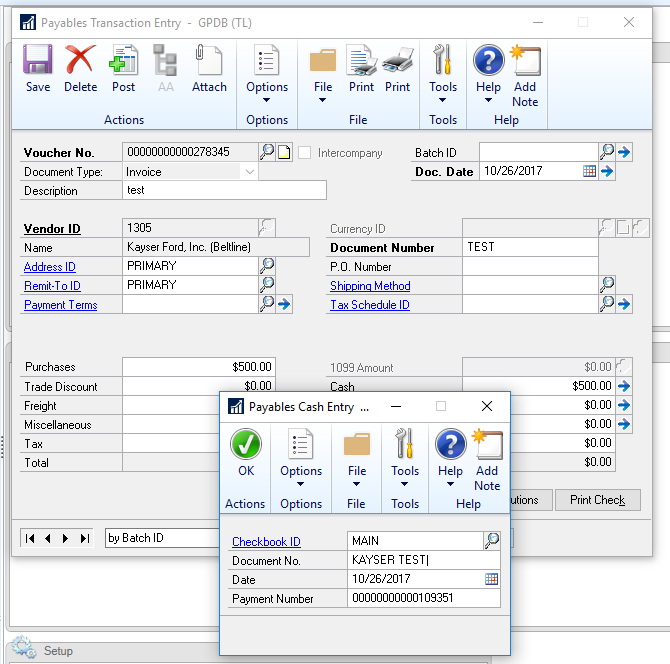
Alternatively, if you’ve already entered the invoice, you can use the Manual Payments Entry screen to enter a cash payment and apply it to the invoice. Just be sure to select Cash as the Payment type. Hope this helps!——————————
Tiffany Ziegler
Vice President & Controller
Velcor Leasing Corporation
Madison WI
——————————
——————————————-
Unknown Member replied 8 years, 5 months ago 1 Member · 0 Replies -
-
0 Replies
Sorry, there were no replies found.
The discussion ‘Accounts Payable’ is closed to new replies.
