


Dynamics GP
Public Group
Active a week ago
Dynamics GP
Organizer:
- JOSE Organized by
-
-

A/P Detail Trial Balance
-
A/P Detail Trial Balance
Posted by Laura Mcnicholas on April 12, 2021 at 5:33 pm-
We are in need of an Accounts Payable report that would include only invoices that are due to be paid based on a specified “Due Date” rather than listing all outstanding invoices as with the A/P Detail Reports. Does such a report exist in GP?
#Accounting?——————————
Laura McNicholas
Maryland Hospital Association, Inc
ELKRIDGE MD
—————————— -
Hi ,
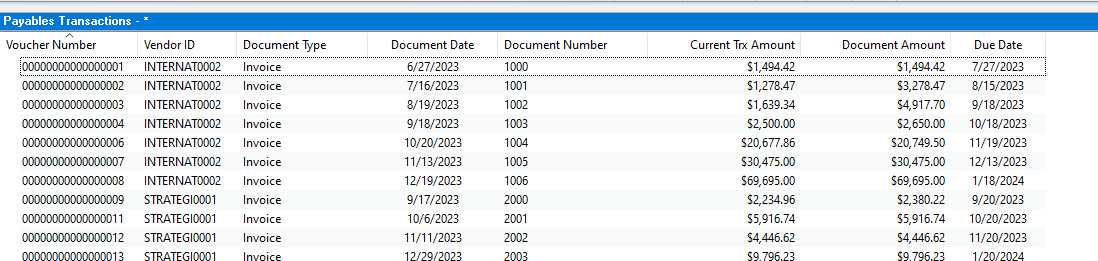
We’ve done similar requests with clients before using the Payables Transactions SmartList as a starting point.
We added the necessary fields (due date, document amount, etc.). We then filter the smartlist to only show invoices, finance charge, misc. charge, etc. (Basically anything you OWE) where the current transaction amount is not equal to 0 and is not voided.
You could add an additional filter criteria for due date…this would be the only filter parameter that would change unless you add others.
You could go one step further and create a new smartList (SQL View Payables Transactions would be your base or you could reference the original SmartList) and then create a single calculated field to tell you how many days old the document is or how many days past due if you want to mimic some aging criteria.
If you wanted to get REALLY specific, you could create a series of calculated fields where each field is the aging bucket you want (i.e. 0-30) and your calculation is an if/then statement (i.e. if the due date is 0-30 days ago then show the current trx amount, else show 0). This would let you mimic the aging columns from an HATB more closely while still being able to limit it to the due date you’re looking for.
Does that make sense? Let me know if you have questions.
Best,
Samantha
——————————
Samantha Higdon ,CPA,CGMA
Consultant
Lagom, LLC
Carmel IN
——————————
——————————————- -

Thaddeus Suter
MemberApril 13, 2021 at 9:43 PM
Or you could also run the AP Cash Requirements Report for your Due Date cutoff under Purchasing Analysis reports.
I like setting the Due Date range back several years so that I get any unpaid vouchers that were missed or on hold as well as seeing what my cash requirements are for those currently Due by the end of April.
You could also Range out by Vendor Class if you want just Trade vendors etc.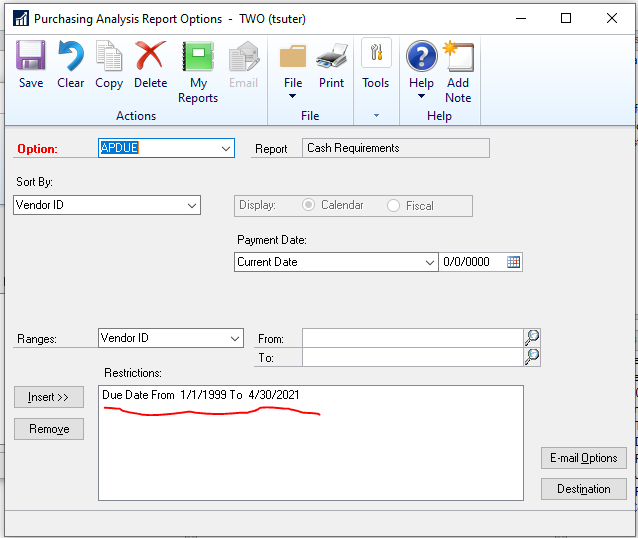
——————————
Thaddeus Suter
Retus, Inc
HELOTES TX
——————————
——————————————- -
Jeff Hassenboehler
MemberApril 14, 2021 at 1:32 PM
I only use the canned A/P and A/R reports for month end reconciliations. They’re kind of clunky for other purposes.For open A/P and open A/R snapshots I rely on Refreshable Smartlists. All the data you need is at your fingertips and you don’t have to print anything (unless you want to). I’ve added Pivot Tables in most of my Refreshable Excel files just for viewing ease.
The end result is to just open an Excel file, click Refresh, and all open Payables are automatically listed in your file. You can also add your own due date formulas in the data tab to enhance what is coming from GP.
It’s worth a look into.
jph
——————————
Jeff Hassenboehler
Definition6
Atlanta GA
——————————
——————————————- -
do you have specifics on how to create this? I would like to have it
Danita
——————————
Danita Simon
Senior Accountant
Detroit Metro Convention & Visitors Bureau
Detroit MI
——————————
——————————————- -
Jeff Hassenboehler
MemberApril 15, 2021 at 4:18 PM
If you have not deployed refreshable smartlists, then that is something you will have to look up on-line because I don’t have notes on it. What I remember about that process (for me anyway) is that deploying new smartlists has to be done while logged in as sa, and that the location that it is deployed to should be accessible by the individuals that will need to access the files. The initial deployment will create many reports that you will likely never use. It’s like the canned regular smartlists — you have to add to them to make them useful.If you know how to create a regular smartlist, you can duplicate it as an Excel Smartlst. Just open the smartlist builder (Tools – Smartlist builder – smartlist builder), select a report to modify, click Options then Duplicate, change the “New List Type” to Excel Report. then click Duplicate.
We are on GP 2018 and I’m set up as a PowerUser. but it has worked for us over many GP versions.
I’ve attached a screen-shot of my first page of my open payables Excel Smartlist.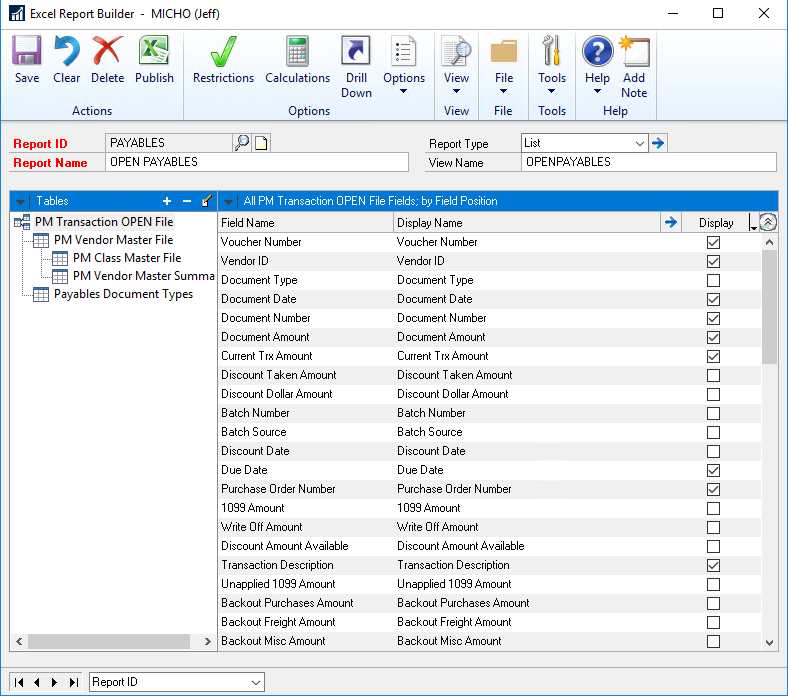
To Deploy this report you click Publish and select where you want the report to reside (network locations work well). It defaults to creating both the Data Connection file and the Excel file. I usually remove the check mark for Create Excel report as you can just open the data connection file (which will launch Excel), then you can just save it as an Excel file somewhere else on the network. (so just the odbc connection files are saved in one location). Here is a view of the deployment (publish) page: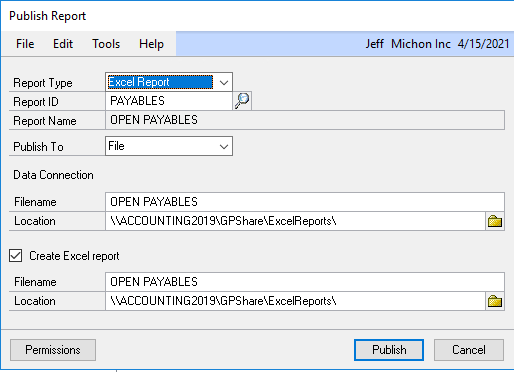
Hope this helps and hope it works for you. Permissions are another whole thing to deal with if that prevents you from getting this to work. There are some good structured steps out in Google-land that will be better than what I just typed up.
And if it does work, consider also: Open A/R, A/P Work Distribution (we use it to review A/P work), Customer listings, Vendor listings, and even current year GL details (with some vlookups we use this to see our P&L in real time without running MR or other reports).jph
——————————
Jeff Hassenboehler
Definition6
Atlanta GA
——————————
——————————————-
Laura Mcnicholas replied 5 years, 4 months ago 1 Member · 0 Replies -
-
0 Replies
Sorry, there were no replies found.
The discussion ‘A/P Detail Trial Balance’ is closed to new replies.
