


Dynamics F/SCM
Public Group
Active 4 hours ago
Dynamics F/SCM
Organizer:
- JOSE Organized by
-
-

Put Picking/Packing and Shipping on Hold Only in D365
-
Put Picking/Packing and Shipping on Hold Only in D365
Posted by DSC Communities on August 18, 2021 at 6:31 pm-

Mara Taylor
MemberAugust 18, 2021 at 6:31 PM
Hi Everyone,In the all customers part of D365 in the setup screen there is a section in the credit and collections where you can either put everything on hold or nothing on hold and i am wondering if anyone knows how to put shipping on hold only? this would include picking and packing.


——————————
Mara Taylor
Credit Manager
Kent Water Sports Holdings, LLC
Snoqualmie WA
—————————— -
As part of the new credit management function, you can set up hold codes at: Sales and marketing > Setup > Sales order > Hold codes. These hold codes can then be applied to a sales order with the hold code button on the “Sales order” tab. Adding a hold code sets the “Do not process” flag on the sales order header. The job to automatically release sales orders to the warehouse is hard coded to bypass orders marked as “Do not process”.
Unfortunately, there does not appear to be a way to attach one of those hold codes to the customer master, so that all new orders are stopped as well. There is a default inventory status on the customer master. If you set up a new inventory status (CreditHold) and apply that to customers, all their new sales orders should get that inventory status on the lines. As long as there is no on-hand inventory with that inventory status, you will not reserve inventory to those sales lines, which will prevent them from releasing to the warehouse.
——————————
Kevin McLean
Strategic Solutions NW
Beaverton OR
——————————
——————————————- -
Hi Mara…..
In the Credit and Collections module, navigate to Credit and Collections ParametersCredit tab. There you will see Credit Management Checkpoints which will stop the process based on the customers credit limit. We are in the process of upgrading to D365 and have been testing this feature. We believe we are having an issue with the Release to Warehouse checkpoint, however. If you test this, I’d be interested in your results. Right now, when we check Release to Warehouse, orders which should be stopped are not being stopped.
Thanks,
Lori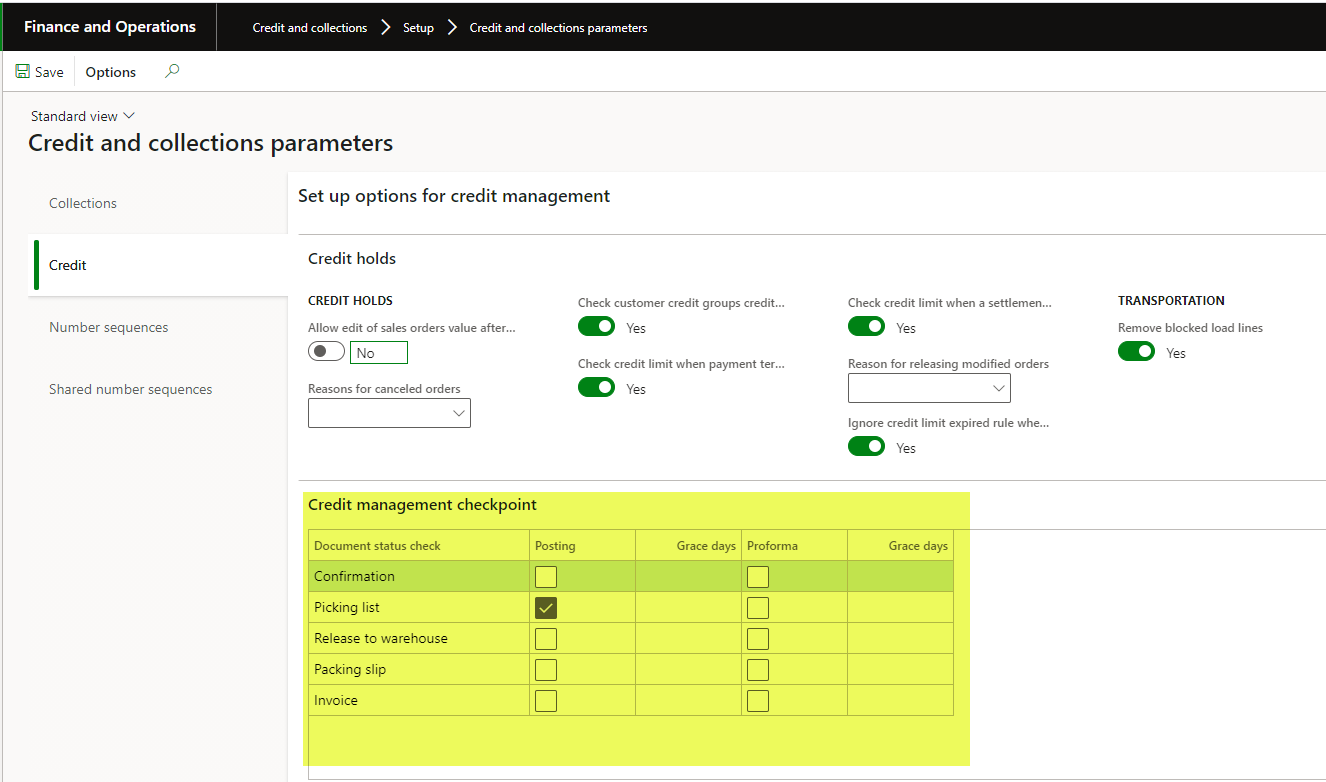
——————————
Lori Holmes
Hamamatsu Corporation
Bridgewater, NJ
——————————
——————————————- -
Mara Taylor
MemberAugust 20, 2021 at 2:48 PM
Thanks so much everyone for your help… I don’t want to mess with the credit part of it as this isn’t a credit reason we are putting the customer on hold.. we just don’t want any of their back orders to ship right now and the only way I have found to do this is to put the whole customer on hold… As far as using the Credit and collections Parameters as Lori suggested We only have our orders check credit at confirmation… we would that having it do credit checks at each of the document status’s was way to limiting…
We are at the end of our season and we are just trying to figure out if a customer wants something to ship or not, so its actually easier for us to turn the customer on or off then to use the credit management checkpoints,
I am so happy to see more people answering credit questions in here. It is really a nice thing….
——————————————-
-
Dan Murphy
MemberAugust 23, 2021 at 11:51 AM
Mara:If you only want to put a specific order on hold, you can. From the All Sales Orders list page with the SO highlighted, from the Credit Management menu select Force credit hold.

It’s not automatic, but you don’t have to put the entire customer on hold.
Hope this helps,
Dan
——————————
Dan Murphy
Special Projects
Flexaust
San Diego CA
——————————
——————————————-
DSC Communities replied 4 years, 7 months ago 1 Member · 0 Replies -
-
0 Replies
Sorry, there were no replies found.
The discussion ‘Put Picking/Packing and Shipping on Hold Only in D365’ is closed to new replies.
