


Dynamics F/SCM
Public Group
Active 19 hours ago
Dynamics F/SCM
Organizer:
- JOSE Organized by
-
-

Planned Purchase Orders
-
Planned Purchase Orders
Posted by DSC Communities on May 10, 2017 at 3:47 pm-

Faygen Grant
MemberMay 10, 2017 at 3:47 PM
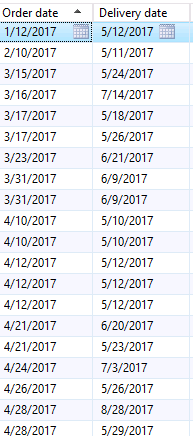
Good day,I’m trying to understand fully the Planned Purchase order list grid. My query is based on the Order data that is suggested. Why would a suggested date that has already gone still be populating here? Is it based on the delivery date being in the future? Any assistance would be appreciated.
——————————
Faygen Grant
Subject Matter Expert
Bermudez Group Limited
Mt. Lambert
—————————— -
Hi Faygen,
The order date is when you would have to place the order based on when you need the item. So if the goods are urgent but the lead time is longer, it would say you would have had to place that order already. Master Planning has settings in the way of Actions and Futures to tell if you should advance or postpone orders.So your first line for example, shows that item must have a 4month lead time. But you need them in 2 days. So you know you need to expedite this PO or whatever demand needs this item will have to be pushed out.
——————————
Andrew Lencsak
Senior Application Consultant
eBECS
Atlanta GA
——————————
——————————————- -
Faygen Grant
MemberMay 12, 2017 at 8:20 AM
Thanks for your reply Andrew.Although I understand what you are telling me, I still have concerns.
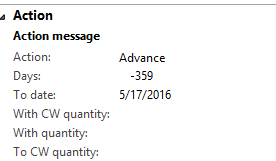
Here’s another example, the order date is the past and the delivery date was yesterday. Why would this order still be here? Also, the action is saying to advance to a date in 2016. Am I missing something?

——————————
Faygen Grant
Subject Matter Expert
Bermudez Group Limited
Mt. Lambert
——————————
——————————————- -
I would need to know what the date is that this supply is trying to fulfill, I.e. the demand order (sales order or production order to consume this item) is. That would be the requirement date. My guess is that order has a date in 2016 which is why you see the action. Realistically, if using Futures, you would also have a Futures message in this scenario telling you what date you can actually receive by based on the lead time and the fact you don’t have the item on order yet.
——————————
Andrew Lencsak
Senior Application Consultant
eBECS
Atlanta GA
——————————
——————————————- -
Robert Stogner
MemberMay 16, 2017 at 8:22 AM
My suggestion is that you use the “Dynamic Negative Days” setting on your Master Planning Parameters. If you have that set, the system will look at lead time for an item before it suggests another planned purchase order, and if it is not possible to get the materials in time for the demand required, it will not suggest another planned purchase order if an existing real purchase order exists. It will just tell you to expedite that. That being said, if no other purchase order exists, then a new planned order must be created to cover the demand and of course, based on the lead time will suggest that you should have ordered it a long time ago.——————————
Robert Stogner
I.B.I.S. Inc., a Sonata Company
Burlington NC
——————————
——————————————- -
Faygen Grant
MemberMay 19, 2017 at 8:10 AM
Hello,We do have Negative Days set up. I suppose it makes sense that an order would be created once there’s an identified need but my confusion is the dates (both order and delivery) are in the past, why would an order still be suggested?
Is there a way to clean up the Planned orders? If orders are either past gone or should be cancelled, is there an option to delete permanently? I’ve tried the delete button but once MP is run, they tend to return.
——————————
Faygen Grant
Subject Matter Expert
Bermudez Group Limited
Mt. Lambert
——————————
——————————————- -
I’m assuming you’re talking about PLANNED orders, not actual/released orders, as MRP will never automatically update actual orders other than throwing messages on them.
Basically what you’re seeing is a result of some requirement with a date that can’t be covered through existing inventory, existing open orders or a new planned order using the part’s normal leadtime. If you want to to see a clean action list with no past due planned orders, you’ve got a lot of work to do:
- Look at the pegging tied to the planned order to understand where the requirement is coming from. Is this an accurate requirement and accurate need-by date? If not, fix that order/requirement.
- Verify that the inventory and existing open orders for this product are accurate
- Verify that the “leadtime” for this product is accurate, noting that “leadtime” can come from a number of places such as trade agreements, coverage settings, default order settings, etc.
- Review the master plan settings, coverage group settings, and any overrides (item coverage, item order defaults). In particular, there’s a coverage setting for “use future dates as requirement” that has a major impact on planned receipt date and therefore planned order dates in these scenarios. In general, MRP will never create a planned order with a past due RECEIPT date***, but can create one due [today], which with leadtime on the product will result in a past due “order by” date. If futures as requirement is checked, then in this scenario MRP will be prevented from creating a planned order with a past due order-by date, the receipt date will be pushed farther out, and you’ll potentially have misalignment where a production order wants a part on date=xx/xx/xxxx but the supporting purchase order is not showing it will arrive until xx/xx/xxxx + [most or all of the leadtime].
***in many companies MRP is run overnight and the results land in mailboxes the next day, which can look like the order was created past due (yesterday), when in fact it was created due [ASAP/today] during the nightly process with no one around until the following day to react.
I vaguely remember you attending a procurement workshop of mine at an AXUG conference, in which case you should be able to pull up the workshop notes/slide deck to review the “time travel” versus “rebound” configuration I covered in that workshop.
As you noted, even if you delete these, MRP will tend to regenerate them. You either have to eliminate the upstream need, or change the rules under which the supply is generated. Otherwise you’ll continue to get the same results. MRP isn’t moody–it just does the math the same way, over and over, day in and day out…
——————————
Chan Stevens
Industry consultant
Cincom Systems
Cincinnati OH
——————————
——————————————- -
Hi Faygen,
It would still create a planned order if the demand was still valid. Either the demand has a date in the past, OR the demand is driving the item’s requirement in the past based on long purchase or build lead times. MRP will always plan for it if the demand is still there. Robert’s suggestion is a good one as it will limit planned orders being created based on certain circumstances if the demand can be covered by other existing supply.——————————
Andrew Lencsak
Senior Application Consultant
eBECS
Atlanta GA
——————————
——————————————-
DSC Communities replied 8 years, 10 months ago 1 Member · 0 Replies -
-
0 Replies
Sorry, there were no replies found.
The discussion ‘Planned Purchase Orders’ is closed to new replies.
