


Dynamics F/SCM
Public Group
Active an hour ago
Dynamics F/SCM
Organizer:
- JOSE Organized by
-
-

Master Planning Tracing
-
Master Planning Tracing
Posted by DSC Communities on November 25, 2019 at 6:21 pm-

Sarah Gabriel
MemberNovember 25, 2019 at 6:21 PM
We recently had an issue with master planning due to bad data entered by an user that caused a circularity problem. Master planning as a whole would not complete but we could run it for a small section of items. It took several days to identify the bad data.
How can I run master planning and know which items are causing issues? Is there tracing that I can run?Thanks in advance for your ideas!
——————————
Sarah Gabriel
Operations Business Analyst
Kai USA Ltd
Tualatin OR
—————————— -
Shelby Wright
MemberNovember 25, 2019 at 7:03 PM
Hmmm. There is log, but only after the run completes.I would suggest a BI (SQL) query in this case: you are looking for a BOM where the Level 0 parent item is also on any other BOM level.
I would also suggest that during the ECO process, a BOM be checked for circularity if a change is made.
BOM designer has a Check option. Once the Check BOM window comes up, click Check circularity and click ok.That would be a value-added step that could avoid the whole planning mess. 🙂
Hope that helps, let me know if not or you need more.
Shelby
——————————
Shelby Wright
Applications Manager
Leatherman Tool Group
OR
——————————
——————————————- -
Corey Vantilborg
MemberNovember 26, 2019 at 7:47 AM
Are you running AX2012 of some version? If so I have a few suggestions.1. Run the item consistency check. https://blog.fullscope.com/ax-technical-tip-prevent-headaches-with-data-consistency-checks It is not a perfect tool, many of the checks are poorly written so run very slowly, the results are in an infolog which is difficult to deal with but it is a good place to start.
2. You can query MRP while it is running to determine which items it is working on. This is a real-time check so you could use to find when MRP is stuck, and what items it is working on. Let me know if you are interested in this as the query and its results would require some explanation.As Shelby mentioned there are some process steps that can help, however, if your BOM’s are many levels deep then those checks will run far to slowly to be useful.
——————————
Corey Vantilborg
ERP Analyst
Tigercat International Inc.
Brantford ON
——————————
——————————————- -
Joseph Hurylovich
MemberNovember 26, 2019 at 9:39 AM
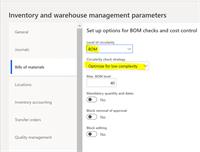
Hi Sarah,You may want to make sure that you have the Parameters set in inventory management to validate and check BOM Circularity. I do not know if your issue was related to a Bill Of Material, all I know is that this helps whenever edits, revision changes take place with BOM activation’s. The system will auto check for circularity and prevent BOM issues for the future. Have Fun, enjoy the Holiday Weekend!
——————————
Joseph Hurylovich
Owner/Sr. Mfg Consultant
5702363460
North Haven PA
——————————
——————————————- -
Hi Sarah –
You can run an AX Trace in AX2012 or D365FO and in many cases the Trace can help determine what MRP is doing. A portion of the MRP engine, Scheduling, is written in C# and does not Trace well (But in D365FO checkout Organization Administration | Setup | Scheduling | Scheduling Tracking Cockpit).
Scheduling aside, the standard Tracing Cockpit is located in the UI (D365FO) or the AOT (AX2012) and I would image your developers already use the tool.
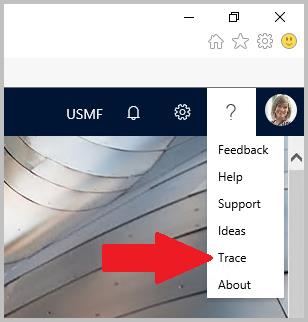
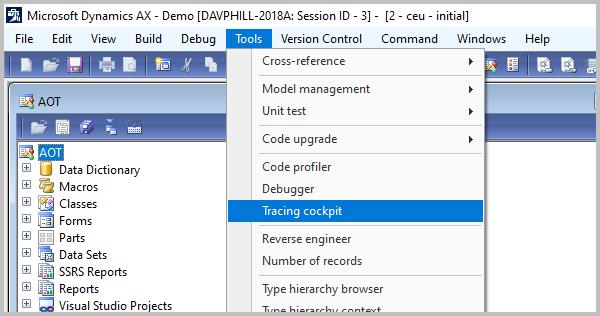
Tracing is not yet available for D365FO On-Premises environments. See, https://docs.microsoft.com/en-us/dynamics365/fin-ops-core/fin-ops/get-started/features-not-implemented-on-prem.). In D365FO make sure you Download the Trace.
Traces are reviewed in a tool called Trace Parser that may already be installed or is available for download (Search on – AX “Trace Parser”).
Some quick Tracing pointers.
1. The best Traces are short. 5 to 10 seconds. Try to simplify a problem down to its bare elements then collect a Trace.
2. The best Traces collect data from just one user. Try to repro the issue in a TEST environment and then collect a Trace.
3. For MRP, run with 1 Helper and 1 Task.
4. You can use Plan Fences to take portions of MRP out of play (e.g. Set the Capacity Time Fence to Ticked and Zero to take Scheduling out of play). I often take Actions, Futures (Delays) and Scheduling out of play then add them in one-by-one if needed.
5. Start a Trace right before an area of interest and Stop a Trace right after the event (e.g. Error).Thanks….Dave
——————————
Dave Phillips
Sr Support Escalation Engineer
Microsoft
Fargo ND
——————————
——————————————- -
I like to use Unfinished scheduling process inquiry. This will tell you exactly what the last thing it worked on was (unfortunately not the current item)
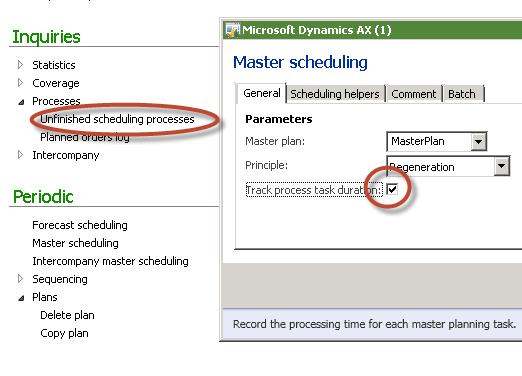
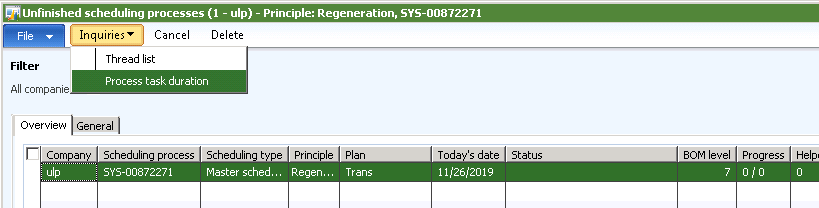
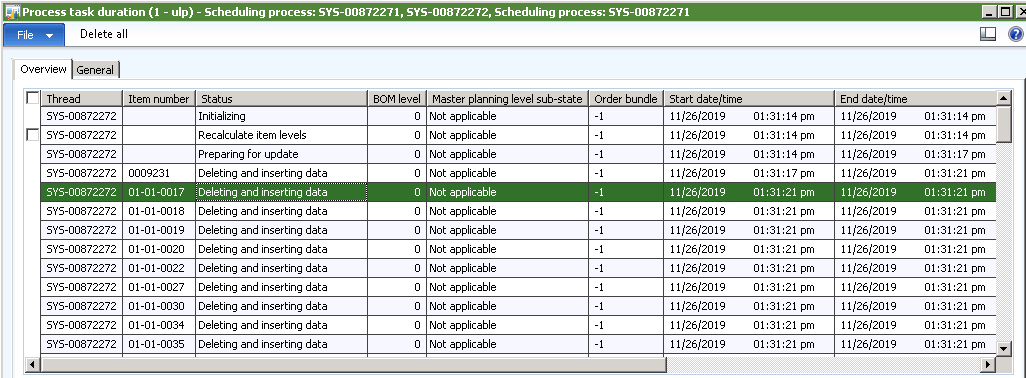
I use this in conjunction with a SQL or ATLAS group query to get a good idea of what steps planning is currently on. In your case I would expect BOM levels go through the roof.
?
——————————
Richard Wehmeyer
PlayCore
Chattanooga TN
——————————
——————————————- -
Sarah Gabriel
MemberNovember 27, 2019 at 11:46 AM
Thank you everyone for great information! I’m recreating our issue in a test environment and running through these different ideas.
I appreciate all the help!——————————
Sarah Gabriel
Operations Business Analyst
Kai USA Ltd
Tualatin OR
——————————
——————————————-
DSC Communities replied 6 years, 4 months ago 1 Member · 0 Replies -
-
0 Replies
Sorry, there were no replies found.
The discussion ‘Master Planning Tracing’ is closed to new replies.
