


Dynamics F/SCM
Public Group
Active 13 hours ago
Dynamics F/SCM
Organizer:
- JOSE Organized by
-
-

Job Registration taking between 20 and 50 seconds to load
-
Job Registration taking between 20 and 50 seconds to load
Posted by DSC Communities on August 21, 2019 at 11:19 am-

Andres Verdin
MemberAugust 21, 2019 at 11:19 AM
Hi, maybe somebody has seen this issue before, on Dynamics AX 2012 R3, we are using manufacturing execution, lately we are having issues with the job registration, after entering the badge id and hit enter, it will take 20 to 50 seconds to load the jobs, I tried everything, clean up registrations, rebuilt the indexes, re-organize them, etc.Is there something else I can do to improve the performance? the table shows about 6000 open jobs for several resources, each resource has from 100 to 1500 open jobs (as more open jobs more time takes). I tested the AX query in SQL and same query (for a resource with 400 open jobs) in SQL takes less than 1 second and in AX 15 seconds.Any help is highly appreciated.
Tanks
——————————
Andres Verdin
IT Eng.——————————
-
Solomon Maricle
MemberAugust 21, 2019 at 11:51 AM
I’d be curious to see what a trace would show for where it is spending its time. I recommend you capture the action in an AX trace when the environment is most quiet. I also recommend a parallel SQL profiler trace as that can yield better SQL based information than the AX trace and look at where the expense is.And if you’re able, I’d copy the DB to a sandbox and see if you get the same behavior there.
——————————
Solomon Maricle
Technical Solutions Architect
PAR Technology
Norwich NY
——————————
——————————————- -
Andres Verdin
MemberAugust 21, 2019 at 12:36 PM
Thank you for your replyLooks like the table that is taking most of the time is prodroutetrans which has 400K records (about 300K for this company),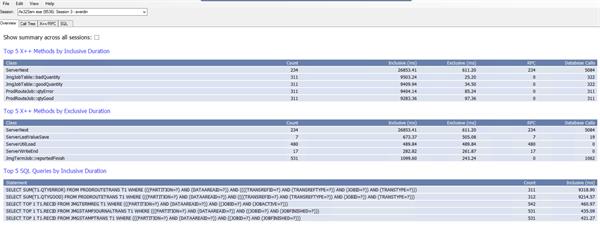
——————————
Andres Verdin
IT
Wall Colmonoy
LOS LUNAS NM
——————————
——————————————- -
Hi Andres, you said you were on R3 but not which CU. there were a lot of changes and cleanup jobs added with CU10 and the latest I believe is CU13. Point being could be a known issue that’s been addressed. I would recommend getting Dynperf set up as well. It will help you gather data to track performance issues and places you might need to put new indexes based on your processes. I keep an eye on queries running over 5 seconds script within dynperf myself. Not that 5 seconds is a lot but I can address those there are taking 30 or more seconds. It will provide you the query plan ax chose among other details and nuggets it captures. Here’s a link to Dynperf. https://community.dynamics.com/ax/b/axinthefield/posts/dynamicsperf-2-0-is-here-1416871041
——————————
Mark Zerr
AX Technical Analyst
New Sunshine LLC
Indianapolis IN
——————————
——————————————- -
Andres Verdin
MemberAugust 21, 2019 at 12:38 PM
Hi Mark, thank you for your reply we are on CU12, I’ll take a look to dynperf.Thanks
——————————
Andres Verdin
IT
Wall Colmonoy
LOS LUNAS NM
——————————
——————————————- -
Bart Kolodziej
MemberAugust 22, 2019 at 10:15 AM
Andres,
Have you updated SQL statistics on the affected tables?
UPDATE STATISTICS DB.dbo.[TableName]——————————
Bart Kolodziej
Midland Paper, Packaging + Supplies
Wheeling IL
——————————
——————————————- -
Andres Verdin
MemberAugust 22, 2019 at 11:11 AM
Yes I did (run statistics), I found the issue, the JmgJobTable has 2 display methods to show reported QtyQrror and QtyGood for the same job/operation, the execution of those queries is what it taking all the time to process. That means two more queries to the table ProdRouteTrans per record on the JmgJobTable query.
Queries on the display methods:return (select sum(QtyError) from prodRouteTrans
where prodRouteTrans.TransRefId == this.ProdId &&
prodRouteTrans.TransRefType == ProdTransRefType::Production &&
prodRouteTrans.JobId == this.JobId &&
prodRouteTrans.TransType == ProdRouteTransType::Qty).QtyError;return (select sum(QtyGood) from prodRouteTrans
where prodRouteTrans.TransRefId == this.ProdId &&
prodRouteTrans.TransRefType == ProdTransRefType::Production &&
prodRouteTrans.JobId == this.JobId &&
prodRouteTrans.TransType == ProdRouteTransType::Qty).QtyGood;Even do this form (job registration) does not use these fields (at least is what I saw) these fields are added to the Cache on the init method for the jmgjobtable datasource:
jmgJobTable_DS.cacheAddMethod(tableMethodStr(JmgJobTable,badQuantity));
jmgJobTable_DS.cacheAddMethod(tableMethodStr(JmgJobTable,goodQuantity));
If I comment or delete these 2 lines, the form will take no more than 5 seconds to load, but I’m not sure if that will create another issue, we are testing it right now.Thank you all for your help.
——————————
Andres Verdin
IT
Wall Colmonoy
LOS LUNAS NM
——————————
——————————————-
DSC Communities replied 6 years, 7 months ago 1 Member · 0 Replies -
-
0 Replies
Sorry, there were no replies found.
The discussion ‘Job Registration taking between 20 and 50 seconds to load’ is closed to new replies.
