Importing customer postal addresses

  • Importing customer postal addresses

    Posted by DSC Communities on April 30, 2020 at 11:07 am
    • Terrie Jones

      Member

      April 30, 2020 at 11:07 AM

      I am having trouble importing the customer postal addresses using the customer postal addresses template.Ā  Keep getting an error of a duplicate record.Ā  The template shows only 2 fields that are mandatory which is account number and legal entitiy.Ā  If this is the key, it would be a duplicate.Ā  We are trying to load multiple deliveries under one customer.Ā  Any suggestions?

      ——————————
      Terrie Jones
      Andis Company
      Sturtevant WI
      ——————————

    • Samantha Mattson

      Member

      May 1, 2020 at 8:54 AM

      Terrie,

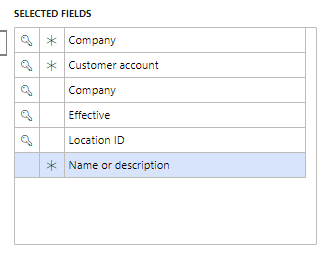
      The screenshot below shows the key fields (having these should eliminate your duplicate errors message), and the ones with stars are mandatory. If you need the AOT field names I have also listed those in order below the screenshot.Ā 

      CustomerLegalEntityID
      CustomerAccountNumber
      dataAreaID
      Effective
      AddressLocationID – You can auto generate this upon importing.
      AddressDescription

      ——————————
      Samantha Mattson
      Business Analyst, Industrial Technology Group, formerly Pettibone LLC
      The Heico Companies
      Warrenville IL
      smattson@pettibone.com
      ——————————
      ——————————————-

    • Arush Kuthiala

      Member

      May 1, 2020 at 10:04 AM

      Hi Terrie

      Funny enough I was importing these a couple days ago. The big issue is that the “AddressLocationID” field must be populated. However you don’t want to populate this manually. Instead when you are importing, click the icon in the View Map field, this should open up a mapping from your file to the entity. Go to the mapping details tab, click New and then check the box that says Auto-Generated. This will deactivate the “Source Field” column, in the Staging field choose AddressLocationID and you should be good to go!

      Thanks,

      ——————————
      Arush Kuthiala
      Western Computer
      Toronto ON
      ——————————
      ——————————————-

    • Terrie Jones

      Member

      May 1, 2020 at 12:27 PM

      Thank you all who responded.

      We now are able to load our customer postal addresses by auto generating the location ID.

      ——————————
      Terrie Jones
      Andis Company
      Sturtevant WI
      ——————————
      ——————————————-

    • Tony Zeigler

      Member

      May 1, 2020 at 10:17 AM

      I believe you will get the duplicate error if there is a dup on any column that has a unique index defined.
      That includes not mapping a column with a unique index…
      There should be another column, logisticslocationid, that is unique as well. Typically a sequence will populate it, so it could be that it is not included in the map, or that the sequence for it needs it’s next number value updated.

      ——————————
      Tony Zeigler
      Senior Consultant
      Strategic Solutions NW, LLC
      Beaverton OR
      ——————————
      ——————————————-

    DSC Communities replied 5 years, 11 months ago 1 Member · 0 Replies
  • 0 Replies

Sorry, there were no replies found.

The discussion ‘Importing customer postal addresses’ is closed to new replies.

Start of Discussion
0 of 0 replies June 2018
Now

Welcome to our new site!

Here you will find a wealth of information created for peopleĀ  that are on a mission to redefine business models with cloud techinologies, AI, automation, low code / no code applications, data, security & more to compete in the Acceleration Economy!