


Dynamics F/SCM
Public Group
Active 22 hours ago
Dynamics F/SCM
Organizer:
- JOSE Organized by
-
-

Default Unit of measure for Sales Order Picking on Mobile Device
-
Default Unit of measure for Sales Order Picking on Mobile Device
Posted by DSC Communities on May 15, 2017 at 3:32 pm-

Amanda Harris
MemberMay 15, 2017 at 3:32 PM
 Hi Everyone-
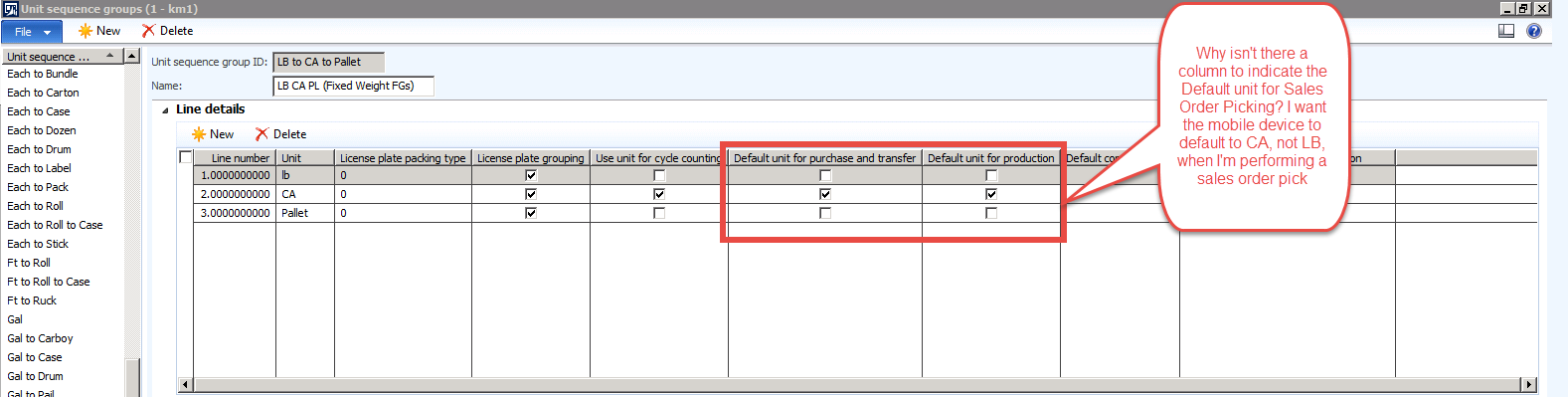
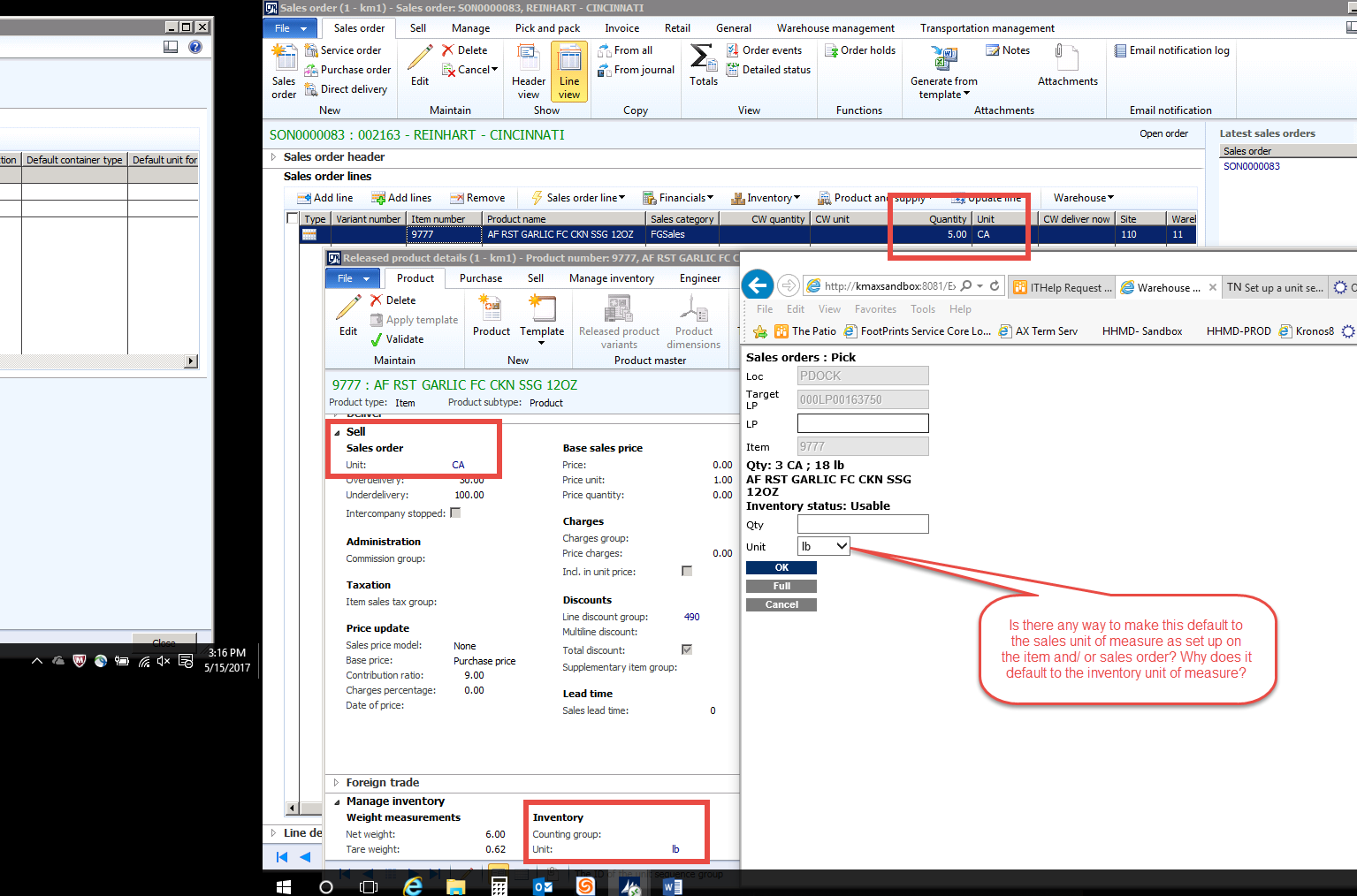
We’re using ax 2012 R3 with advanced warehousing. Our items are set up with LB as the inventory unit of measure and CA as the sales unit of measure. We enter sales orders by the CA. When picking sales orders using the mobile device, the unit of measure dropdown defaults to LB. I’d like it to default to CA. I know that there is a setting on the unit sequence group ID that allows you to indicate the default unit of measure for purchase order receiving, transfer orders and production orders. Why isn’t there a similar setting for Sales Order picking? Is there any way I can get the dropdown to default to CA (my sales unit of measure)? I’m worried that if it always defaults to LB a lot of our warehouse workers will make a mistake because they will forget to change the dropdown before clicking ok.
Thanks,
Amanda——————————
Amanda Creedon
IT Business Analyst
Kayem Foods Inc.
Chelsea MA
—————————— -
Colby Gallagher
MemberMay 15, 2017 at 3:53 PM
Use the “Default for Material Consumption” checkbox all the way to the right.——————————
Colby Gallagher
Manufacturing Systems Consultant
Agility Business Solutions
Brecksville OH
——————————
——————————————- -
Amanda Harris
MemberMay 15, 2017 at 4:42 PM
Hey Colby-Thanks so much for reading my message and replying- I always appreciate when people take time out of their busy days to reply to the online forum messages. I tried checking the “default unit for material consumption” checkbox on the CA line in my unit sequence group ID, then I created a brand new sales order and started the pick for it, but the mobile device is still defaulting to LB, not CA. Is there another setting that works in conjunction with the “Default unit for material consumption” that I should set up to make it work?
Thanks,
Amanda——————————
Amanda Creedon
IT Business Analyst
Kayem Foods Inc.
Chelsea MA
——————————
——————————————- -
Colby Gallagher
MemberMay 15, 2017 at 10:14 PM
On your item 9777 -> Warehouse Mgmt fast tab -> Unit sequence group, does that unit sequence group have unit CA flagged as the default consumption unit?If thats not it, what CU are you on? I tested this on a CU12 box just now and it’s working as expected.
——————————
Colby Gallagher
Manufacturing Systems Consultant
Agility Business Solutions
Brecksville OH
——————————
——————————————- -
Amanda Harris
MemberMay 16, 2017 at 12:47 PM
Hey Colby-Thanks again for replying to my post. Yes, I have that setting checked on the unit sequence group ID assigned to that item. I tested it both with and without the setting checked, but it defaulted to LB both times. We’re only on CU11 though, so perhaps that’s the difference. I’ll have to check out the release notes for CU12 to see if it says anything about that.
Thanks again- this has been very helpful.
Amanda——————————
Amanda Creedon
IT Business Analyst
Kayem Foods Inc.
Chelsea MA
——————————
——————————————- -
Hi Amanda,
Do you by any chance have “Restrict by unit” selected in your Location Directives form under the middle “Lines” section? Wondering if for any reason, that may interfere. If not, the CU difference could be relevant. I just looked at one of my CU8 environments and the tickbox for “default unit for material consumption” does not seem to exist. I only have default unit for purchase and transfer, and default unit for production.——————————
Andrew Lencsak
Senior Application Consultant
eBECS
Nashua, NH
——————————
——————————————- -
Amanda Harris
MemberMay 16, 2017 at 2:16 PM
 Hey Andrew-
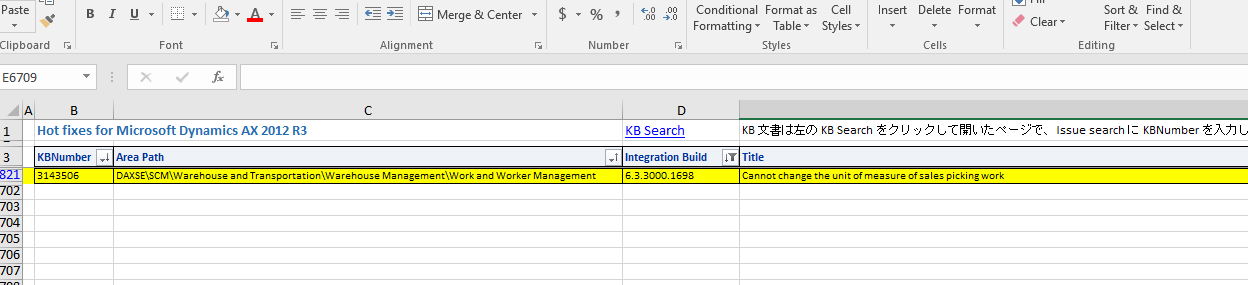
Thanks for your reply. I just looked at my location directives for SO Picking and I do not have the “Restrict by unit” box selected. Should I select it? The Unit sequence group ID setting for the default unit for material consumption was definitely added after CU8, because we just recently upgraded from CU8 to CU11 and I don’t think we had it until we upgraded. The TechNet article on unit sequence groups doesn’t even mention the setting yet, but googling it results in articles talking about BOMs, which leads me to believe that that checkbox is referring to the consumption of raw materials on Production orders, as opposed to the consumption of Finished Goods on Sales Orders. We don’t have production set up in AX yet though because we’re doing a phased implementation, so I’m not sure if that’s really referring to BOMs and Production orders or not. I tried googling “dynamics ax 2012 r3 default unit sales order picking” and I got a link with a list of hot fixes for 2012, one of which is described as “cannot change the unit of measure of sales picking work,” so I’m wondering if this hotfix might resolve my issue. I’m not sure how to tell whether or not the hotfix applies to my situation though.
Thanks,
Amanda——————————
Amanda Creedon
IT Business Analyst
Kayem Foods Inc.
Chelsea MA
——————————
——————————————- -
No I was thinking maybe it was causing issues if it was ticked, just a shot in the dark. I do see the hotfix you’re talking about, MS says this about it:
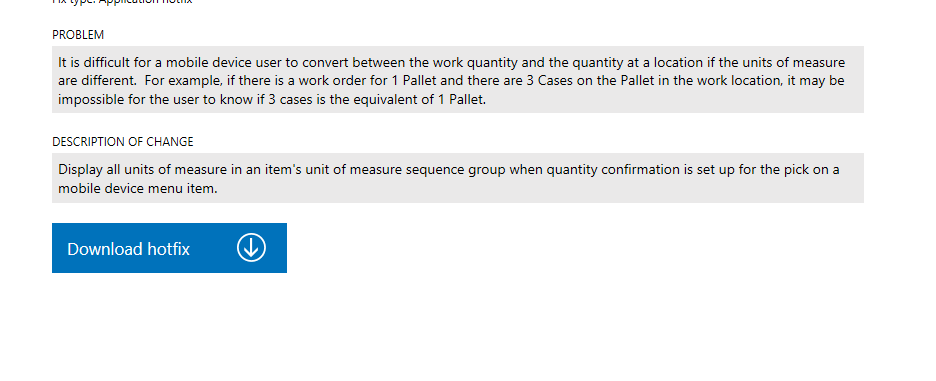
Not sure if that’s related but worth a try.——————————
Andrew Lencsak
Senior Application Consultant
eBECS
Atlanta GA
——————————
——————————————- -
Amanda Harris
MemberMay 16, 2017 at 3:36 PM
Andrew- thanks for sending the hotfix details.
Hey Colby-
Out of curiosity, if you were to deselect the default consumption checkbox on the unit sequence group ID, does it still default to CA, or does it default to LB?
Thanks,
Amanda——————————
Amanda Creedon
IT Business Analyst
Kayem Foods Inc.
Chelsea MA
——————————
——————————————- -
Guy Terry
MemberMay 16, 2017 at 5:25 PM
Hi Amanda,My view is that the Unit you see on the mobile device comes from the Unit on the Work Line. If you want a specific unit to appear on the mobile device, you need to drive that unit on to the Work line. And I think that you cannot do that the way you would like.
As far as I can tell (and without including anything we can do with work breaks) AX will automatically choose which unit (from the unit sequence group) to use for sales picking. It will try to use the largest unit that it can, as long as the quantity of the pick (in the inventory unit) is a multiple of that unit.
This doesn’t explain well! Let me give an example.
You stock an item in Eaches, and have Box on the Unit Sequence Group. There are 20 Eaches in a Box.
With a sales order for 10 Eaches, you are asked to pick 10 Eaches.
With a sales order for 40 Eaches, you are asked to pick 2 Boxes.
With a sales order for 45 Eaches, you are asked to pick 45 Eaches.
I have one question. Whilst testing this I notice that I am simply told the quantity / unit to pick, but on your screenshot, the unit field is editable and offers a drop-down. What config or flow on the mobile device makes that happen?
——————————
Guy Terry
Application Consultant
ibrl
United Kingdom
——————————
——————————————- -
Colby Gallagher
MemberMay 16, 2017 at 10:19 PM
Guy – You can optionally change the unit on the handheld when the mobile device menu item has Work Confirmation -> Quantity Confirmation flagged for Picks.
Amanda –
Regarding your concern of the user picking the wrong quantity, you appear to have quantity verification turned on. If the user entered 3 for cases, and left units at LB, they would get an error on the handheld.
Yes, its not the “Default Consumption” checkbox thats doing it, sorry for the confusion. Its as Guy is saying, whatever unit lands on the WORK line when the work creates is what will default onto the mobile device. What lands on the work line is based on the combination of the unit sequence group and the location directives.
I believe the combination of the following that will get what you want:
1.) Unit of measure conversions between all the units you want to handle. I think you have this set up correctly.
2.) Unit Sequence group. As Guy said, this is a hierarchy. AX searches from largest unit (say pallets) to smallest unit (eaches or lbs). If it can’t find the full quantity in the largest unit to reserve in one location, and you dont allow splits, it moves to the next smallest unit. I think you have this set up correctly.
3.) Location directives. I think this is where you want to be testing, and i think you want to play around with the “Allow Split” flag to see that you can get work lines for CA. See what you have on hand in locates and what your orders are for. If your location directive can’t find the entire CA quantity in one location and you don’t allow splitting, your going to get work lines for the next smallest unit.
Do you have the work creation history log turned on? The parm is at Whse Mgmt -> General -> Work fast tab -> Create work creation history log. Then a log file will be created at Whse mgmt -> Inquiries -> history -> work creation history.
I find this very helpful in troubleshooting location directive / work template issues. The easiest way is create a sales order / lines, reserve them, release to warehouse. Look at the corresponding work, look at the log file, then delete the work, delete the load, change something, re-release to warehouse.
For Guy’s example, on CU12, I’m actually able to get:With a sales order for 10 Eaches, you are asked to pick 10 Eaches.
With a sales order for 40 Eaches, you are asked to pick 2 Boxes.
With a sales order for 45 Eaches, you are asked to pick 2 boxes and 5 Eaches (because I am allowing splits).
Thanks for raising the question, this was a fun one to dig into.
——————————
Colby Gallagher
Manufacturing Systems Consultant
Agility Business Solutions
Brecksville OH
——————————
——————————————- -
Amanda Harris
MemberMay 17, 2017 at 12:22 PM
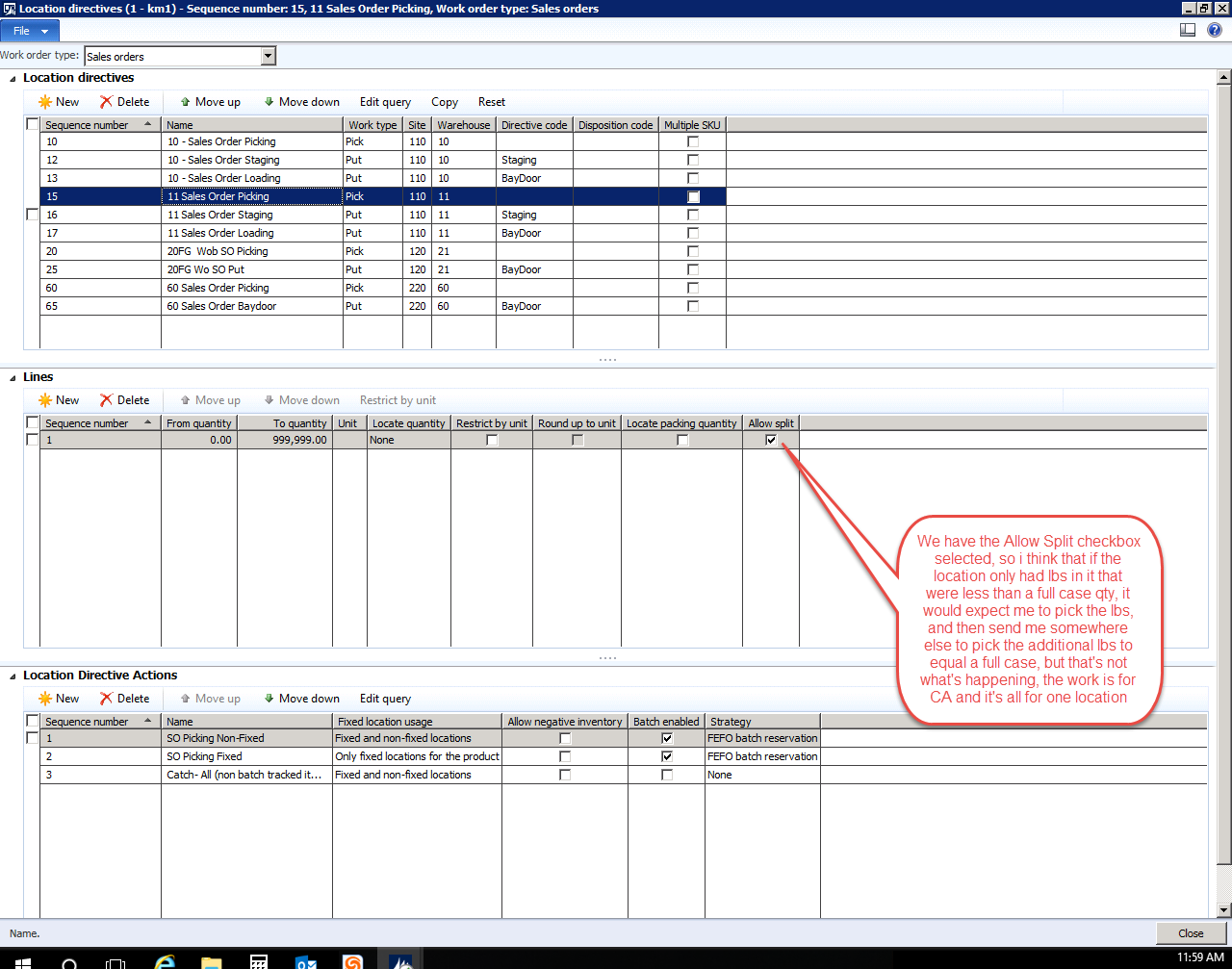
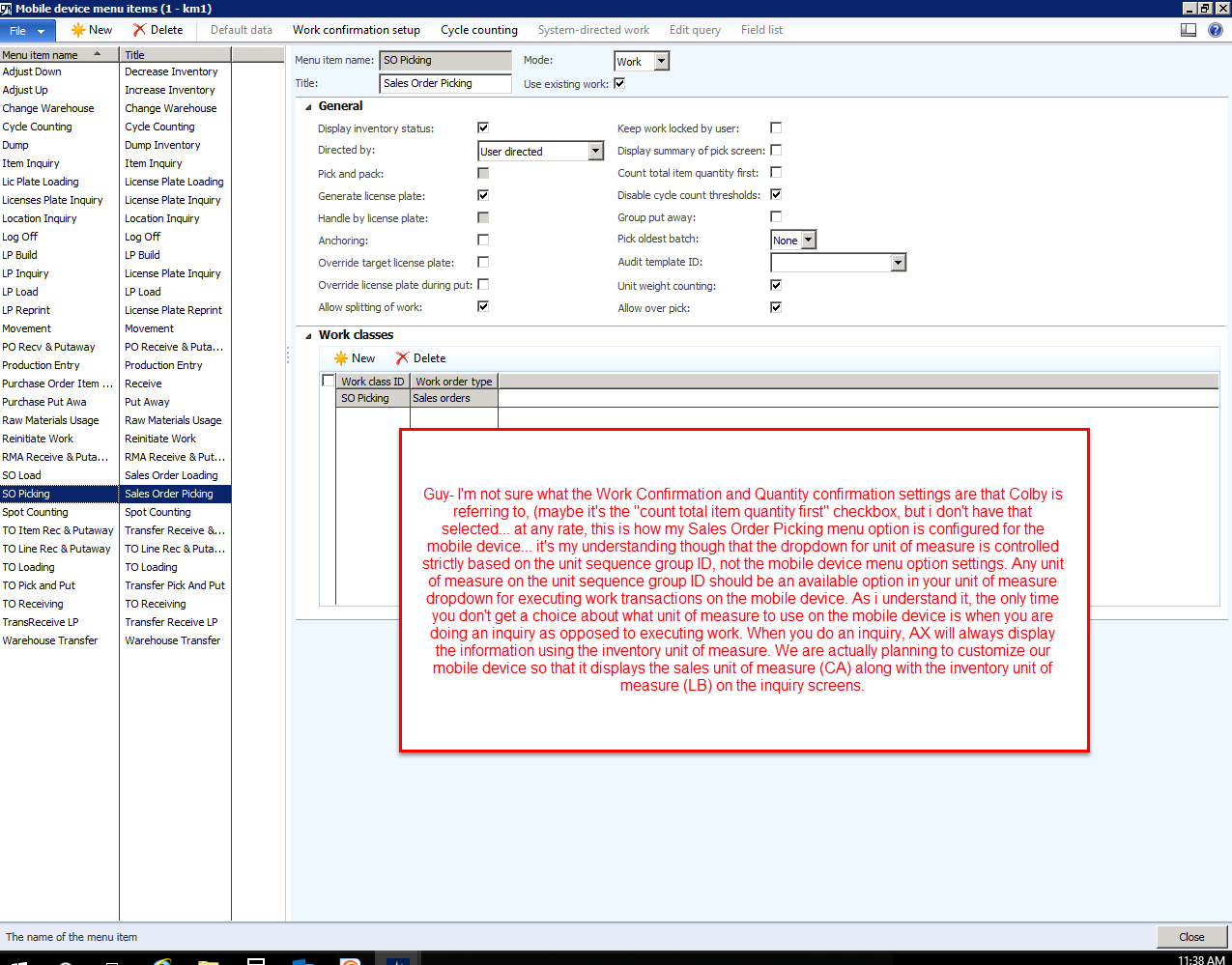
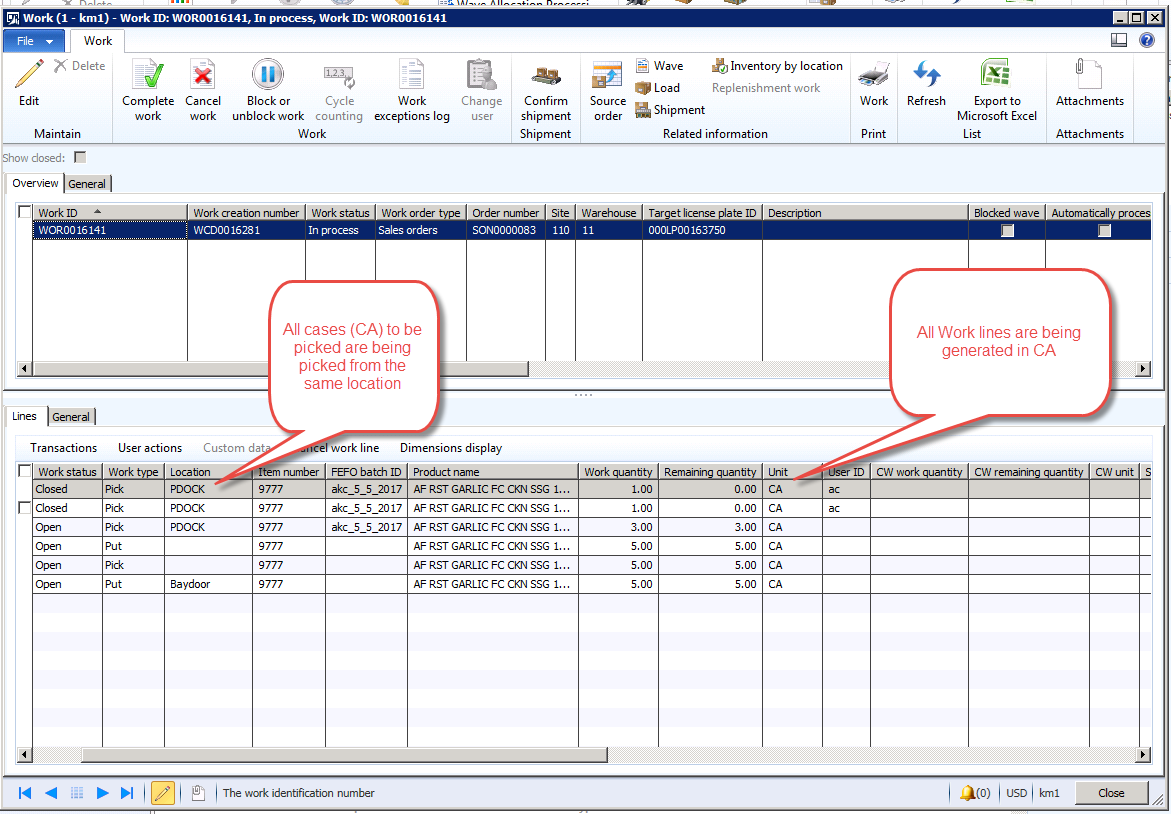
Thank you both so much for replying to my post. I really, really appreciate the help in working through this.
Guy-
You’re right, AX is automatically choosing the largest available unit when generating the work. In this example the work is being generated in cases (CA), not LBS, but for some reason the mobile device dropdown defaults to LB, rather than defaulting to the unit the work was generated in.
To answer your question about why my unit of measure drop down is editable on the mobile device: it’s my understanding that the dropdown for unit of measure is controlled strictly based on the unit sequence group ID, not the mobile device menu option settings. I think that any unit of measure on the unit sequence group ID should be an available option in your unit of measure dropdown for executing work transactions on the mobile device. As I understand it, the only time you don’t get a choice about what unit of measure to use on the mobile device is when you are doing an inquiry as opposed to executing work. When you do an inquiry, AX will always display the information using the inventory unit of measure. We are actually planning to customize our mobile device so that it displays the sales unit of measure (CA) along with the inventory unit of measure (LB) on the inquiry screens. Colby suggests in his reply that it is both the unit sequence group ID and the mobile device configuration that controls the unit of measure dropdown, but I’m not familiar with the Work Confirmation and Quantity Confirmation settings he is referring to. I’ve included a screen shot of my Sales Order picking mobile device menu option though so that you can see how I have set it up.
Guy- I was wondering what version of AX you’re on. If you’re on CU12 than maybe I do need to upgrade to get the mobile device to default to CA like you guys are seeing.
Colby-
I’m not sure what the quantity verification setting that you’re referring to is, but no error message is presented. The user is allowed to pick using any unit of measure and to enter any quantity, which is okay. We wouldn’t want to see an error message because what if the picker was supposed to pick 10 cases, and the location had exactly 10 cases, but when they got to the location they saw that 1 case was damaged, so we would want them to be able to just pick the 9 cases that were not damaged.
No worries about the default consumption, sometimes you’ve got to test everything to find the magic bullet. As I mentioned to Guy above though, my work is being generated in CA, it’s just the mobile device default value in the dropdown that is defaulting to LBs.
I agree with you, I think my unit conversions and my unit sequence group are set up correctly. Regarding the location directives: We have the allow splitting checkbox selected but I’m not sure if this will make a difference because the work is already being generated for CA, and it’s all for one location. I’ll deselect the allow splitting and test it out to see what happens and let you know if that makes a difference.
Thanks again, to everyone who has replied, for helping me try to solve this mystery. It’s very much appreciated.
Amanda
——————————
Amanda Creedon
IT Business Analyst
Kayem Foods Inc.
Chelsea MA
——————————
——————————————- -
Colby Gallagher
MemberMay 17, 2017 at 12:48 PM
Amanda,
At the top of your mobile device menu item for “Sales Picking”, there is a menu item “Work Confirmation Setup”. That’s the standard area for getting a Quantity input box and drop down for convertible units like you have shown in your screenshots. I bet you have Quantity Confirmation turned on for Picks.Also, based on your comments it doesn’t sound like you are using the Short Pick button. That would be the vanilla input requirement for any quantity entered other than whats on the work line. Do you have mods in the handheld code?
Finally, i see you have batch numbers on your open work lines. That would mean you have a reservation hierarchy with batch above location. I didn’t test that scenario at all, my items weren’t batch tracked.
——————————
Colby Gallagher
Manufacturing Systems Consultant
Agility Business Solutions
Brecksville OH
——————————
——————————————- -
Amanda Harris
MemberMay 17, 2017 at 1:14 PM
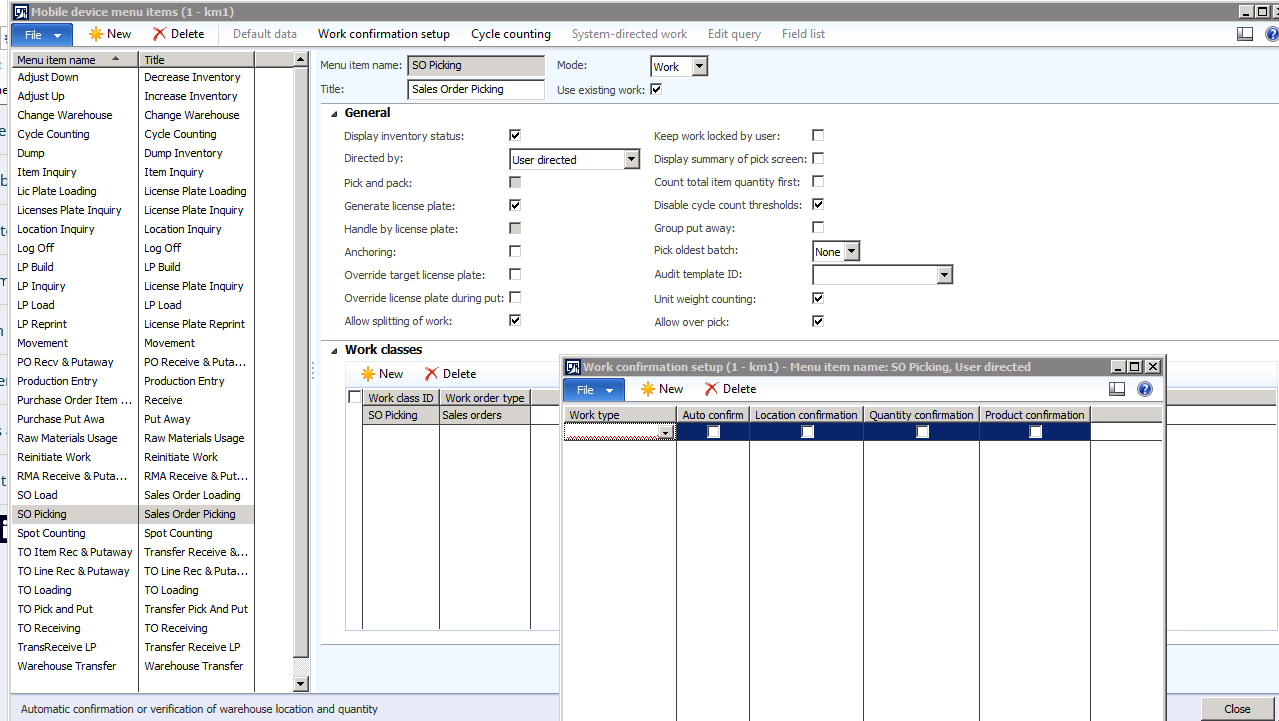 Hey Colby-
Now I see the Work Confirmation button you were talking about. We don’t have anything set up for work confirmation.
In the scenario I described I wouldn’t have used the short pick button. It does get displayed sometimes but to be honest I’m not sure of the correct sequence of steps to take using the short pick button, but I don’t want to go too far down that rabbit whole since it’s aside from the original issue of the default unit of measure. Currently there is a piece of custom code on our mobile device for batch tracked items during PO receiving that makes the vendor batch number a required field. We added an error message if the user forgets to fill in that info. I don’t think something on the PO receiving would affect the default unit on the SO picking side though. And we are also planning to add in custom code on the SO picking side to display the sales unit of measure on the inquiry screens, but that custom code hasn’t been introduced to this environment yet, so it wouldn’t be impacting this.
Regarding the reservation hierarchy of my items, they are actually batch below location, not batch above. Our picking rules are FEFO based, so as I understand it, when the work is generated it generates the pick for the oldest batch, which inevitably is sitting in some location, so the system suggests the location where you should go pick that FEFO batch from. If your FEFO batch is in 2 or more locations, I think it suggests the one with the smallest qty, in order to deplete that stock first, since we have the allow split checkbox checked on our location directive.
I’m starting to think this must be CU11 vs CU12 but I welcome and appreciate any and all additional suggestions since I know that upgrading to CU12 won’t be well received internally since we just went through an upgrade a couple weeks ago.
——————————
Amanda Creedon
IT Business Analyst
Kayem Foods Inc.
Chelsea MA
——————————
——————————————- -
Colby Gallagher
MemberMay 17, 2017 at 1:25 PM
Ahh, FEFO Batch ID not Batch Number. Sorry for the oversight on the reservation hierarchy.The quantity input box you have on the mobile device makes me scratch my head. Thats not standard behavior unless you have quantity confirmation turned on. Let me ask you this, if you do turn Quantity Confirmation on, do you get two quantity input boxes?
——————————
Colby Gallagher
Manufacturing Systems Consultant
Agility Business Solutions
Brecksville OH
——————————
——————————————- -
Amanda Harris
MemberMay 17, 2017 at 2:06 PM
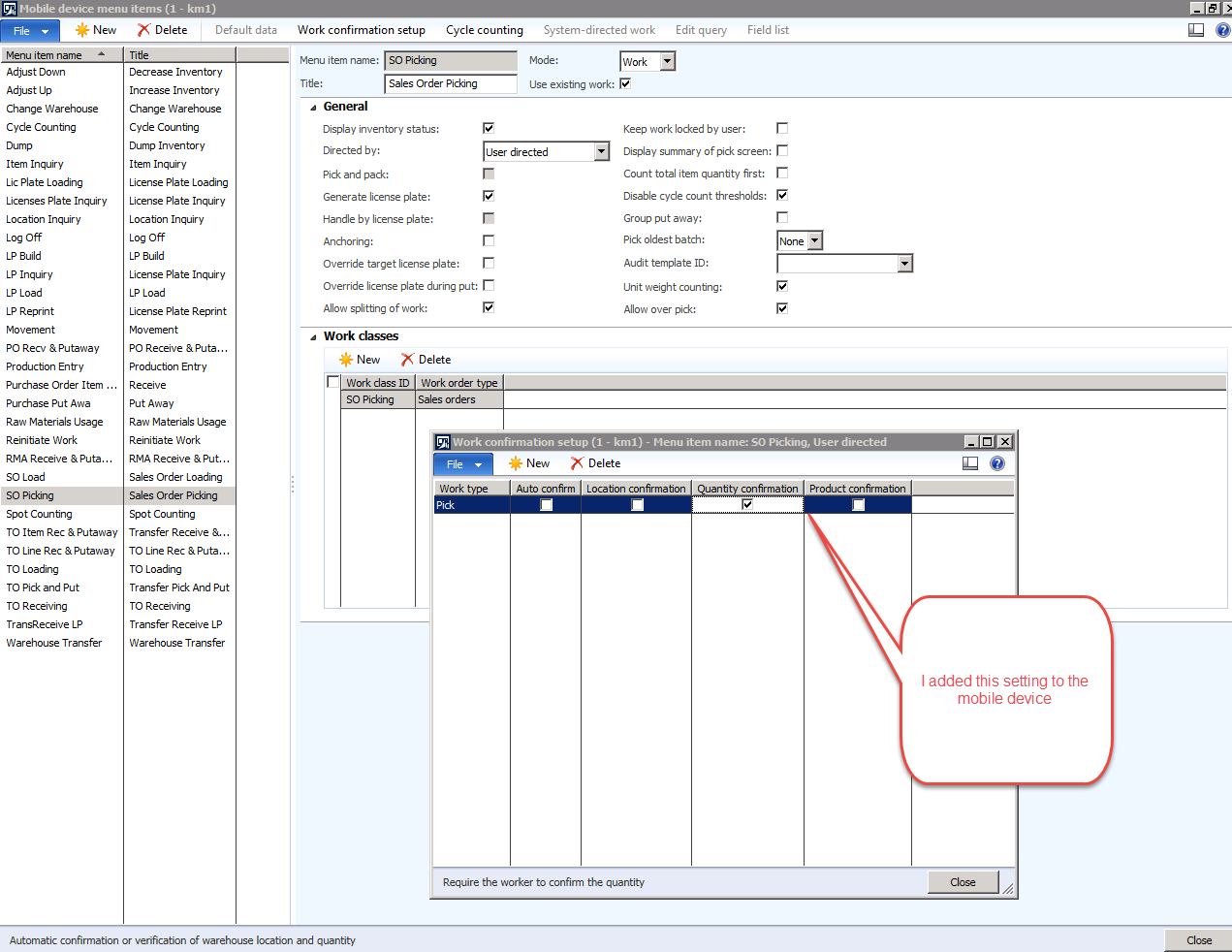
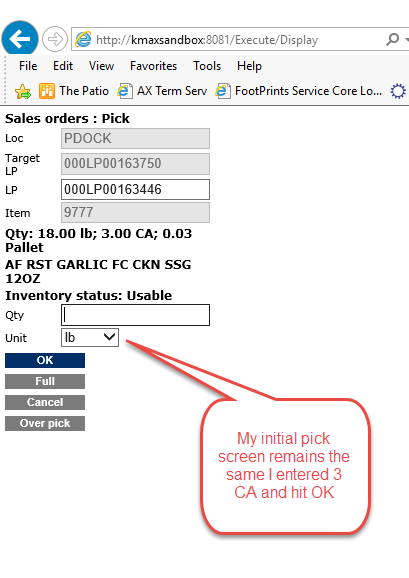
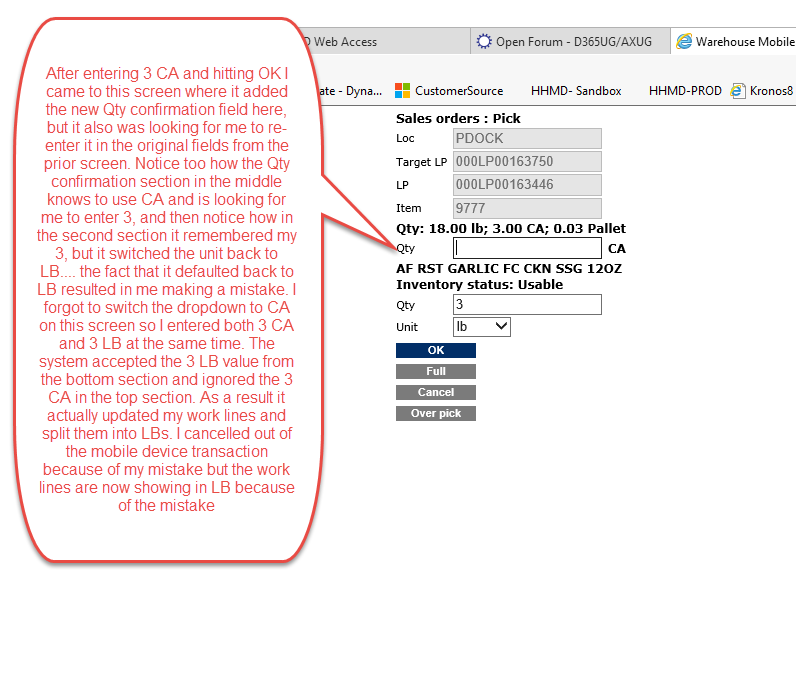
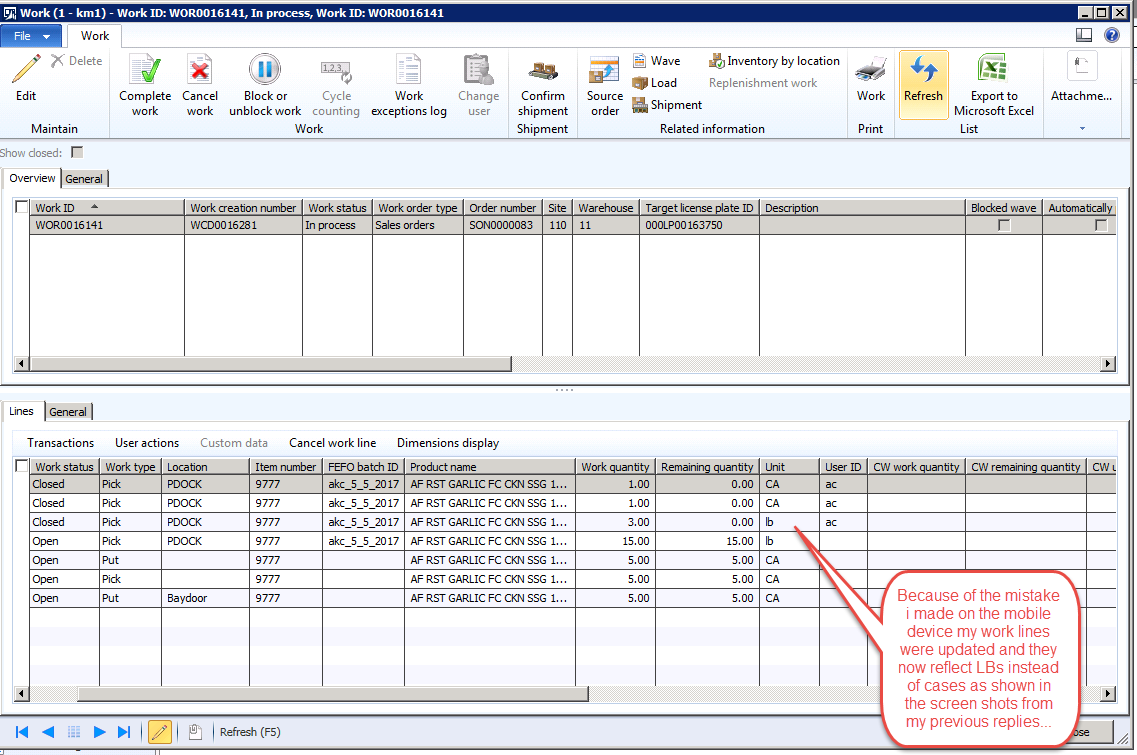
Hey Colby-
I added the quantity confirmation setting as shown here and yes, I got another field to enter quantity but it was on a new and subsequent screen. Adding the quantity confirmation actually made the pick more confusing and resulted in me making exactly the mistake I was trying to prevent the warehouse workers from making because I not only had to do the confirmation, but I had to also enter the original value twice, for a total of 3 entries of the same information. I entered 3 CA twice, and 3 LB once. The system accepted the 3LB and subsequently updated my work lines to show that I needed to pick the remaining 15 LBs for a total of 18 lbs (3 CA at 6 lbs each = 18 lbs) 🙁
——————————
Amanda Creedon
IT Business Analyst
Kayem Foods Inc.
Chelsea MA
——————————
——————————————- -
Colby Gallagher
MemberMay 17, 2017 at 3:56 PM
Amanda,
Are you sure you don’t have a mod on the sales picking process for the quantity verification? We wrote something similar for a client, then turned on the vanilla work confirmation and got the similar behavior to what you are experiencing, multiple entry boxes for quantity verification and weirdness posted back to the work lines.I would try to confirm / deny there are any mods in this area, then strip them out and use the vanilla quantity confirmation. Note that when you do this, they do not always propagate to the IIS server quickly / get cached. You may need to run an in-private browser or use the AOT Menu item -> Action -> WHSWorkExecute.
——————————
Colby Gallagher
Manufacturing Systems Consultant
Agility Business Solutions
Brecksville OH
——————————
——————————————- -
Amanda Harris
MemberMay 17, 2017 at 4:15 PM
Hey Colby-Thanks again for helping me dig into this. We do have a custom catch weight module installed from our implementation partner, which affects the picking screen interface for catch weight items, but the item in the example is a fixed weight item, so I’m not sure if that would be impacted or not. Could you send me screen shots of how you have your SO picking mobile device menu set up so I can try to mimic your set up? I’ll also raise the question to our implementation partner about the possibility of custom code impacting this screen.
Thanks,
Amanda——————————
Amanda Creedon
IT Business Analyst
Kayem Foods Inc.
Chelsea MA
——————————
——————————————- -
Guy Terry
MemberMay 17, 2017 at 5:39 PM
Hi Amanda,My money is on your CW add-on. Is it Blue Horseshoe, Edgewater Fullscope or something else?
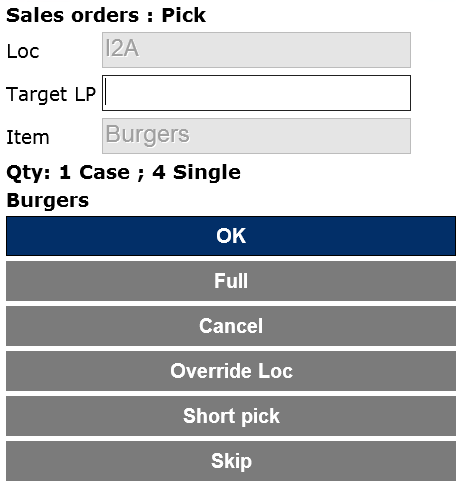
These screenshots are from CU12, but I do not believe CU11 would be any different. I am told how many to pick (1 Case) and also shown what that is in the inventory unit (4 Singles).
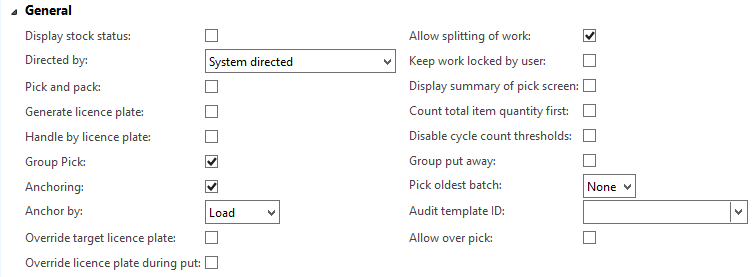
This is the setup of that menu item. I don’t have Work confirmation enabled. I don’t believe any of the settings I have made here are responsible for the unit being fixed on the mobile device.
——————————
Guy Terry
Application Consultant
ibrl
United Kingdom
——————————
——————————————- -
Amanda Harris
MemberMay 18, 2017 at 2:32 PM
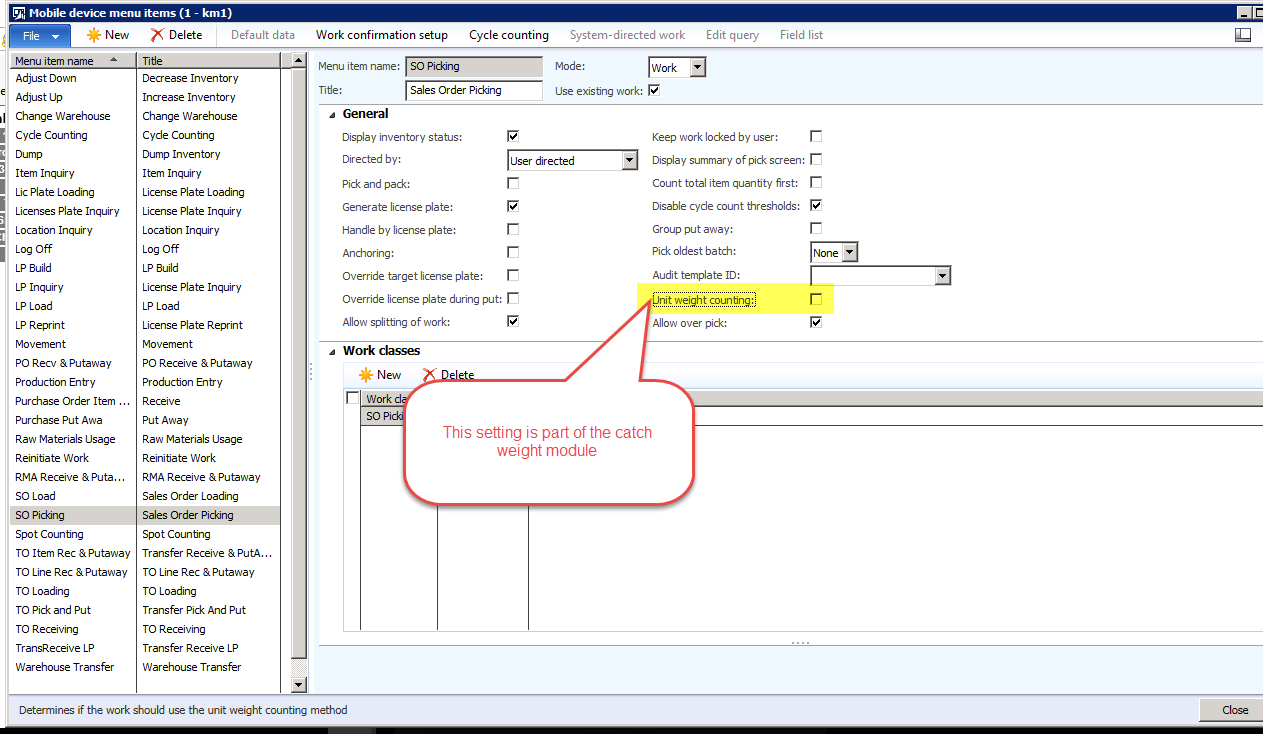 You guys are like super sleuths! It definitely is from the custom Catch Weight code, which is from Edgewater FullScope, to answer your question, Guy. There is a setting on the SO Picking mobile device menu called “unit weight counting” that comes from the catch weight module. when that setting is enabled it allows the picker to enter the individual case weights one at a time for catch weight items. It also changes the picking screen for the fixed weight items though, adding that dropdown and editable qty field to my screen that you guys aren’t seeing on your screens. It seems like regardless of whether or not I have the “unit weight counting” setting enabled though I am missing the Short Pick button that I see on Guy’s screen. So it seems like if I disable that setting I solve the problem of the default unit of measure, but then I’m no longer able to short pick (because I was using the editable qty and unit of measure fields that came from that setting when I needed to short pick.) I’m wondering if the catch weight code eliminated the Short Pick button or if there is another setting somewhere that I need to change to get the Short Pick button to display. Are you guys doing anything special to get the Short Pick option to display or is it always there?
Thanks again,
Amanda——————————
Amanda Creedon
IT Business Analyst
Kayem Foods Inc.
Chelsea MA
——————————
——————————————- -
Amanda Harris
MemberMay 19, 2017 at 10:12 AM
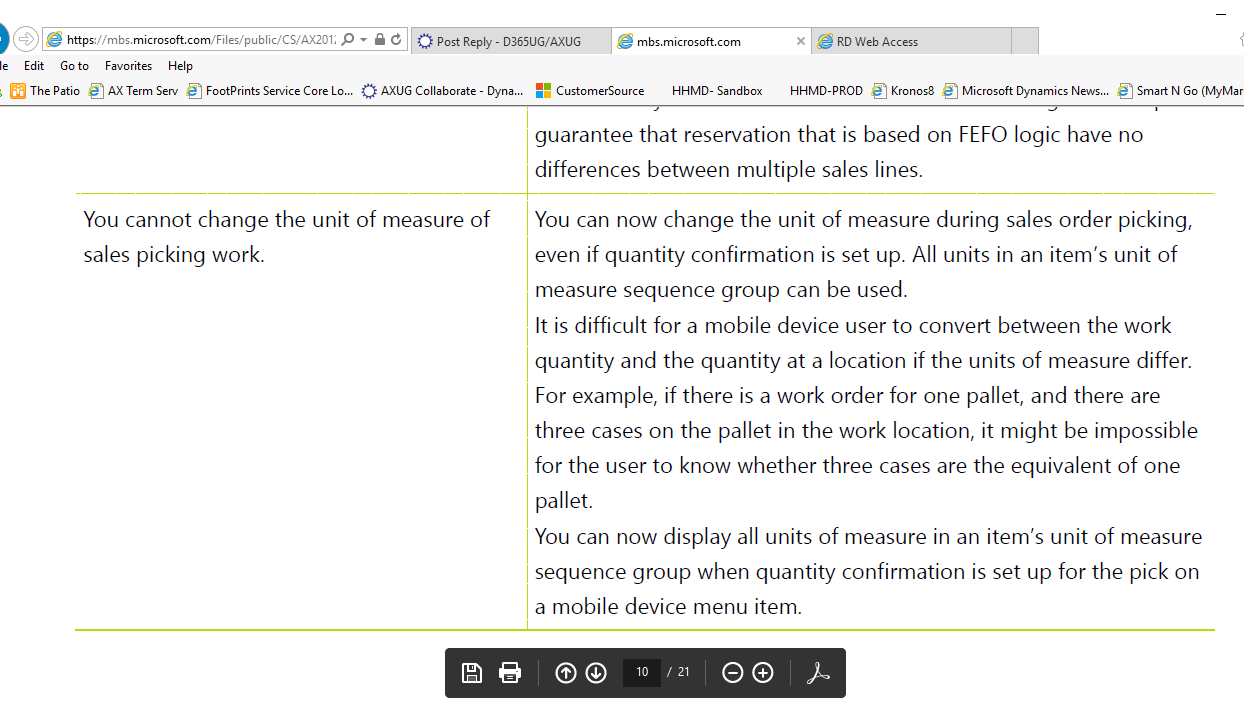
Colby and Guy-I was reading back through the CU11 release notes and it looks like Microsoft added the ability to choose the unit of measure for sales order picking work as part of CU11. The unit weight counting checkbox from FullScope’s CW module that I mentioned in my previous post is definitely impacting the behavior of the unit of measure for picking, but the release notes make it sound like the fields came from Microsoft, not FullScope:
https://mbs.microsoft.com/Files/public/CS/AX2012R3/Whats_New_in_AX2012_R3_CU11.pdf
I’m surprised they aren’t showing up on your sales Order picking screens.
Thanks,
Amanda——————————
Amanda Creedon
IT Business Analyst
Kayem Foods Inc.
Chelsea MA
——————————
——————————————- -
Guy Terry
MemberMay 23, 2017 at 6:07 PM
Hi,I cannot find any config to turn off the ‘Short pick’ option!
Regarding the option to choose the UoM on the hand held; I tested on a CU8 environment. In that environment, I only seem to get to choose the unit of measure if I hit ‘Short pick’, and I don’t get the option if I enable Quantity Confirmation. I assume the fix you found enables the unit of measure selection for Quantity confirmation (as it says in the last paragraph).
——————————
Guy Terry
Application Consultant
ibrl
United Kingdom
——————————
——————————————-
DSC Communities replied 8 years, 10 months ago 1 Member · 0 Replies -
-
0 Replies
Sorry, there were no replies found.
The discussion ‘Default Unit of measure for Sales Order Picking on Mobile Device’ is closed to new replies.
