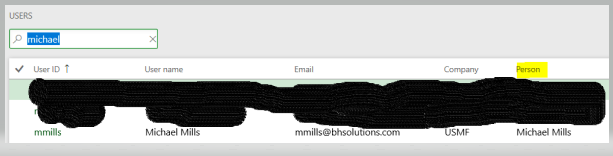
Hi all, I have forgotten the setup that is missing when the purchase requisition button is grayed out and need a little help.Ā Thanks in advance, Michael
—————————— Michael Mills AX D365 Enterprise Consultant Operations Blue Horseshoe Solutions Carmel, IN ——————————
David Scattergood
Member
June 13, 2019 at 6:09 AM
Hi Michael
I’m not as familiar with D365 but in AX2012 the requisition button would be greyed out if the user was not linked to an employee
Regards
—————————— David Scattergood P2 Dynamics Solutions Ltd Corby —————————— ——————————————-
David is correct. The user must have a worker record linked to an employee record just like in AX 2012
—————————— Paul Martin Production Program Manager Elite Comfort Solutions, LLC Rutherfordton NC —————————— ——————————————-
MICHAEL MILLS
Member
June 13, 2019 at 12:39 PM
Thanks, that was enough to get the brain back in gear.Ā In D365 User it is the population of Person within User.
—————————— Michael Mills AX D365 Enterprise Consultant Operations Blue Horseshoe Solutions Carmel, IN —————————— ——————————————-
Gary Screeton, CPA
Member
June 13, 2019 at 9:33 AM
Purchase reqs, POs, expense reports, and approval workflows all require you to be an employee in the system, so, yes, you have to hire yourself as an employee in HR and then go to your System User ID and associate yourself to that employee. You can then add the Employee role to your profile.
—————————— Gary Screeton Sr Adviser System Architect DXC Technology indianapolis IN —————————— ——————————————-
Please note:
This action will also remove this member from your connections and send a report to the site admin.
Please allow a few minutes for this process to complete.
Report
You have already reported this .
Welcome to our new site!
Here you will find a wealth of information created for peopleĀ that are on a mission to redefine business models with cloud techinologies, AI, automation, low code / no code applications, data, security & more to compete in the Acceleration Economy!