


Dynamics Business Central (NAV)
Public Group
Active 3 days ago
Experts:




Who Did it — Created a Purchase Order
-
Who Did it — Created a Purchase Order
Posted by Ronald L McVicar Jr on May 13, 2019 at 11:41 am-
If approvals are not turned on and no enhancement, there is not a way to see who created a purchase order in default NAV (2015), right?
No value entries?
No vendor ledger entries?
on release no entry tied to a end-user, right?Or is there?
I say a post for NAV 2013 and it seemed to indicated that with out an enhancement, no out of the box feature for Purchase Orders or Sales Orders.
Any input on this?
——————————
Ronald McVicar, IT Software Mgr
NSP (Quality Meats)
nspproteins.com
—————————— -
Hello Ronald,
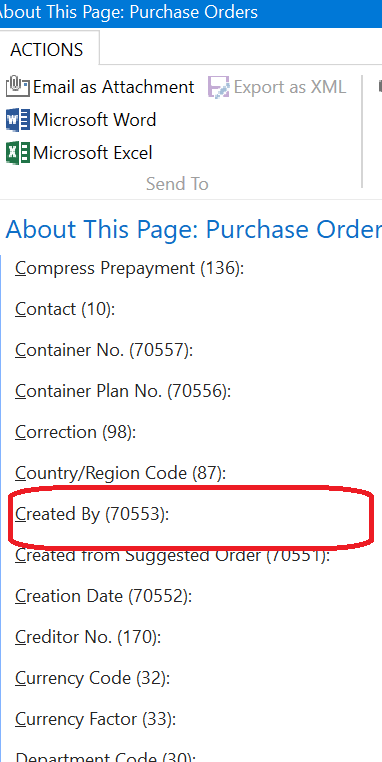
We’re on NAV2013R2 and I see a field called Created By that contaiins the USER ID for the person who entered the purchase order:
The fiels is in Table 38 – Purchase Header, but is not on the page.??
——————————
Lewis Rosenberg
IT Manager
Mars Fishcare
Chalfont PA
————————————————————————
BCUG/NAVUG All-Star
BCUG/NAVUG Board of Advisors, Chairperson
BCUG/NAVUG Programming CommitteeTwitter: @RosenbergL
LinkedIn: https://www.linkedin.com/in/rosenbergl
————————————————————————NAVUG/BCUG Summit (navugsummit.com)
Orlando, FL – October 15-18, 2019
——————————
——————————————- -
Lewis,
that field in not on our Purchase Order (Header or Table 38) for NAV 2015.
I also went in to the Designer and nope no Created By field for the Purchase Table. Must have been take out for NAV 2015. Interesting——————————
Ronald McVicar, IT Software Mgr
NSP (Quality Meats)
nspproteins.com
——————————
——————————————- -
I don’t see the field in my NAV 2018 playground either. In our production system there are a few fields all in the 70000 number range that are related to manufacturing, so I guess they are either only there for manufacturing or they may be part of Lanhams’s DP add-on.?
——————————
Lewis Rosenberg
IT Manager
Mars Fishcare
Chalfont PA
————————————————————————
BCUG/NAVUG All-Star
BCUG/NAVUG Board of Advisors, Chairperson
BCUG/NAVUG Programming CommitteeTwitter: @RosenbergL
LinkedIn: https://www.linkedin.com/in/rosenbergl
————————————————————————NAVUG/BCUG Summit (navugsummit.com)
Orlando, FL – October 15-18, 2019
——————————
——————————————- -
Yep, you’ll see that’s a 70XXX field, and since it is between 50,000 and 99,999 it is a custom field.
If you want to see who is creating and updating records, just turn on the change log for that table: https://www.archerpoint.com/blog/Posts/change-logs-and-microsoft-dynamics-nav-2016
It won’t be a field on the header / lines that you can see or filter on, but you can drill into the update history.
——————————
Matt Traxinger
NAV Developer
ArcherPoint Inc.
San Antonio TX
——————————
——————————————- -
Ron, the user id is on value entries and vendor ledger entries (at least in 2018). I know user id on value entries has been around for several versions. I guess? the lack of a created by user id on purchase orders and sales orders is Microsoft’s way of giving developers work….I’ve seen it added at least 75% of my clients.
——————————
Kim Dallefeld
Kim@Dallefeld.com
Dallefeld Consulting, LLC
Member of Dynamics Consulting Group
Ft. Worth, TX
2019 NAVUG Board of Advisors
Past NAVUG Board Chairman
NAVUG Programming Committee
——————————
——————————————- -

Iaroslav Pankovskyi
MemberMay 14, 2019 at 11:21 AM
Ronald,
Matt’s recommendation about Change Log seems to be your best bet to avoid a modification. I have seen this function work successfully on Vendor-related information and it is quite sophisticated.In Business Central, on the PO page, you also have the Field called “Assigned User ID” that can be used for the purpose.
Another option is Notes, but this is a less likely solution for the purpose.
Kind regards,——————————
Iaroslav
——————————
——————————————- -
Geovanny Fuentes
MemberMay 14, 2019 at 2:40 PM
I agree with Iaroslav , no matter which version you are in, activate the change log with a few fields that are important.
For now the posting which may hit the G/L Entries you can go there to see who posted the Invoice (Help About This Page) and look for the USER ID (27).Good luck.
——————————
Geovanny Fuentes
San Diego CA
——————————
——————————————- -
Thank you everyone. LibertyGrove helped me confirm my choices.
Change Log and getting an enhancement for the User ID automatically added to a Created by Field for a Purchase Order. Else we have other options for Purchase Invoice on posting, etc.——————————
Ronald McVicar, IT Software Mgr
NSP (Quality Meats)
nspproteins.com
——————————
——————————————-
Ronald L McVicar Jr replied 7 years, 2 months ago 1 Member · 0 Replies -
-
0 Replies
Sorry, there were no replies found.
The discussion ‘Who Did it — Created a Purchase Order’ is closed to new replies.
