


Dynamics Business Central (NAV)
Public Group
Active a day ago
Experts:




Vendor & Item Costs – Managing pricing
-
Vendor & Item Costs – Managing pricing
Posted by DSC Communities on October 30, 2019 at 11:57 am-

Bradley Schacht
MemberOctober 30, 2019 at 11:57 AM
Hello,I want the purchase price to show up automatically in purchase orders and in requisition worksheets. I assume the Unit Cost would drive this, but it’s the Last Direct Unit cost that is driving the price within purchase orders and requisition worksheets. Why is that? What is the difference between the two?
Under fast tab Costing & Posting within the Item Card, these two options appear:
Unit Cost – specifies the cost of one unit of the item or resource on the line
Last Direct Cost – specifies the most recent direct unit cost of the itemThen, within the Purchase Order (Lines), this is the driving cost:
Direct Unit Cost Excl. Tax – specifies the cost of one unit of the selected item or resourceBased on these descriptions, I just assumed the unit cost would be applied and drive the direct unit cost in the purchase orders and requisition worksheets. But, it’s rather only the last direct cost.
My other question is: how do you tie vendor costs to one specific item? We have multiple vendors that share the same item at different costs. Ideally, we’d want to be able to create a purchase order, select vendor, then select item that would drive a specified price based on the vendor you have chosen.
Bradley
——————————
Bradley Schacht
Clesen Wholesale
Evanston IL
—————————— -
The two fields have different uses. The Unit Cost field is designed to give you the weighted average cost of items in inventory. The Last Direct Cost is the direct cost of the last inbound transaction. This is a better place to capture the last purchase price for the item. You can specify purchase costs for items for vendors by opening the Purchase Price page (or Special Prices from the purchase group on the item card). On this page, you note the item number and vendor number and set the purchase price for that vendor/item. When purchase orders are created, the system looks first to this table to see if prices are available. If so, it will use that purchase price on the order. If nothing there, it will go to the item card (Last Direct Cost). Hope that this helps.
——————————
David Wiser
Client Lead
Tigunia
2019-2020 Board of Advisors
BCUG|NAVUG All-Star
——————————
——————————————- -
Bradley Schacht
MemberOctober 30, 2019 at 2:28 PM
Hey David,Thanks for your reply. So, I found the purchase prices and set it up.
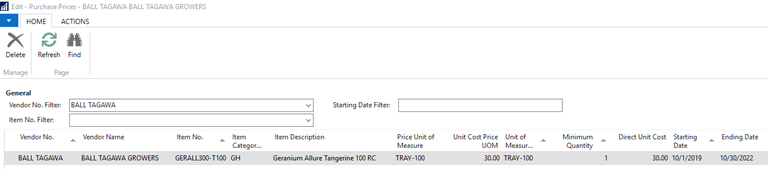
Then, I created purchase order with this vendor, but the direct unit cost didn’t automatically generate in the PO line. I also tested this in requisition worksheet, same problem. But, as I stated previously, when Last Direct Cost is placed, it does automatically generate.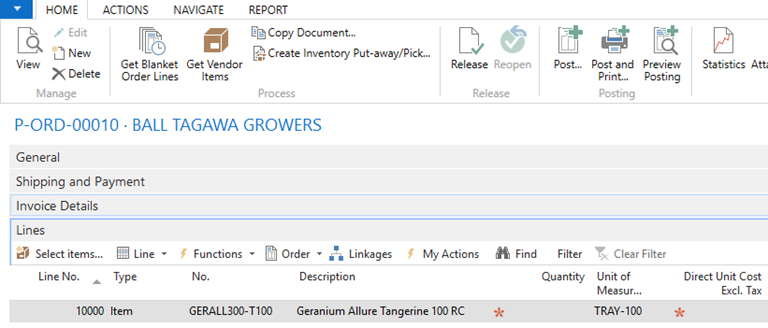
You’ll note the Direct Unit Cost is still blank even after I selected the item. Same vendor, same item, PO date is within the date range… any more feedback on this?Bradley
——————————
Bradley Schacht
Clesen Wholesale
Evanston IL
——————————
——————————————- -
In the price table, you show the minimum quantity as 1. The PO does not have a quantity. If you put a quantity of 1 on the PO, does the price come up? You may want the minimum quantity on the purchase price table to be zero, then it should come you as soon as the line is created.
——————————
David Wiser
Client Lead
Tigunia
2019-2020 Board of Advisors
BCUG|NAVUG All-Star
——————————
——————————————- -
Bradley Schacht
MemberOctober 30, 2019 at 2:43 PM
Oh, interesting… that fixed it. Thanks again!——————————
Bradley Schacht
Clesen Wholesale
Evanston IL
——————————
——————————————-
DSC Communities replied 6 years, 5 months ago 1 Member · 0 Replies -
-
0 Replies
Sorry, there were no replies found.
The discussion ‘Vendor & Item Costs – Managing pricing’ is closed to new replies.
