


Dynamics Business Central (NAV)
Public Group
Active 6 days ago
Experts:




Sort Descending by Default
-
Sort Descending by Default
Posted by Greg Alford on September 3, 2020 at 5:30 pm-
We are on BC 14, but we use the desktop client. Is there a way to default a list page to sort descending on the ID?
——————————
Gregory Alford
Director of Technical Resources
Tri Star Metals LLC
Aurora IL
—————————— -

Kris Ruyeras
MemberSeptember 4, 2020 at 4:52 PM
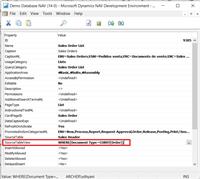
Yes. You’ll need to change the property of the page under the “SourceTableView” where you can set the sorting of a particular field.
Example: SourceTableView = SORTING(Cross-Reference No.) order(Descending)——————————
Kristoffer Ruyeras
VP of Operations
Tigunia
Seattle, WA
——————————
——————————————- -
Where do I find the “Source Table View”?
——————————
Gregory Alford
Director of Technical Resources
Tri Star Metals LLC
Aurora IL
——————————
——————————————- -
You need to set the property in page as highlighted in attached screenshot.
——————————
Saurav Dhyani
Upgrade Technical Futurist
ArcherPoint Inc.
Duluth
Blog – https://saurav-nav.blogspot.com
——————————
——————————————- -
That is what I was aftraid of. We are on full extensions. Therefore, I have to involve a developer. Heavy sigh…
——————————
Gregory Alford
Director of Technical Resources
Tri Star Metals LLC
Aurora IL
——————————
——————————————- -
In that case I would suggest, that you can create a new page based on the same table and set the SourceTableView as per your need.
** If you have custom extensions on that page then it may be an issue but if its just for viewing purpose then you will be good there.
——————————
Saurav Dhyani
Upgrade Technical Futurist
Archerpoint Inc.
Dehradun, India
Blog – https://www.sauravdhyani.com/
——————————
——————————————- -
Hey Saurav,
Is that the best way to go about it? – when you have a custom extension and need to change sorting or make other changes, go ahead and create a new page for that specific change instead of disrupting the existing extension.~Meenakshi
——————————
Meenakshi Singh
Ruby Award RecipientNAVUG/D365BC-Community Summit:
https://www.dynamiccommunities.com/events/community-summit-north-america/
October 7-9, 2020
——————————
——————————
——————————————-
Greg Alford replied 6 years, 1 month ago 1 Member · 0 Replies -
-
0 Replies
Sorry, there were no replies found.
The discussion ‘Sort Descending by Default’ is closed to new replies.
