


Dynamics Business Central (NAV)
Public Group
Active 2 hours ago
Experts:




Sales Order Comment Lines to Purchase Order Lines
-
Sales Order Comment Lines to Purchase Order Lines
Posted by DSC Communities on August 20, 2020 at 11:26 am-

Abby Barton
MemberAugust 20, 2020 at 11:26 AM
Has anyone found a way to copy/transfer Sales Order Comments to a Purchase Order? You can easily create a PO document from an SO and it will add the Item Lines but there doesn’t seem to be a way to also transfer the comments. Unfortunately, the comments are not standard line comments so that feature would not work.——————————
Abby
—————————— -
This looks like it would need to be a customization. Besides just creating the PO from the SO, I also tried using the Dropship and Special Order processes and neither of them copied the comments over either. Sorry.
——————————
David Wiser
Sr. Solution Consultant
Tigunia
2019-2020 Board of Advisors
BCUG|NAVUG All-Star
——————————
——————————————- -
Diane Schulz
MemberAugust 21, 2020 at 9:19 AM
Have you used line item comments or just adding comment lines on the sales order? You need to make sure that the line item comments are added right after the item you want the comments to address. Line item comments should work for this.——————————
Diane Schulz
Finance
TAPCO
Brown Deer WI
——————————
——————————————- -
Abby Barton
MemberAugust 21, 2020 at 9:36 AM
David, I can look into an extension just thought it would be native functionality.
Diane, they are currently Line Item Comments shown below:

When you create to a linked PO it only brings in the Item lines not the Comment Lines as well. These are also necessary for the purchase of the Item.——————————
Abby
——————————
——————————————- -
Abby,
What your screen shot shows are Comment Lines on the Sales Order. To the system they are stand alone, even though the user knows they are related to the line above them.
What I believe Diane is referring to are Line Comments. Once you have entered your Item Line, you can use the Lines menu to select Line > Comments. This is where you can enter comments that the system ties to a specific line on the Sales Order.
I did not run a test to see if the line comments transfer to the Purchase Order through the Drop Ship process, but it has a better chance than the current Comment Lines.
Hard to believe there is such a difference between Comment Lines and Line Comments, but to the system there is.
——————————
Ben Baxter
Consultant
Accent Software, Inc.
carmel IN
——————————
——————————————- -
Diane Schulz
MemberAugust 24, 2020 at 10:49 AM
I know that the line item comments do work on drop ship orders. The comment line(s) will follow the items on the PO.
I believe also, that if a PO is generated via the demand worksheet, the line item comment line(s) will follow the items on the PO. This won’t work if the PO is created manually. I do not remember if we had to have this done for us or if this was always part of NAV. If it is not part of NAV, it has been done so you can request it to be done.
Thank you Ben, you correctly understood my comment.——————————
Diane Schulz
Finance
TAPCO
Brown Deer WI
——————————
——————————————- -
Abby Barton
MemberAugust 24, 2020 at 11:16 AM
I appreciate both of your responses! However, maybe I am missing something…On the SO I enter the Item Line then went to Lines > Related Information > Comments and entered a comment. Tried first with a Drop Shipment and created the PO from the SO, the comments did not come over. Tried the same by just going to Actions > Create PO from the SO. Either way no comments are on the PO side. I’m thinking it may have to be an extension unless I’m completely doing the steps wrong!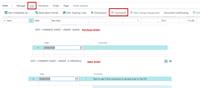
——————————
Abby
——————————
——————————————- -
Diane Schulz
MemberAugust 24, 2020 at 11:25 AM
Go to Line, then Comment. The box that comes up should have check boxes that you can check as to where you would like the comment lines to carry over to.——————————
Diane Schulz
Finance
TAPCO
Brown Deer WI
——————————
——————————————- -
Abby Barton
MemberAugust 24, 2020 at 11:47 AM
Hi Diane,I don’t have that exact option. Can you by chance attach a screenshot? Thank you!
——————————
Abby
——————————
——————————————- -
Diane Schulz
MemberAugust 24, 2020 at 11:56 AM
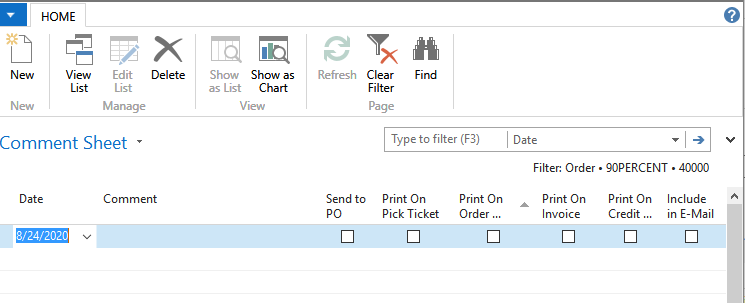
——————————
Diane Schulz
Finance
TAPCO
Brown Deer WI
——————————
——————————————- -
Abby Barton
MemberAugust 24, 2020 at 12:08 PM
Ah ha! So Business Central doesn’t have the option to Send to PO available: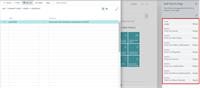
——————————
Abby Barton
Abby Barton
——————————
——————————————- -
Diane Schulz
MemberAugust 24, 2020 at 12:31 PM
Seems to me, that it should be there. Maybe someone can get it in for you?——————————
Diane Schulz
Finance
TAPCO
Brown Deer WI
——————————
——————————————- -
Abby Barton
MemberAugust 24, 2020 at 1:17 PM
Thank you Diane. It’s not available within Design or Personalize. I’ll have to see if the code has it hidden on that page. However, I’m not sure that will work for their needs in the end. The reason to have the comment lines on the Sales Order transfer to the PO is because they are integrated from CRM as comments in BC. I suppose these would have to be added to the Requisition Lines that BC looks at when creating the transfer during Create Purchase Order.——————————
Abby Barton
Abby Barton
——————————
——————————————- -
Ben Tiffin-Sze
MemberAugust 25, 2020 at 11:12 AM
Hey guys,
Looking at the code in BC14, there is actually no code to bring across Sales Comment Lines (the ones you add via Line–>Related Info–>Comments) from the SO to the PO either via Req. Worksheet or via direct Get Sales Order on the PO.
Additionally, both methods will only pull over lines of Type Item with an Outstanding Quantity so you cannot even trick it by creating Sales Lines with Type Item and no Item No. This also means comments in the Sales Lines (Type = blank) do not come across.Unfortunately, the only “comments” that are automatically put in the PO are Extended Texts for the Item (only the ones set for Purchasing) so you will require an extension to pull across comments. If you do have an extension built be aware that the two methods of creating a PO for Drop Shipment/Special Order are completely separate so if you want your comments to come across regardless of which method is being used (Req. Worksheet or direct PO–>Get Order) you will need to make sure that both processes are customized.
——————————
Ben Tiffin-Sze
Liberty Grove Software
Oakbrook Terrace IL
——————————
——————————————- -
Abby Barton
MemberAugust 25, 2020 at 11:38 AM
Thank you Ben! I do see that they are completely separate. I looked at the code also. Basically, it would be a customization of both processes to get the comments copied in any scenario. Whether you create it from Purchase Order > Get Special Order/Get Drop Ship Order or from the Sales Order > Create Purchase Order, is that accurate with the information you provided?——————————
Abby
——————————
——————————————- -
Ben Tiffin-Sze
MemberAugust 25, 2020 at 12:00 PM
Hi Abby,
Yes, you would be customizing both processes if you want the comments to come across regardless of the method used.——————————
Ben Tiffin-Sze
Liberty Grove Software
Oakbrook Terrace IL
——————————
——————————————- -
Harsha Polavarapu
MemberAugust 25, 2020 at 2:38 AM
Hi Abby,Hi Abby,
After few days of struggle, I finally get the solution, it worked for usPlease follow the steps as mention below, we did managed to do it in NAV 2016(Special order function),it needs some development work
- Table 37 – Sales line
- Table 39 – Purchase line
- Code unit 5702 – Dist.Integration
I have attached the word document the changes that we did, hope it helps you
Harsha
——————————
Harsha Polavarapu
Scientific games
sydney NS
——————————
——————————————-
DSC Communities replied 5 years, 7 months ago 1 Member · 0 Replies -
-
0 Replies
Sorry, there were no replies found.
The discussion ‘Sales Order Comment Lines to Purchase Order Lines’ is closed to new replies.
