


Dynamics Business Central (NAV)
Public Group
Active 10 hours ago
Experts:




RE: Dimensions not showing on the Purchase Invoice lines
-
RE: Dimensions not showing on the Purchase Invoice lines
Posted by DSC Communities on March 4, 2017 at 1:13 pm-

John Koo
MemberMarch 4, 2017 at 1:13 PM
Hello, I am having the issue with the dimension values which are not showing on the Purchase Invoice lines.My client has to book a bulk credit card transactions in NAV 2015. It is monthly basis and because the transactions are up to several hundreds, they are looking for the easier way to enter in the Purchase Invoice. Now, I am testing the Configuration Package & Worksheet for the Purchase Invoice creation.
– I created the configuration package which has a table 38 and 39. I included the shortcut1 and 2 as well as other 4 dimensions (Dimension as Columns is set to Yes)
– Assigned the package in Configuration Worksheet (table 38 and 39) and exported, modified the data including the dimensions, and imported it.
– After Apply Data, I checked the Purchase Invoice.After several tests, It seems like the shortcut dimension 1 and 2 as well as other data are showing on the line correctly but other 4 dimensions are not (it’s really random); some of them show but obviously, I am missing quite a few dimension values in the lines. When I read someone’s post, he is talking about the Dimension Set ID which also has to enter in order to populate the dimension value properly. The client won’t get the Dimension Set ID through Codeunit because it might be more complicated for them.
If he is true, is there anyway I can show the dimension values on the lines without going through the Dimension Set ID? Or what other method you would suggest in order to enter the bulk purchase invoice transactions?
Hope my question makes sense to you,
Thanks.
——————————
John Koo
NAV Knowledge Services & Support Analyst
Altus Dynamics——————————
-
Paul Turner
MemberMarch 6, 2017 at 8:14 AM
My guess as to why some of the dimensions do not show is that particular Dimension Set may not exist. I believe it was the 2015 version (maybe 2013?) that introduced Dimension Sets which was a brilliant stroke by MS – reduced DB size and improved posting efficiency. Anyway I think if you are importing the dimensions, instead of importing directly to the purchase lines you would want to check if that Dimension Set already exists and create it if it does not. Then assign that Dimension Set ID to that purchase line. When you look at the dimensions for the purchase lines after doing this, it should look up the dimensions based on that dimension set ID.Hope this helps.
Another thought – if the client is required to repeat many credit card transactions I would recommend looking at the Charge Logic products as they handle this well (as well as making it much easier to be PCI compliant).
——————————
Paul Turner
Liberty Mountain
Sandy UT
——————————
——————————————- -
Ramin Marghi
MemberMarch 6, 2017 at 11:06 AM
Hi John,You shouldn’t have to assign the Dim Set ID manually — if your “Dimensions as Columns” boolean is set to Yes, that will automatically fire off Codeunit 408 (DimensionManagement):
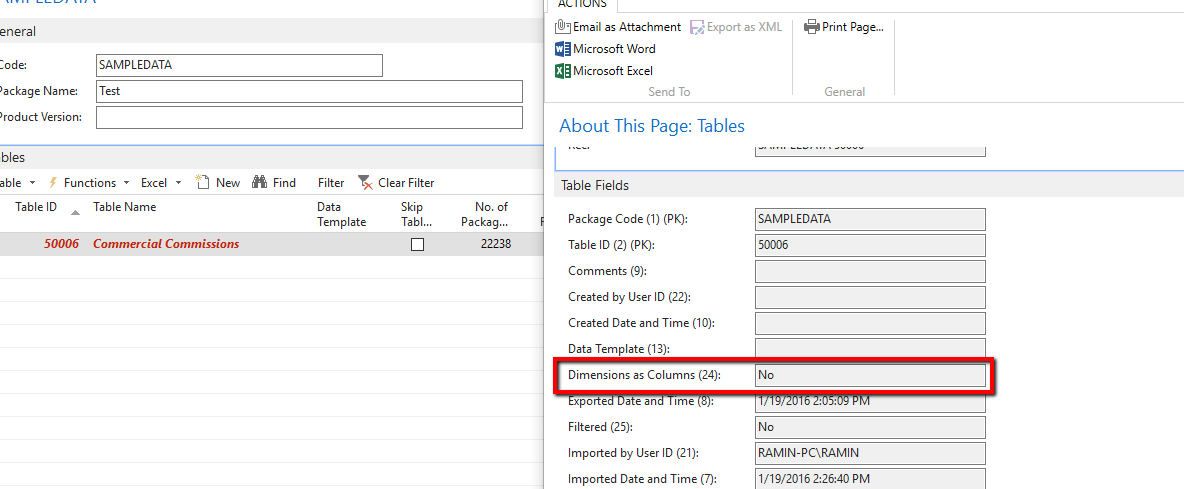
Might be a bug in their build, but also can you test to see if instead of the Configuration Worksheet, you do a one-off Excel import/export if that works? Additionally, try toggling the “Validate Field” boolean in the Config. Package Fields page/table.
——————————
Ramin Marghi , CPA, CGA
NAV Finance Consultant
Catapult
VANCOUVER BC
——————————
——————————————- -
John Koo
MemberMarch 6, 2017 at 9:45 PM
Thanks Paul and Ramin,Indeed, the “Dimensions as Columns” boolean is set to Yes. But I am not sure why some of them are not showing. When I ran the dimension set entry (Ctrl+Shift+D) in purchase line, The dimension values showed but the some of dimension values were not same as the ones in the purchase lines (even some of them in the lines disappeared once the dimension set entry had popped up).
I ran table 39 from object designer, found the invoice lines which I just imported. And I checked the dimension values without going into the purchase invoice page. I only saw that Shortcut dimension 1 and 2 but no others. Do you think it could be the issue and I need to modify the table (insert the other dimension fields)?
Good to know that it fires up automatically once the Dimension as Columns is set to Yes.
John
——————————
John Koo
NAV Knowledge Services & Support Analyst
Altus Dynamics——————————
——————————————- -
Paul Turner
MemberMarch 7, 2017 at 8:13 AM
I don’t think you need to modify the table. Shortcut dims 1 and 2 are your Global 1 and 2 dimensions. This means they can be used as a filter anywhere in Dynamics NAV. They’re set as fields on the document line tables for easy filtering and typically these will be the two most used in their financial reports. All of the dimensions link to the document lines via the dimension sets (Document Dimensions in previous versions).Check the “General Ledger Setup” and see if all the dimensions you are importing are listed as shortcut dimensions for the client. You can assign up to 8 of these. Maybe the dimension values having issues are not set up as shortcut dimensions?
——————————
Paul Turner
Liberty Mountain
Sandy UT
——————————
——————————————- -
Ramin Marghi
MemberMarch 7, 2017 at 12:53 PM
Hi John,Just building on what Paul said — there are two Fields in the Purchase Line table for the Global Dims (i.e. Shortcut Dim 1 and 2) and the other Dimensions you see on the subform page are actually a multi-dimensional variable that is populated by a call to a table function to surface the other shortcut Dims to the page. Below you can see the fields in red and the functions in green:
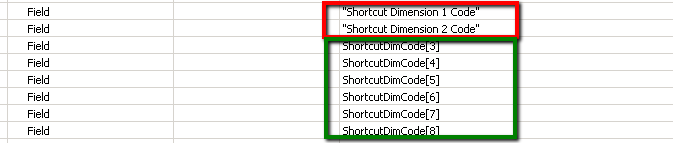
What that function invariably does is call on the DimensionManagement codeunit, to pull in that shortcut dimension, of which the first thing it does is a GET of the G/L Setup.So as Paul suggested, go there first. If that’s set up as expected, next would be to run the Dimension Set Entry table and confirm that the Dimension Set ID from the lines is valid and has the full gamut of Dimensions you entered.
——————————
Ramin Marghi , CPA, CGA
NAV Finance Consultant
Catapult
VANCOUVER BC
——————————
——————————————-
DSC Communities replied 9 years, 1 month ago 1 Member · 0 Replies -
-
0 Replies
Sorry, there were no replies found.
The discussion ‘RE: Dimensions not showing on the Purchase Invoice lines’ is closed to new replies.
