


Dynamics Business Central (NAV)
Public Group
Active 21 hours ago
Experts:




RDLC Reports
-
RDLC Reports
Posted by DSC Communities on August 30, 2018 at 9:27 am-

Ancillare LP
MemberAugust 30, 2018 at 9:27 AM
Is it possible for me to add additional fields to the dataset of an existing RDLC reports?There is a field called “Work Description” that is on the Sales Header Page and Table. However, in Report 14004475 that field is not available for me to add when I’m editing the report. Are there instructions available to adjust the dataset for the report to include this field or do I need to reach out to our NAV Partner to add this?
Thanks!
——————————
Anthony Rowan
Ancillare
Horsham, PA
—————————— -
Samuel Champoux
MemberAugust 30, 2018 at 10:22 AM
?The dataset is what you see when you first open that report in Dev Env.
You should be able to add a field there before opening the report design.——————————
Samuel Champoux
IT Director
Drummondville QC Canada
——————————
——————————————- -
Ancillare LP
MemberAugust 30, 2018 at 10:54 AM
I could add it in Object Designer?
It seems like I’m missing something when I add it, I didn’t close/compile it since I’m unsure.——————————
Anthony Rowan
Ancillare
Horsham, PA
——————————
——————————————- -
Kris Ruyeras
MemberAugust 30, 2018 at 12:56 PM
If there field already exist, you’ll need to add the caption as well when adding it to the report dataset.——————————
Kristoffer Ruyeras
Director of Business Technology
Seattle, WA
——————————
——————————————- -
Ancillare LP
MemberSeptember 6, 2018 at 8:55 AM
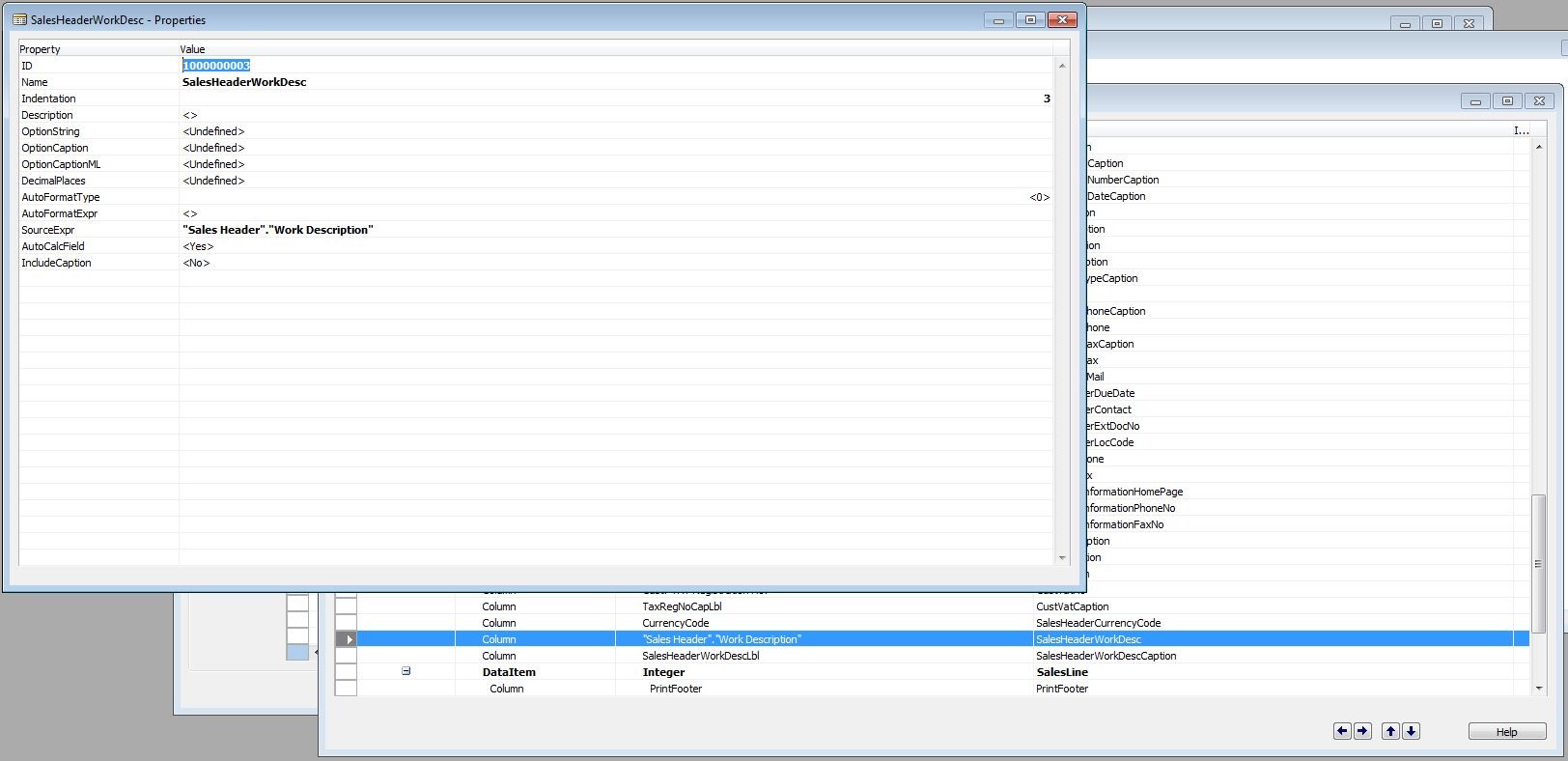
Ok, I’ve managed to add the field in the dataset by adding it as a new column and defining its SourceExpr in Object Designer. After saving and compiling, I see it listed when I’m editing the RDLC. However, when I print the report, it is not showing.What else am I missing?
——————————
Anthony Rowan
Ancillare
Horsham, PA
——————————
——————————————- -
Samuel Champoux
MemberSeptember 6, 2018 at 9:19 AM
Try to remove the “Sales Header.” and keep only the field name alone, since your report is already listing a sales header.——————————
Samuel Champoux
IT Director
Drummondville QC Canada
——————————
——————————————- -
Ancillare LP
MemberSeptember 6, 2018 at 3:10 PM
I believe I have done what was needed to add the field to the report. However, I think because the field itself is a BLOB type, NAV cannot parse the record to the report without some extra programming/modification. I have confirmed this with our NAV Partner.Thank you all for the help and suggestions!
——————————
Anthony Rowan
Ancillare
Horsham, PA
——————————
——————————————-
DSC Communities replied 7 years, 7 months ago 1 Member · 0 Replies -
-
0 Replies
Sorry, there were no replies found.
The discussion ‘RDLC Reports’ is closed to new replies.
