


Dynamics Business Central (NAV)
Public Group
Active 9 hours ago
Experts:




Rapidstart and Item Attributes
-
Rapidstart and Item Attributes
Posted by DSC Communities on August 26, 2019 at 5:44 pm-

Bryan Christian
MemberAugust 26, 2019 at 5:44 PM
Not having much luck finding info on this. Anyone have good resources on using RapidStart to load item attribute data? We’re on NAV2016, but we’ve created a backported version of the functionality from NAV2017 (mostly renamed tables and a few changes to deal with the lack of indention capabilities with Item Categories). Rapidstart would be preferred, but if I need to I could do this using another method like using a report, XMLPort, or codeunit if that’s someone recommends. I just need to find a way to get the data into the system. It’s currently in an Excel file, but porting the data to another format wouldn’t be a big deal. Any suggestions?#Technical #DataManagement #Implementation????
——————————
Bryan Christian
IT Systems Manager
VPT, Inc.
Blacksburg VA
—————————— -
Renato Fajdiga
MemberAugust 27, 2019 at 2:13 AM
Hi Bryan,to import Item Attributes first you need to import Item Attributes into table Item Attribute. Then you need to import for each Item Attribute its value into table Item Attribute Value where you will link your Item Attribute ID with new values for Item Attribute.
Finally you have table Item Attribute Value Mapping where you will map Table: 27 (item table), Item Code, Item Attribute ID, Item Attribute Value ID.Best regards,
Renato——————————
Renato Fajdiga
Application Consultant
Adacta d.o.o.
zagreb
——————————
——————————————- -
Bryan Christian
MemberAugust 27, 2019 at 9:42 AM
So if I’m understanding this right, I need to import into Table 7501 (my table 50041) all the actual values that will be needed, and then I need to import a mapping of those values into Table 7505 (my table 50045) and that should do it? Seems easy enough.——————————
Bryan Christian
IT Systems Manager
VPT, Inc.
Blacksburg VA
——————————
——————————————- -
Renato Fajdiga
MemberAugust 27, 2019 at 10:09 AM
Bryan,that’s right. Take a look at my screenshots:
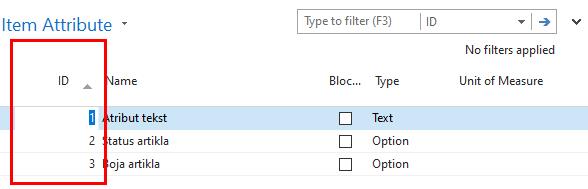
- ItemAttributes – defines all my item attribtues, ID, Name, Type
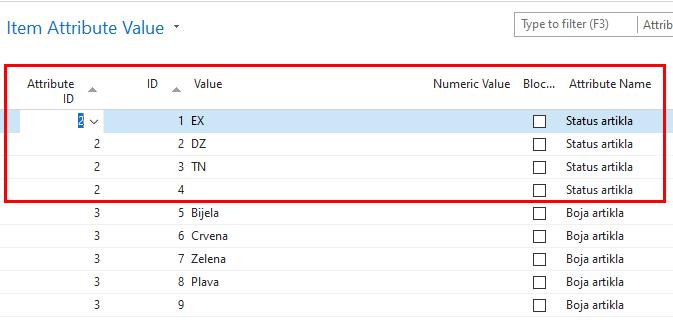
- ItemAttributesValue – if you see that for ItemAttribute with ID:2 I have values EX, DZ, TN, blank. This all are related to my ItemAttribute ID:2
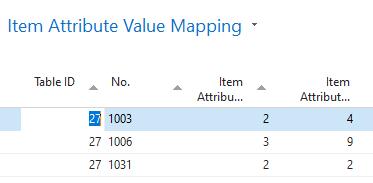
- ItemValueMapping – you can see that for item 1003 I defined Attribute with id: 2 and value with id: 4 and if I read this as user this means that Item 1003 has attribute “Status artikla” and value blank… Item 1031 has same attribute “Status artikla”, and value DZ.
best regards,
Renato——————————
Renato Fajdiga
Application Consultant
Adacta d.o.o.
zagreb
——————————
——————————————- -
Iaroslav Pankovskyi
MemberAugust 27, 2019 at 9:58 AM
Hi Bryan,
On top of what Renato has said, here are the Tables you need to use to manage Attributes – please note, that I am using Business Central and North American version below and in this order (other versions may differ, but this still should give you a good idea of how these things work):
1) Use Table 7500 – Item Attribute to import your top level Attribute data (e.g. “Colour”, Option; “Weight”, Decimal; “ID X”, Text, etc.).
2) Use Table 7501 – Item Attribute Value to import your Attribute Values (e.g. blue, green, white (for colour), etc.).
3) Use Table 7505 – Item Attribute Value Mapping to assign your Attribute Values to your master data records (e.g. Item XYZ should be ‘white’, etc.)That should do the trick. Another thing you can do is to manually create and assign a couple of Attributes in the system and only then export the Tables above using a Configuration Package or Configuration Worksheet. This will give you a clearer idea as to how the system does it and how you should fill out the templates that are based on the Tables above.
——————————
Iaroslav
——————————
——————————————- -
Jenifer Elliott
MemberAugust 27, 2019 at 1:08 PM
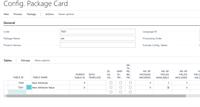
Hi Bryan,You should be able to use RapidStart for your Item Attributes.
——————————
Jenifer Elliott
Senior Application Consultant
Technology Management Concepts
807 Parkview Drive North, Suite 150
El Segundo, CA 90245
Phone: 831.277.3280
Email: jelliott@tmc-la.com
Website: http://www.abouttmc.com?
——————————
——————————————- -
Hi NAVUG
Is there any limit to the number of attributes that can be added? we’ve been told by a consultant that we had too many to use the native NAV item attributes tables. we have 95 attributes.
#NAV2017Thanks?
——————————
Michael Sedlock
Dukal Corp
Dukal Corporation
Ronkonkoma NY
——————————
——————————————- -
Jenifer Elliott
MemberAugust 28, 2019 at 12:29 PM
Hi Michael,I haven’t found anything on size limitations for Item Attributes but it would also depend on how many Items you have. So if you have 10,000 Items with 95 Attributes per Item = 950,000 Item Attributes.
The bigger question is why do you have so many Attributes per Item and are you actually reporting by all of them? Could they be combined to shorten the list, Like Color and Year as 1 instead of 2 attributes.
You can also Use Item Categories to make this a bit easier. Here is an Article on that:
Set Up Item Attributes and Assign Them to Items – Business Central
Microsoft remove preview 
Set Up Item Attributes and Assign Them to Items – Business Central When customers inquire about an item, either in correspondence or in an integrated web shop, they may ask or search according to characteristics, such as height and model year. View this on Microsoft > ——————————
Jenifer Elliott
Senior Application Consultant
Technology Management Concepts
807 Parkview Drive North, Suite 150
El Segundo, CA 90245
Phone: 831.277.3280
Email: jelliott@tmc-la.com
Website: http://www.abouttmc.com?
——————————
——————————————- -
Hi Jenifer,
thank you for the info and link. I will look into item categories. Also your math does assume every item has all 95 attributes, but that may not be the case.another question, can Item attributes & categories be Vendor specific?
Thanks again——————————
Michael Sedlock
Dukal Corp
Dukal Corporation
Ronkonkoma NY
——————————
——————————————- -
Jenifer Elliott
MemberAugust 28, 2019 at 1:01 PM
Hi Michael,You can set the Vendor on an Item Card which would then (sort of) link the Attributes and Item Category of that Item to the Vendor but if you use a different Vendor (let’s say the main Vendor is out of stock), these attributes would then link the second Vendor. There is no true link between the Vendor and Attributes from an Item.
Having Vendor Attributes is not Standard NAV functionality but I’m sure your VAR could customize this for you.
——————————
Jenifer Elliott
Senior Application Consultant
Technology Management Concepts
807 Parkview Drive North, Suite 150
El Segundo, CA 90245
Phone: 831.277.3280
Email: jelliott@tmc-la.com
Website: http://www.abouttmc.com?
——————————
——————————————-
DSC Communities replied 6 years, 7 months ago 1 Member · 0 Replies -
-
0 Replies
Sorry, there were no replies found.
The discussion ‘Rapidstart and Item Attributes’ is closed to new replies.
