


Dynamics Business Central (NAV)
Public Group
Active 3 days ago
Experts:




Product Group Codes – NOT in 2017
-
Product Group Codes – NOT in 2017
Posted by Deb Peters on October 16, 2017 at 2:55 pm-
?Since in NAV 2017, there are not Product Group codes as I understand it, do you go deeper in Item Category or use the Attributes? Or just move to a Dimension?
I went to Summit and now have questions I didn’t get clear in my head when I was there 🙂
Thanks,
Deb——————————
Deb Peters
Controller
Midwest Rubber Service & Supply
Plymouth MN
—————————— -
I used Item Categories that have Parent Categories for example…
Item categories
Chemicals
Acid – parent Chemicals
Biocide – parent Chemicals
Buffer – parent ChemicalsAcid, biocide, buffer would have been the product groups
——————————
Kim Dallefeld
NAV Consultant
Past NAVUG Chair
NAVUG Programming Committee
Ft Worth, TX
Kim@Dallefeld.com
——————————
——————————————- -
?Is the parent category a customization or just how you set up the coding?
——————————
Deb Peters
Controller
Midwest Rubber Service & Supply
Plymouth MN
——————————
——————————————- -
Just how I setup the item categories.
——————————
Kim Dallefeld
NAV Consultant
Past NAVUG Chair
NAVUG Programming Committee
Ft Worth, TX
Kim@Dallefeld.com
——————————
——————————————- -

James Ellard
MemberOctober 17, 2017 at 8:37 AM
?Hi DebI just wanted to let you know that I am using NAV 2017 CU1 and the product groups are still available, they are available to select via the item card page (30) as part of our default install.
We do have a United Kingdom install so possibly this is the difference, if this is something you don’t want to move away from immediately I would check at the table level to see if the information is still held in the database, it may just need exposing on the relevant page(s) that you need access to.
——————————
James
——————————
——————————————- -
Cesar Zavala-Mesta
MemberOctober 17, 2017 at 9:27 AM
In the US version you can add them back by customizing the Item Fast Tab in the Item Card page. We’re using NAV 2017, version US. Our partner was counting on that field, then he didn’t see it and I believe he only had to add it by customizing the page (I’m not sure if they had to do other things, I believe they didn’t).——————————
Cesar Zavala-Mesta
Master’s: ALM, Harvard University Extension School, Information Management Systems
IT Manager
Burgess Pigment Company
Sandersville GA
——————————
——————————————- -
Wanda Roldan
MemberOctober 17, 2017 at 9:37 AM
?Hi Deb,This was a surprise to many that upgraded since Microsoft did not announce the change with the release.
Microsoft deprecated Product Groups in NAV 2017. The reason it is still there behind the scenes is to provide a path when upgrading the data from an older version to the newer one.
I am not sure how the Worldwide version was released, but for the North America (NA) version, the Product Group is no longer visible on the pages and their plan is to drop it. Therefore, it is best practice not to add it to the pages and to move towards using Attributes.
The purpose for the change is to provide more flexibility by allowing an item to have multiple descriptors/identifiers. The old method of having an Item Category with a Product Group was limiting in that it only allowed a single level. You had one Item Category associated to one Product Group. In NAV 2017, you can have multiple identifiers for that Item Category by using Attributes. This “one-to-many” approach, allows easier integrations with Web shopping. Companies can setup searching for items by attributes (color, height, model, etc.).
Kim is correct in that there is a “Parent Item Category”. However, I don’t believe that Microsoft has released the functionality behind that field. It is there to use as a reference, and if you need additional functionality for it, your VAR can provide customizations for it.
Hope this helps clarify things a bit.
——————————
Wanda Roldan
Technology & Management Consulting
RSM US LLP
New York NY
——————————
——————————————- -
Devraj Ghosh
MemberOctober 17, 2017 at 10:43 AM
Based on what I understand, ?In order to use this functionality correctly, if you are trying to set a hierarchy, you would first set up all your item category codes that you designate as parent item category codes (Parent categeory set to blank). You would then create new child item category codes and assign the appropriate parent category code to them.This is if your just looking to a 1 level hierarchy. To do multiples, you need to assign parent – child combinations for each level and keep digging in depending on the number of levels you want to go.
——————————
Devraj Ghosh
Sr. NAV Consultant
RSM US LLP
Chicago IL
——————————
——————————————- -
Dave Cintron
MemberOctober 17, 2017 at 11:23 AM
The Product Group field did NOT go away, it simply does not show on the “out of the box” Item Card. Microsoft arbitrarily decides what shows and what does not on master data cards throughout the application. Many very useful fields do not show by default. The more NAV evolves, the more consultation you may need with your partner on how to configure your system for different groups of users. Especially in NAV 2017 many, many fields were moved around. The bottom line is you can put the Product Group back on the Item Card in less than a minute and you’re good to go.——————————
Dave Cintron
Dynamics West
Ventura CA
——————————
——————————————- -
?We would be happy with one level of hierarchy so using a Parent / Child Item category would be best for us. We want to be able to filter as someone is looking up an item in our system to enter an order.
As an example, here is what we have:
Item Category
Belts (Parent)
Timing (Child)
Transmission (Child)
Modular (Child)
Conveying (Child)
Other (Child)Then these Attributes/values for the style of each of the above kind of Item Category.
Attributes & Values
Style-Timing
-classic – v
-banded
-notchedStyle-Transmission
-light
-heavy
-industrialStyle-Conveying
-embossed
-smoothMaterial
-pvc
-urethane
-gum rubberSo do I just ask my VAR/Partner to set up the Parent/Child hierarchy, or can I do it?
Thanks very much,
Deb——————————
Deb Peters
Controller
Midwest Rubber Service & Supply
Plymouth MN
——————————
——————————————- -
Cesar Zavala-Mesta
MemberOctober 22, 2017 at 8:10 AM
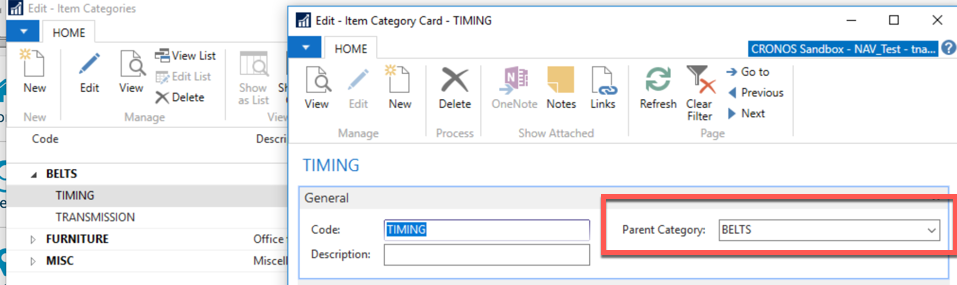
Hi ,As for setting up the parent/child hierarchy, ?you can do that in the Item Category Card of the child by selecting the appropriate Parent Category (see image below). I tried the example you gave and got it (Belts as parent and Timing and Transmission as children). I set the attributes under the Item Category Card, and used “Filter by Attributes” in the Item List to find, say, Items with Style=Classic
——————————
Cesar Zavala-Mesta, DCP
Master’s: ALM, Harvard University Extension School, Information Management Systems
IT Manager
Burgess Pigment Company
Sandersville GA
——————————
——————————————- -
Cesar Zavala-Mesta
MemberOctober 22, 2017 at 7:38 AM
Thank you, , for posting ?this very complete answer. Being New2NAV, I had no idea that Product Groups were deprecated or Item categories had new functionality. I’ll add a link to the NAV Team Blog with some details about it.The Item Categories feature replaced the Product Group feature in Dynamics NAV 2017
Dynamics NAV Team Blog remove preview The Item Categories feature replaced the Product Group feature in Dynamics NAV 2017 To help companies maintain an overview of their items and to help them sort and find items, it is useful to assign item attributes to items and to organize them in item categories. When customers inquire about an item, either in correspondence or through a web shop, they can then ask or search according to attributes, such as height and model… View this on Dynamics NAV Team Blog > ——————————
Cesar Zavala-Mesta, DCP
Master’s: ALM, Harvard University Extension School, Information Management Systems
IT Manager
Burgess Pigment Company
Sandersville GA
——————————
——————————————- -
Jason Nicolaou
MemberOctober 23, 2017 at 5:26 PM
Hello. Was a functionality removed in relation to Product Group Codes, or were you just not able to find it? If you hit the drop down in the upper left the fasttab can be customized (this is really just personalized) to display the product group code. It can be nested under the item category code just like in older versions. If there was a loss in functionality will you please share?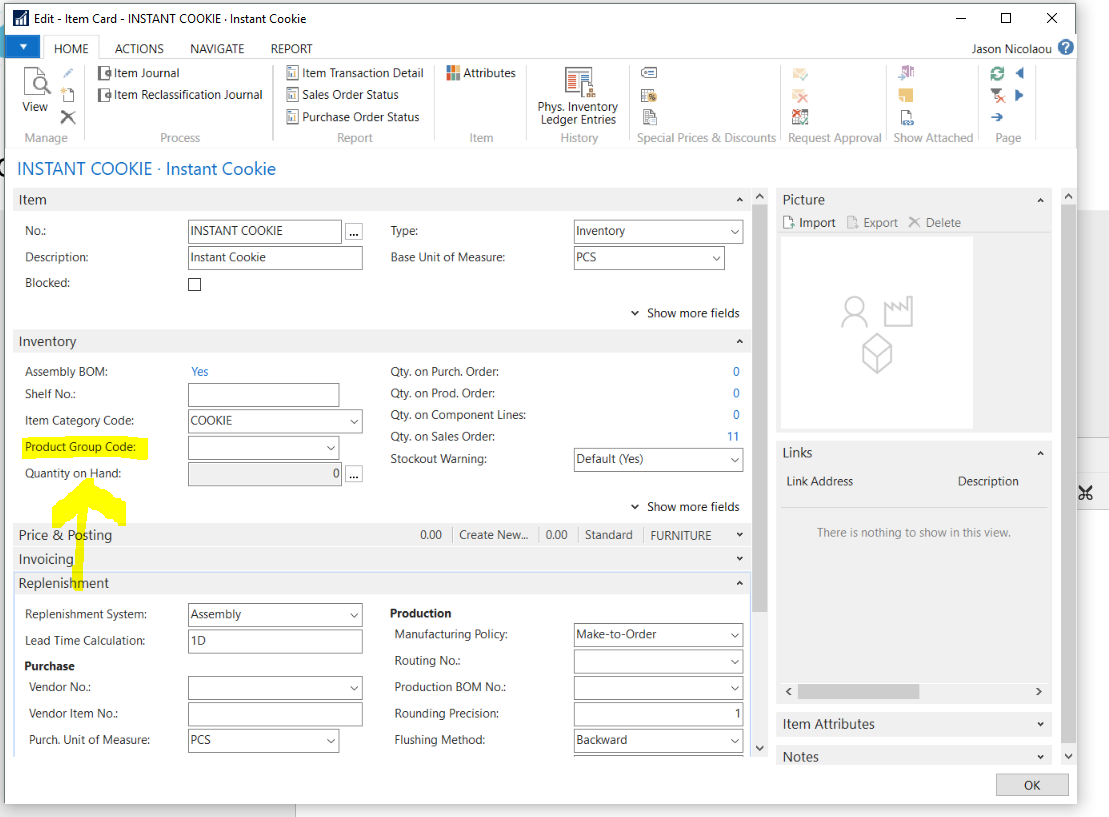
——————————
Jason Nicolaou
Solutions Architect
Socius
Dublin OH
——————————
——————————————- -
Cesar Zavala-Mesta
MemberOctober 25, 2017 at 2:32 PM
Hello . The functionality is there, but it was deprecated, so the Product Code needs to be added as you mentioned. ?——————————
Cesar Zavala-Mesta, DCP
Master’s: ALM, Harvard University Extension School, Information Management Systems
IT Manager
Burgess Pigment Company
Sandersville GA
——————————
——————————————- -
Dave Cintron
MemberOctober 26, 2017 at 1:21 PM
I would be careful in throwing around the word “deprecated”. The field is there. The data is there. You can still filter on reports and pages. Is the same true of “Attributes”? If you moved all your Product Group codes to Attributes, can you still filter this data on reports and pages? There is no “Attribute Filter” that would do this. So saying this field is deprecated and replaced with Attributes may not be an entirely workable statement.——————————
Dave Cintron
Dynamics West
Ventura CA
——————————
——————————————-
Deb Peters replied 9 years ago 1 Member · 0 Replies -
-
0 Replies
Sorry, there were no replies found.
The discussion ‘Product Group Codes – NOT in 2017’ is closed to new replies.
