


Dynamics Business Central (NAV)
Public Group
Active a day ago
Experts:




Preventing EDI from sending for manual orders
-
Preventing EDI from sending for manual orders
Posted by Unknown Member on June 27, 2019 at 3:55 pm-
We trade regularly with a partner and EDI flows in and out of NAV fine (Lanham for EDI and for shipping). Every now and then, we’ll find out that a customer that received their order through EDI needs a part sent. Sales orders are entered manually for the customer card that has EDI associated with it and the shipping address is the customer who doesn’t have a part and the orders are shipped / invoiced just fine.
I’m pretty sure the packing rule associated with the customer card is getting triggered and the 856 is sent. So we get an error from our partner because they received an 856 for a sales order they didn’t request. Is there a setting for packing rules that check before sending an 856 that the order is, in fact, an EDI order? Or is the solution that a new ship-to address has to be used on the sales order so no packing rule is triggered during the shipping process?
Thanks
Josh——————————
Josh Kandiko
Saris
Madison WI
—————————— -
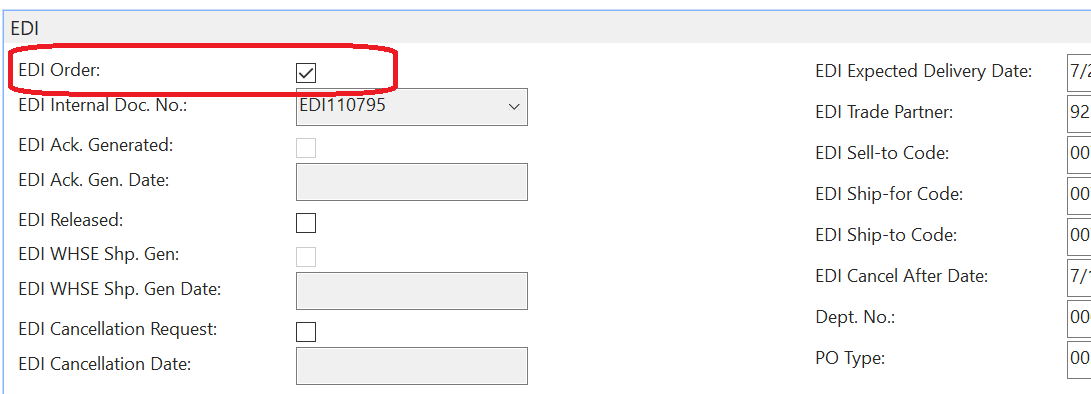
?You can try unchecking the EDI Order field on the EDI tab of the sale order. This will also prevent EDI invoices from being sent.
——————————
Lewis Rosenberg
IT Manager
Mars Fishcare
Chalfont PA
————————————————————————
BCUG/NAVUG All-Star
BCUG/NAVUG Board of Advisors, Chairperson
BCUG/NAVUG Programming CommitteeTwitter: @RosenbergL
LinkedIn: https://www.linkedin.com/in/rosenbergl
————————————————————————NAVUG/BCUG Summit (navugsummit.com)
Orlando, FL – October 15-18, 2019
——————————
——————————————- -
EDI Order is not checked when creating a sales order. So no invoice gets sent, but the ASN does.
——————————
Josh Kandiko
Saris
Madison WI
——————————
——————————————- -

Wayne Fox
MemberJune 28, 2019 at 9:07 AM
You’re on the right track. Don’t know what version of E-Ship/EDI you’re on, but it shouldn’t matter. Even tough your manual order doesn’t get flagged as an EDI order, the ASN definition on the packing rule makes the BOL that you create get flagged for an EDI ASN. To get around that, you can do one of two things. Either manually uncheck the EDI ASN box on the EDI tab of the BOL that you create, or change the packing rule on the ship-to card to one that doesn’t have the ASN defined on the ASN tab. It seems that it would be better to just change the BOL when you create it rather than changing the customer or ship-to card.——————————
Wayne Fox
Senior Consultant
Team Technology
——————————
——————————————- -
Since we Auto-BOL and this order was shipped by pack line scanning, the shippers don’t even know they are creating a BOL. So I imagine it is EShip looking up the packing rule for the customer, seeing the Auto BOL, Auto ASN, and then sending but not checking if the order itself was EDI to begin with. I’ll just have everyone create a new ship-to for these one off orders so the BOL / ASN don’t get triggered.
——————————
Josh Kandiko
Saris
Madison WI
——————————
——————————————-
Unknown Member replied 6 years, 9 months ago 1 Member · 0 Replies -
-
0 Replies
Sorry, there were no replies found.
The discussion ‘Preventing EDI from sending for manual orders’ is closed to new replies.
