


Dynamics Business Central (NAV)
Public Group
Active a day ago
Experts:




Planning for Purchasing
-
Planning for Purchasing
Posted by DSC Communities on March 18, 2020 at 3:05 pm-

Lorna Campbell
MemberMarch 18, 2020 at 3:05 PM
??Hello,We currently use NAV 2015 and looking to start planning for purchasing. When I run my tests and Make Orders, multiple lines show on the PO created by the system with different quantities. Is it possible to roll up the quantities to one line item?
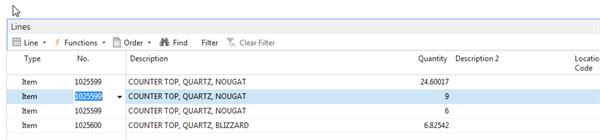
Or is there somewhere I can manage the roll up of item quantities in the Planning worksheet under Qty. to Order before I Make Orders?
The order date and due dates are the same for this item.Thanks,
Lorna
——————————
Lorna Campbell
Triple M Housing
Lethbridge AB
——————————
? -
Jason Nicolaou
MemberMarch 19, 2020 at 7:29 AM
Overall the planning and requisition worksheets are great tools. Which one are you using for planning? It takes some adjusting and trail and error before it is exactly right. It is worth the journey. Let’s start on the item card.- Is your reordering policy set to Order? NAV will make a suggestion for each demand.
- Lot-for-lot reordering policy will aggregate your demands over the period of time you indicate for the Lot Accumulation Period.
- NAV will also consider your lead time for purchased items. This means that even if you have lot-for-lot turned on and the lead time is only a couple of days then multiple lines may be suggested. This is impacted by the Lot Accumulation Period. There is a balance required.
- Another area that impacts this is under the replenishment fasttab. The Manufacturing Policy set to Make-to-Order will also impact the suggestions.
So how do you test all of this? I would start out simple and then change only one thing at a time. It might be worth it to make a list of the combinations so that you can test the combinations and record your adjustments along the way so that it can be repeated for the rest of your inventory items. For example, I would make my manufacturing policy as make-to-stock, I would remove all of the safety stock and safety lead times so that you can see what NAV is going to suggest. You may need to adjust the safety areas too. Next, change the reordering policy to lot-for-lot, run the worksheet that you are using, and see what happens it. Delete all of the lines, now add the lot accumulation period. Run the worksheet. Rinse and repeat until it behaves the way that you want it to. You will come out of the other side understanding the logic better and have a functioning worksheet.
Happy testing!
——————————
Jason Nicolaou
Engagement Manager
Sikich, LLP
——————————
——————————————- -
Jason Nicolaou
MemberMarch 19, 2020 at 7:30 AM
Looks like and I were responding at the same time!! Similar thoughts.?——————————
Jason Nicolaou
Engagement Manager
Sikich, LLP
——————————
——————————————- -
Josh Flagner
MemberMarch 19, 2020 at 7:38 AM
,logged in, read the issue, and set forth crafting a useful, detailed reply. I spent five minutes staring at my coffee maker, then hit send. We both know the answer, but you should definitely use his.
——————————
Josh Flagner
Cleveland Tank & Supply, Inc
Cleveland OH
216-771-8265
——————————
——————————————- -
Josh Flagner
MemberMarch 19, 2020 at 7:21 AM
Hi Lorna,It looks like the reordering policy on the item card is setup to buy only what you need, when you need it. Check on extending your time bucket on a lot-for-lot setup, or possibly changing the policy to max. quantity or fixed reorder quantity before you run your next set of tests.
Let me know if that works, because if it doesn’t, then I probably need a lesson, too!
——————————
Josh Flagner
Cleveland Tank & Supply, Inc
Cleveland OH
216-771-8265
——————————
——————————————- -
Kevin Fons
MemberMarch 19, 2020 at 9:35 AM
Don’t change from Lot-for Lot to a different policy please, I would start with lot-for-lot.
Please review your Planning Tab of the Item card for this item check your lot accumulation period. By setting this planning will find the first demand and then combine all demand within the period into one message / PO line. So if you have it set to 1M (1 month) it will combine demand in a 1 month period from the demand point.——————————
Kevin Fons
Senior Application Consultant
Innovia Consulting
waunakee WI
——————————
——————————————- -
Hi Lorna,
Great time to work on projects like this!
is really the expert on this stuff and my go-to, but let me make a few suggestions.
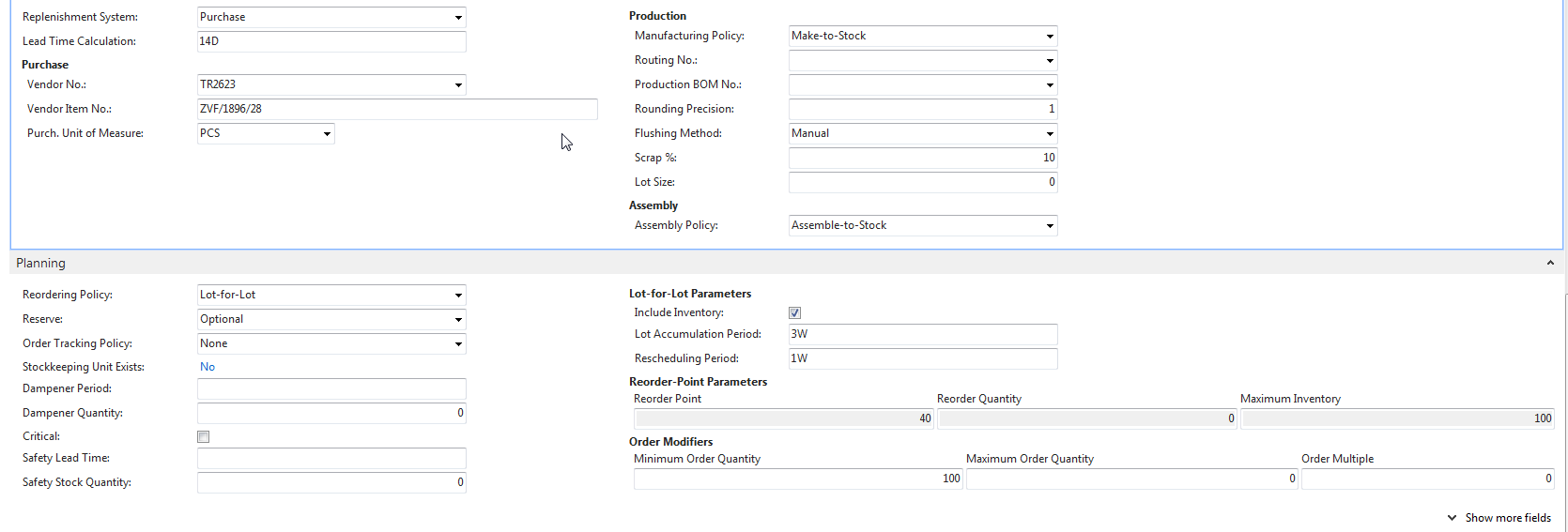
In the item you’re planning try setting it up like this (example)

I set it for Lot-for-lot reordering policy, set the Lot Accumulation Period to 3W and the Rescheduling period to 1W
So what this should do, is consolidate the purchases for this item by looking out 3 weeks to see what I need, totaling that, and weekly suggesting a Planned PO.
You may have set the Reorder Policy to Order – which would create a PO line for every order that needs that part. Or you set it Lot-For-Lot with no accumulation period, so it would schedule a line on a PO for each day unless you also setup minimum order quantities or order multiples.
Normally you’d have a Minimum Order Qty or Multiple if your vendor requires you to buy in a particular UofM – like a box of 100 widgets. Then you want a Minimum of 100 and an Order Multiple of 100.
I did not fill in a Dampener Period or Quantity but you certainly should.
We are starting to recommend Safety lead time over Safety stock in many cases, but traditionally Safety Stock is often set as well. which to use depends on whether your variability is in the time it takes to get the item from the vendor, or the quantity of item you need to get. Analysis of the Standard Deviation of demand order sizes vs supply order delivery days is the way to establish that.
Thanks,
-Rob
??——————————
Robert Jolliffe B.A.Sc, MCSE, MCS – NAV Manufacturing Expert
President
Sabre Limited
Cambridge
robert@sabrelimited.com
http://www.sabrelimited.com
——————————
——————————————- -
Lorna Campbell
MemberMarch 19, 2020 at 2:48 PM
Thank you, I will do little changes as suggested and test and track them as I go along and I will let you know how I do.Thank you for all the info.
Lorna?
——————————
Lorna Campbell
Triple M Housing
Lethbridge AB
——————————
——————————————- -
Kevin Fons
MemberMarch 19, 2020 at 4:50 PM
Just do 1 item at a time and replan it until you get what you want and then expand to more items——————————
Kevin Fons
Senior Application Consultant
Innovia Consulting
Windsor WI
——————————
——————————————- -
Lorna Campbell
MemberMarch 25, 2020 at 3:23 PM
Hi Rob,I have tried as suggested, there seems to still be a problem with the multiple lines on the PO. I have taken a snapshot of my item card as well as the PO and maybe I am still doing something wrong with it or missing something, would you have a minute to review:
PO:
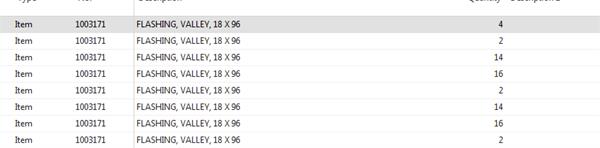
?Thanks,
Lorna
——————————
Lorna Campbell
Triple M Housing
Lethbridge AB
——————————
——————————————- -
Jason Nicolaou
MemberMarch 26, 2020 at 7:09 AM
Lorna what all of us forgot to mention is that the validation at the line level takes a snapshot at time of entry. I am not a developer so I can’t name every page where this happens. This means that there is a chance that when you made the changes to the item card those didn’t translate to the current demand lines. Try entering a new demand and see what happens. Like I said, planning is trail and error for a bit at the beginning. Thank you for sharing what you did.——————————
Jason Nicolaou
Engagement Manager
Sikich, LLP
——————————
——————————————- -
Another thought is the potential SKU for this Item. If you are using Locations and SKUs, the planning parameter for the SKU is what the planning will read. You should be able to tell in the Planning/Req. Worksheet what will happen prior to creating the PO. If the Plan/Req. Worksheet has multiple lines, so will the PO.
——————————
Ben Baxter
Consultant
Accent Software, Inc.
carmel IN
——————————
——————————————- -
Jenn Claridge
MemberMarch 26, 2020 at 3:35 PM
LornaThe Lot for Lot and Lot Accumulation period should be what you need here as a start. All the suggestions are good ones and some things I would add is to ensure your starting date is today’s date, review if these are “emergency” scenarios and check Skus.
Many people think to “catch everything that is late” the use a starting date of something in the past. This always causes issues and provides a weird plan.
From your screen shot I can’t see the dates or if these are emergency scenarios which causes they system to ignore some planning parameters.
Jenn
——————————
Jenn Claridge
Manufacturing Consultant
Sabre Limited
Cambridge Ontario Canada
——————————
——————————————-
DSC Communities replied 6 years ago 1 Member · 0 Replies -
-
0 Replies
Sorry, there were no replies found.
The discussion ‘Planning for Purchasing’ is closed to new replies.
