Hi, we’re looking to be able to type a short note to a vendor and have it print on the PO / PINV.Ā I have hunted the Serenic knowledge base and don’t see where this functionality is.Ā I would think this would be native, built-in functionality, but am not seeing it on any fast tab.Ā Does anyone know how or where I can enter a custom comment and have it print on each document?Ā I don’t want to enter it at the customer card level, as it has to vary with each PO/PINV.
Thank you in advance for your help!
—————————— Andrea Gabel Manager of Financial Systems & Reporting City of Naples Airport Authority NAPLES FL ——————————
Jamie Theis
Member
June 15, 2017 at 7:12 AM
Andrea,
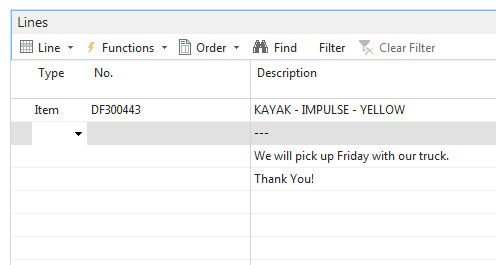
I simply add a blank in the Type columnĀ (typlically I just key the space bar) tab to discription and add a couple dashes to break it from the Item above and type my note to vendor. (See below)
You got the perfect answer from Jamie in how to do it. It is standard functionality in NAV to do it like this.
You can also use TEXT codes behind it, so on a type <Blank> you can in the “No.” field look-up to standard text codes.Ā In here you could have a code for the delivery days, as well as a code for standard greetings. The latter just to make it easier for the users to select a code instead of typing the message.
—————————— Soren Smith Nielsen & Partners Ltd Cape Town —————————— ——————————————-
Please note:
This action will also remove this member from your connections and send a report to the site admin.
Please allow a few minutes for this process to complete.
Report
You have already reported this .
Welcome to our new site!
Here you will find a wealth of information created for peopleĀ that are on a mission to redefine business models with cloud techinologies, AI, automation, low code / no code applications, data, security & more to compete in the Acceleration Economy!