No series

  • Posted by DSC Communities on March 17, 2017 at 11:59 am
    • Victor Smith

      Member

      March 17, 2017 at 11:59 AM

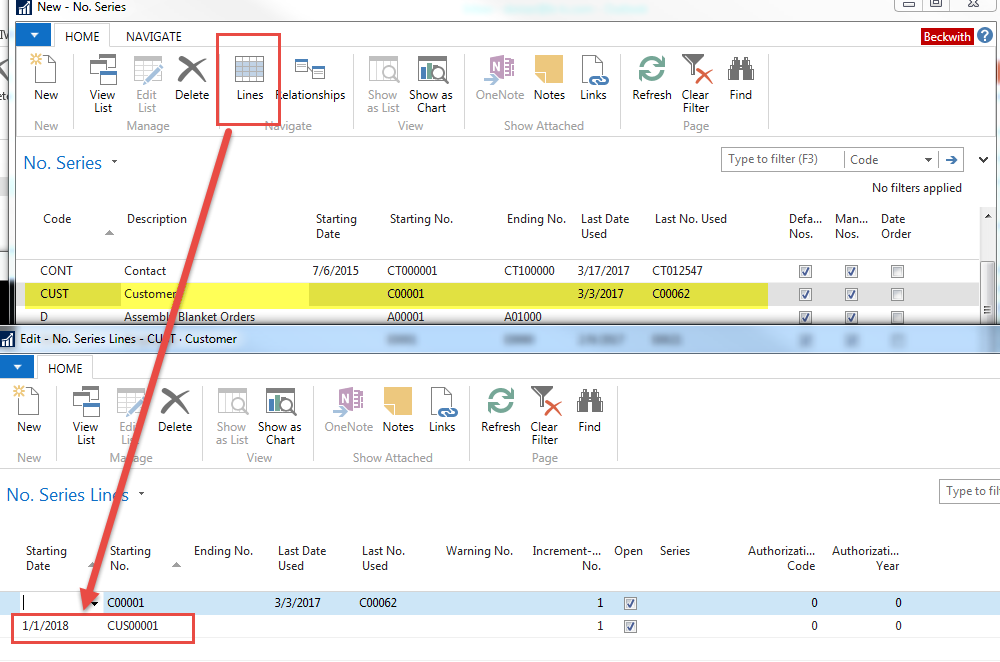
      I need to create new No series which should have effective date , how do I do it ?

      Example

      Existing No series

      ABC   A000001 A9999999

      New series

      ABC A0040000 A999999 Effect 4/1/2017

      ——————————
      Victor Smith
      SCC
      ——————————

    • David Wiser

      Member

      March 17, 2017 at 12:36 PM

      Highlight the number series code you desire and then click “Lines” from the ribbon.  Add a new line with the new numbering series along with the starting date for when you want the new series to begin.  That should do it.

      ——————————
      Dave Wiser
      Controller
      Beckwith & Kuffel
      Seattle WA
      ——————————
      ——————————————-

    DSC Communities replied 9 years ago 1 Member · 0 Replies
  • 0 Replies

Sorry, there were no replies found.

The discussion ‘No series’ is closed to new replies.

Start of Discussion
0 of 0 replies June 2018
Now

Welcome to our new site!

Here you will find a wealth of information created for peopleĀ  that are on a mission to redefine business models with cloud techinologies, AI, automation, low code / no code applications, data, security & more to compete in the Acceleration Economy!