


Dynamics Business Central (NAV)
Public Group
Active 9 hours ago
Experts:




Nav 2017 WebClient issue
-
Nav 2017 WebClient issue
Posted by DSC Communities on March 17, 2017 at 8:06 pm-

Ketan Patel
MemberMarch 17, 2017 at 8:06 PM
Hope Someone can help.Two Nav separate NAV installs, one fresh install and second upgraded from NAV 2016.
Desktop (RTC) can see Business Charts in both Installs
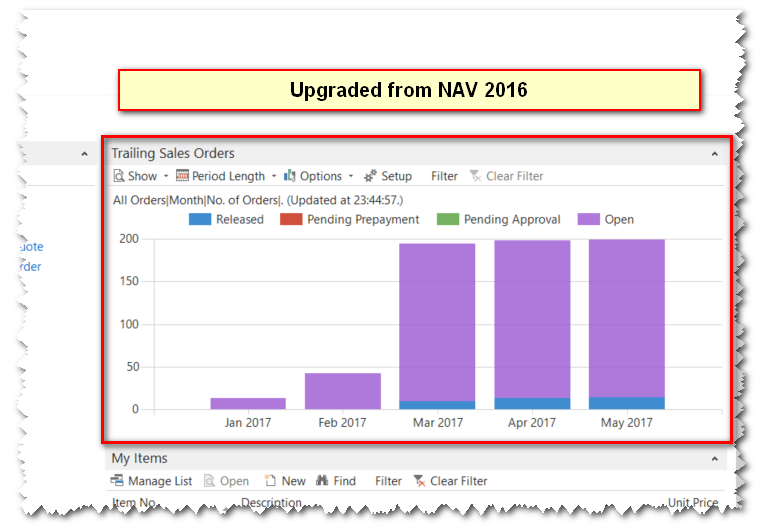
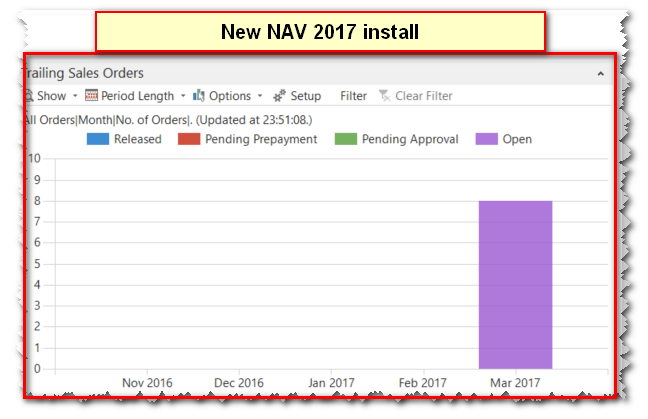
But WebClient, the chart is only displayed on New 2017 installation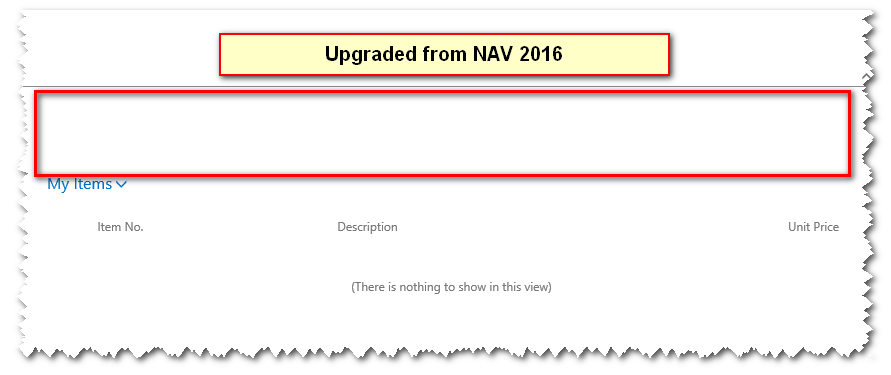
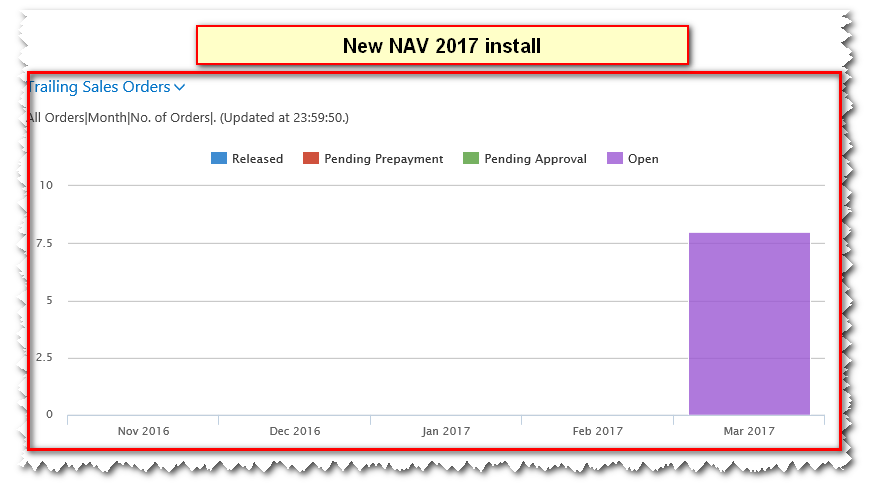
There must be some setup missing for the upgraded install, can anyone help in resolving this issue.Thanks.
——————————
Ketan Patel
London
—————————— -
Ketan,
Out of curiosity, are other charts (like the Finance Performance Chart) loading in the Web Client of the environment upgraded from NAV 2016?
-AJ
——————————
AJ Ansari
NAV Product Manager
InterDyn BMI
Houston TX
——————————
——————————————- -
Ketan Patel
MemberMarch 19, 2017 at 4:37 AM
AJ,No, none of the charts are loading in the upgraded enviroment. They all display just fine on the desktop client.
——————————
Ketan Patel
London
——————————
——————————————- -
Can’t say that I know for sure what could be causing it, but I’d start by checking if the upgraded environment is missing a Custom Control (see from NAV Development Client, make sure the proper database is opened, and check Tools > Custom Controls.
I’ll poke around NAV when I get a chance, and let you know if I find something.
Might be worth opening a case with Microsoft.
——————————
AJ Ansari
NAV Product Manager
InterDyn BMI
Houston TX
——————————
——————————————- -
PS, I may have stumbled onto something that can help you. Assuming that the upgraded DB/instance and the fresh install are on different servers, are you by chance using Microsoft IE (or Edge, if accessing from a workstation)?
I found a thread on Mibuso about a similar issue. The user found that Internet Explorer Enhanced Security Configuration was enabled on the server, preventing Business Charts (like Trailing Sales Orders, Finance Performance, etc.) from displaying in the Web Client. Turning it off fixed the issue.
You can check out the full thread here: http://forum.mibuso.com/discussion/62150/chart-page-not-shown-in-webclient
Hope this helps! Either way, let me know, because I’m curious. 🙂
——————————
AJ Ansari
NAV Product Manager
InterDyn BMI
Houston TX
——————————
——————————————- -
Ketan Patel
MemberMarch 20, 2017 at 2:35 AM
AJ,No not a browser issue, as I have tried ie, Firefox, and chrome, same result for both installs in each case. I will check on custom controls, but don’t think that should be an issue, as the RTC client works fine.
Regards
——————————
Ketan Patel
London
——————————
——————————————- -
Hi Ketan, if the Custom Controls are not an issue, it’s probably not something that can be easily resolved sight-unseen.
A support case with Microsoft will be your best bet at this point. The folks at the NAV support desk are very helpful.
——————————
AJ Ansari
NAV Product Manager
InterDyn BMI
Houston TX
——————————
——————————————- -
Ketan Patel
MemberMarch 30, 2017 at 7:03 AM
This is a quick update on the issue for all. Apparently this issue has already been reported to Microsoft by other customers and they have not found a solution todate (at time of writting).Fortunantly we have resolved the issue working together with an independent Nav Consultant, the charts are now working on the web client as expected. The issue is something to do with the upgrade process where system tables are not being updated, or are being over-written with old data from the upgrade process.
Over the weekend I will post a detailed workflow of how we resolved the issue, it worked for us, but cannot garentee it will work for everyone with the same issue.
——————————
Ketan Patel
London
——————————
——————————————- -
Ketan Patel
MemberApril 11, 2017 at 3:34 AM
Solution for Business charts not displaying in NAV 2017 after upgrading database from NAV 2016.
- Start by restoring standard NAV 2017 Cronus database on SQL Server.
- Export ALL modified objects from live production database.
- Import ALL objects to the Cronus database created in step 1. Ensure all objects compile without errors.
- From production database export the company data. This can be done either from PowerShell or from RTC client. From RTC client, search for “Export to a Data File”.
- Select the company/companies to export, WITHOUT Global Data, Application Data or Application options selected.
- The exported data now needs to be imported into the Cronus database created in step 1, this can again be done through PowerShell or RTC Client. From RTC client, search for “Import from a Data File”. Select the datafile saved in step 5. and click “OK” button to import data.
- The Final step is to re-create USERS, Permissions, Permission Sets and User Personalisation’s manually in the newly imported company.
- Please test the newly created database and data before uploading to production environment.
Importing the data in step 7, from the old database, at least for us did not work. Well it works but then the Business Chart error is re-introduced in the web client.
——————————
Ketan Patel
London
——————————
——————————————-
DSC Communities replied 9 years ago 1 Member · 0 Replies -
-
0 Replies
Sorry, there were no replies found.
The discussion ‘Nav 2017 WebClient issue’ is closed to new replies.
