


Dynamics Business Central (NAV)
Public Group
Active 7 hours ago
Experts:




Multiple Addresses on Purchase Order
-
Multiple Addresses on Purchase Order
Posted by Unknown Member on February 20, 2018 at 3:46 pm-
??Good Afternoon Everyone!
Is there any out-of-the-box Navision functionality to have a Purchase Order with multiple Ship-To Addresses? We are trying to solution situations where we may order something from a vendor, but would like it shipped to two different locations (therefore having two receipts for a single PO). Say, for example, that we wanted to order 1,000 booklets from our printer and have 800 shipped to one of our distribution centers, and the remaining 200 to our other distribution center – can Navision handle something like this?
Putting everything under a single Purchase Order would be easier to manage, especially with applying any bulk discounts and not needing to worry about matching up Purchase Orders with one another.
I appreciate any direction or suggestions that you may have! Thanks!
——————————
Abram Towle, CPIM
Ortho Molecular Products, Inc
Woodstock IL
—————————— -

Cynthia Priebe
MemberFebruary 20, 2018 at 4:58 PM
Abram,This is an interesting one.
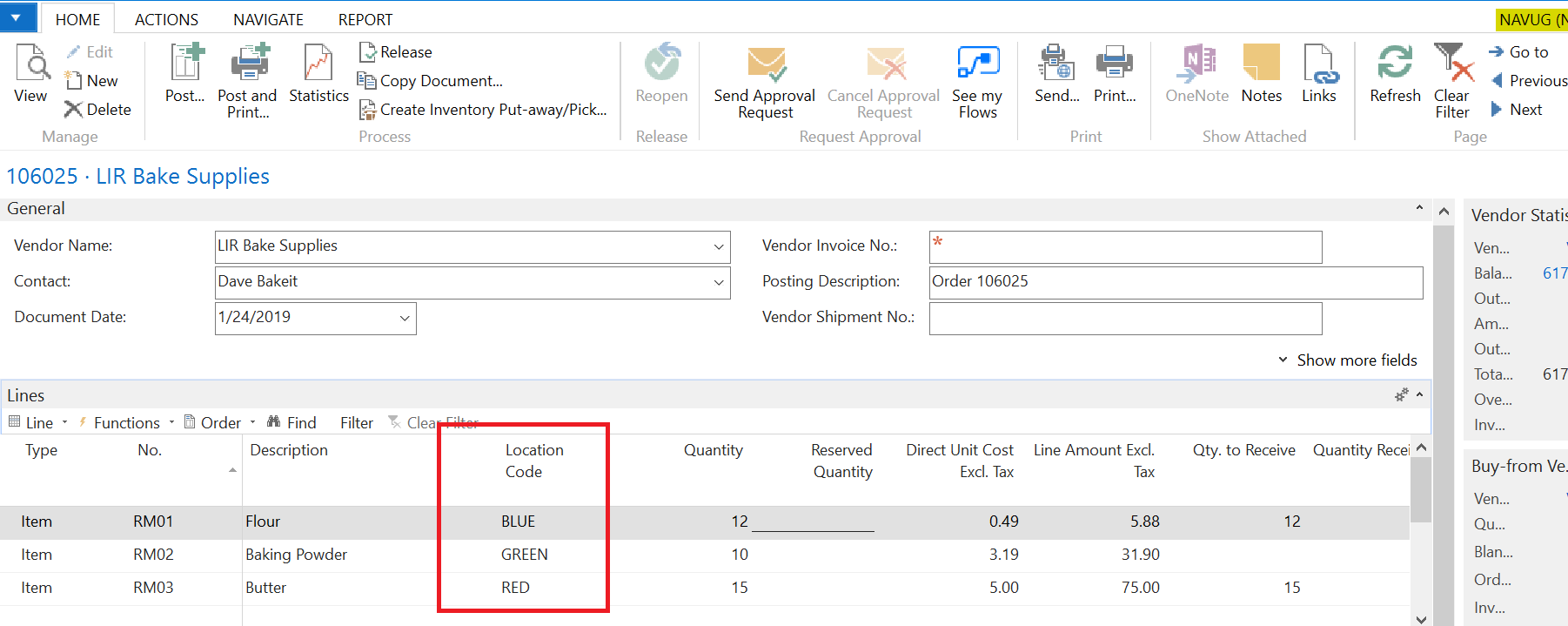
The Ship-to Address is found in the Purchase Header as well as a Location Code (if you are using them) that upon selection, defaults in this address. However, you are also able to select Location per Purchase Line. There are no customizations needed to receive lines to various locations from a PO.
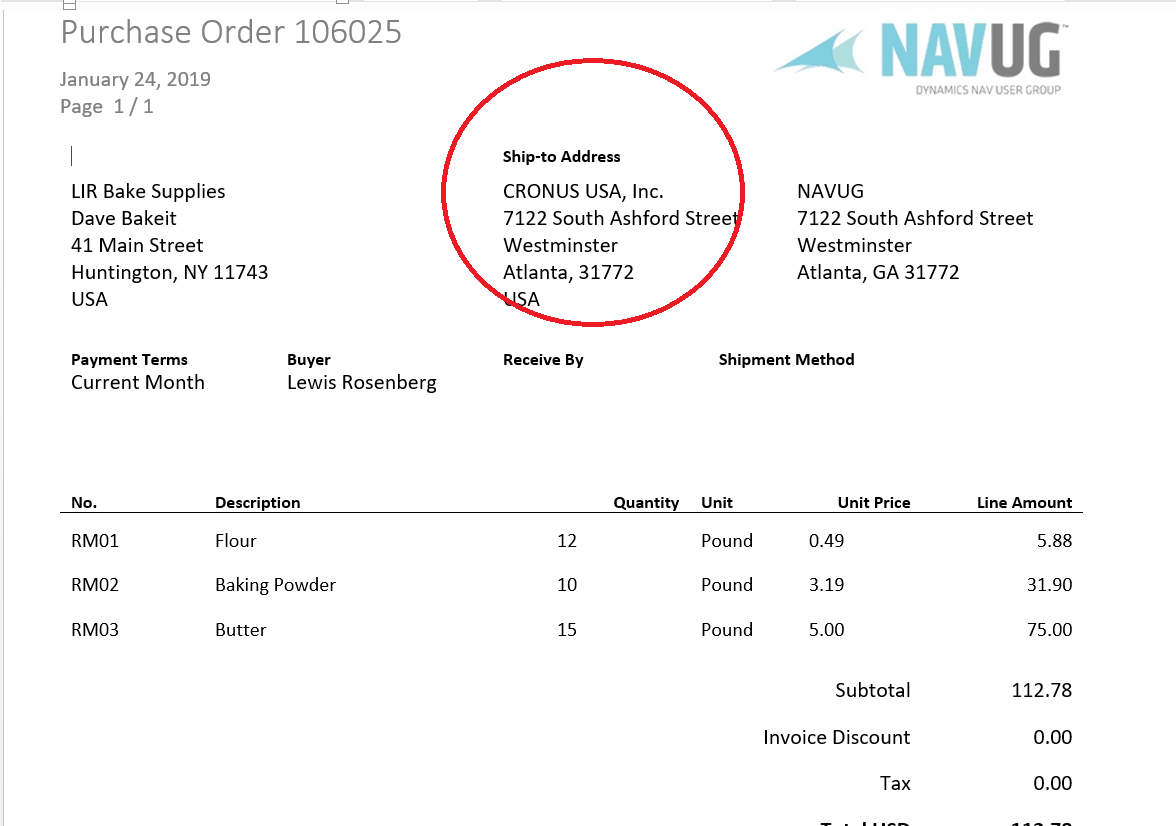
1) Create a custom PO Report that would include in the line detail the Location Code and enough of the Location Code address for your vendor to know that you want the items shipped to different locations. You could even add these fields to Purchase Line as flowfields for visibility of the information on the Purchase Order in NAV.
If you are on one of the newer NAV versions, you could assign this custom report in Document Layouts for only the vendors where this is needed. All other vendors would receive the standard report.
2) Use Purchase Blanket Order to establish the pricing for the order. Issue releases to create Purchase Orders for each location. You would have multiple POs using this approach but your pricing should work and all POs would relate to a single Blanket Order.
Good Luck and I am interested to see what others suggest,
Cynthia
——————————
Cynthia Priebe, MCTS, DCP
Senior Business Analyst and Project Manager
Liberty Grove Software
——————————
——————————————- -
?Abram,
I was thinking along the same lines as Cynthia. You could create a blanket PO and then relase PO’s against it to different revceiving locations.
I do like the idea of selecting different receiving locations on the PO Line of a regular purchase order, but as Cynthia stated, the PO Print, if used, would need to be customized as it will only indicate the location from the PO Header.
——————————
Lewis Rosenberg
IT Manager
Mars Fishcare
Chalfont PANAVUG Board of Advisors, Programming
NAVUG Programming Committee
NAVUG Membership Committee
——————————
——————————————- -
?Cynthia and Lewis –
Thank you both for your great responses! I will look into both of them to see which one would work best for our situation. The Location Code by Purchase Order Line might work the best provided that I can get some time for development, otherwise the blanket PO seems like a perfectly workable solution as well.Much appreciated!
——————————
Abram Towle, CPIM
Ortho Molecular Products, Inc
Woodstock IL
——————————
——————————————-
Unknown Member replied 8 years, 1 month ago 1 Member · 0 Replies -
-
0 Replies
Sorry, there were no replies found.
The discussion ‘Multiple Addresses on Purchase Order’ is closed to new replies.
