Installing Nav Demo 2017

  • Installing Nav Demo 2017

    Posted by DSC Communities on March 16, 2017 at 5:24 pm
    • Mike kamisa

      Member

      March 16, 2017 at 5:24 PM

      Hi,

      Am installing NAV Demo 2017 but during installation am getting erro message please see attached screen shot.

      ——————————
      Mike kamisa

      ——————————

    • Saurav Dhyani

      Member

      March 17, 2017 at 12:58 AM

      Hi,

      NAVDEMO SQL instance exists but your user id does not permission to access it. Try following –

      1. Run installer (setup.exe) as administrator.

      2. Add your windows user id with full permission in SQL NAVDEMO instance. 

      ——————————
      Saurav Dhyani
      ArcherPoint Inc.
      Atlanta GA
      ——————————
      ——————————————-

    • Muhammad Rehan

      Member

      March 17, 2017 at 8:55 AM

      Hi
      I think issue is with the NAV SQL Instance. That might not running. Confirm that instance is running.
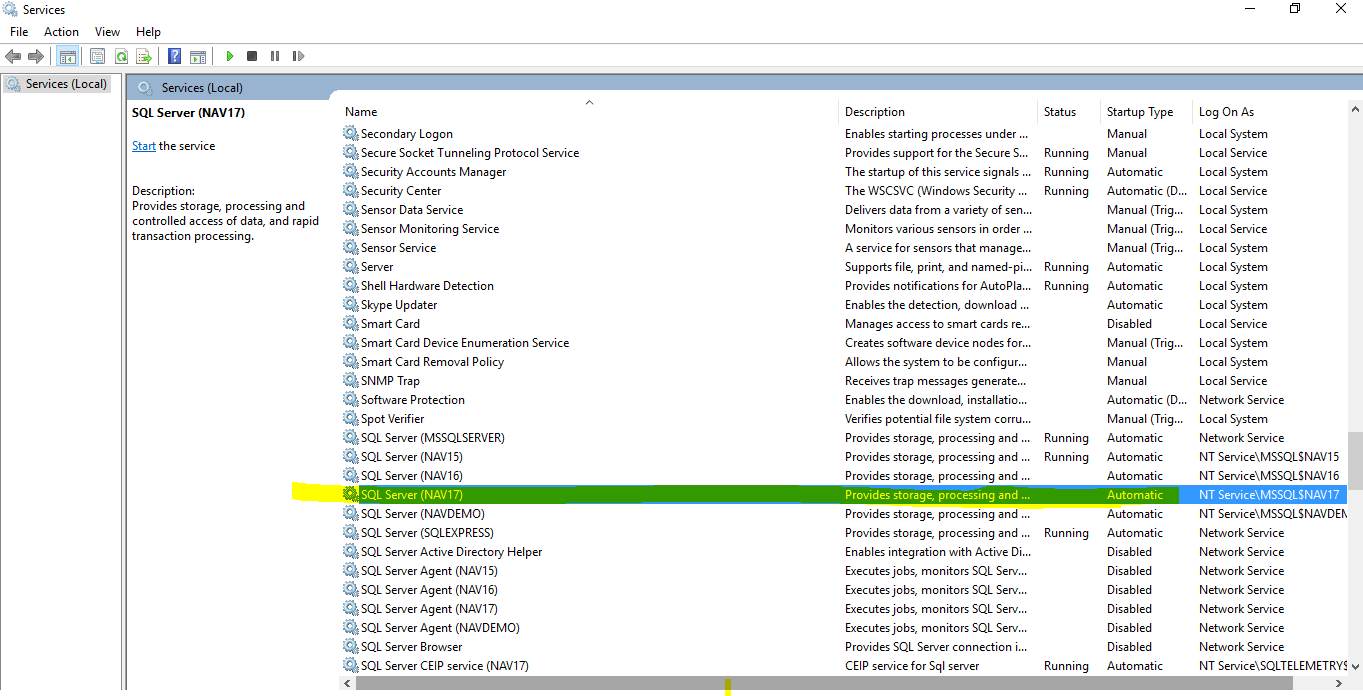
      Go to search menus in windows type services—->Services OVRLep29QlOedvxi78j0_Service.PNG
      Try to locate the SQL17 Instance as in the attched screen short you can see that the NAV2017 instance is stoped by default on system startup. Right click on the service and start the NAV17 SQL instance.

      ——————————
      Muhammad Rehan
      Dynamics NAV conslutant
      Synergy-IT Pakistan
      Islamabad
      ——————————
      ——————————————-

    DSC Communities replied 9 years ago 1 Member · 0 Replies
  • 0 Replies

Sorry, there were no replies found.

The discussion ‘Installing Nav Demo 2017’ is closed to new replies.

Start of Discussion
0 of 0 replies June 2018
Now

Welcome to our new site!

Here you will find a wealth of information created for peopleĀ  that are on a mission to redefine business models with cloud techinologies, AI, automation, low code / no code applications, data, security & more to compete in the Acceleration Economy!