


Dynamics Business Central (NAV)
Public Group
Active a day ago
Experts:




How to reverse a Prepayment to a Vendor on a PO
-
How to reverse a Prepayment to a Vendor on a PO
Posted by Michael-Carr on August 9, 2019 at 4:52 pm-
I have spent the day pulling my hair out on this one , reviewed as much data as I could find on the ‘net.
I can see were you POST a Prepayment Credit Memo on the PO but I will be darned if I can see where you ENTER the Prepayment Credit Memo to Post?
Scenario : Vendor asks for a down payment on 200 kg of material , we provide the down payment and enter as a prepayment. Vendor can’t supply the 200 kg only 100 and is supposed to return a check for the balance. How do I reduce the prepayment to 100kg at half the original price.
I see in the documentation how to post the prepayment credit but not how to actually create the prepayment credit to post.
My sanity may depend on your help<Grin>
——————————
Michael Carr
VP , Finance
Philadelphia Scientific LLC
Montgomeryville PA
—————————— -
When you post the Prepayment Credit Memo, it will reverse the original prepayment invoice in full. It does allow just crediting the difference. You post the prepayment credit memo which reverses the original prepayment invoice. Then you can change the prepayment amount/percentage on the PO and reissue the prepayment.
——————————
David Wiser
Project Manager
Tigunia
Seattle WA
——————————
——————————————- -
Dave,
If I read your response correctly, you are saying that simply posting a prepayment credit memo will create the create memo on it’s own – there is no need to enter a prepaid credit memo – Is that correct?
The issue is if It try that I get the following error :
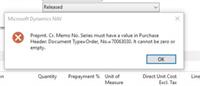 when we look at the prepayment PO it shows no entry in the Table 138 field which is what it seems to be looking for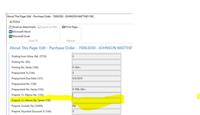
So The question is why is it missing? I assumed it meant I had to create a Prepayment Credit memo before I post it to the PO. But I cannot find any reference to any such functionality in any NAV documentation.
I am missing something here.
Thanks for reponding, Dave.
——————————
Michael Carr
VP , Finance
Philadelphia Scientific LLC
Montgomeryville PA
——————————
——————————————- -

Samuel Champoux
MemberAugust 12, 2019 at 8:00 AM
Michael, it looks like you are only missing a Number Series setup for that document.?——————————
Samuel Champoux
IT Director
Drummondville QC Canada
——————————
——————————————- -
Forgot to mention —- we do have a No. Series set up for the Prepayment credit memo —- so that’s not the issue either?
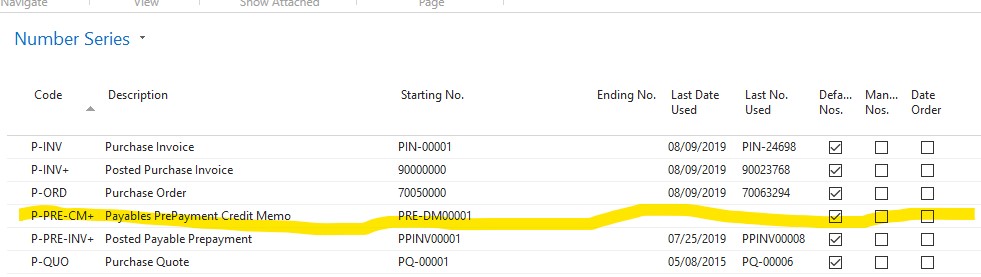
——————————
Michael Carr
VP , Finance
Philadelphia Scientific LLC
Montgomeryville PA
——————————
——————————————- -
Toni Kapp
MemberAugust 12, 2019 at 8:46 AM
You can enter a Vendor Credit Memo number in the “Prepayment” section of the PO.
——————————
Toni Kapp
IMG Citrus, Inc.
Vero Beach FL
——————————
——————————————- -
Check to make sure that the “Prepmt. Cr. Memo No. Series” field is populated on the header of the purchase order. It’s possible that the value was deleted by mistake or it wasn’t populated when the purchase order was created.
——————————
Chris Gittins
Storm Products, Inc.
Brigham City UT
——————————
——————————————- -
To Dave,Toni & Chris,
Thank you for all your help.
For enlightment and use of all, The issue was that the P-PRE-CM+ code was not entered in the purchases and payables setup originally on our setup 5+ years ago. So the PO header DID NOT have the reference to look for a number- the No. Series is assigned at the time of PO creation. Without the reference on the PO it could not obtain a Prepayment credit memo number. The line was blank.
Thank you all again for your help.
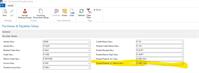
——————————
Michael Carr
VP , Finance
Philadelphia Scientific LLC
Montgomeryville PA
——————————
——————————————-
Michael-Carr replied 6 years, 4 months ago 1 Member · 0 Replies -
-
0 Replies
Sorry, there were no replies found.
The discussion ‘How to reverse a Prepayment to a Vendor on a PO’ is closed to new replies.
