


Dynamics Business Central (NAV)
Public Group
Active 9 hours ago
Experts:




How to remove a user’s right to insert, modify, delete from “Reevaluation Journal” in NAV 2009
-
How to remove a user’s right to insert, modify, delete from “Reevaluation Journal” in NAV 2009
Posted by DSC Communities on January 5, 2017 at 9:49 am-

Diana Orellano
MemberJanuary 5, 2017 at 9:49 AM
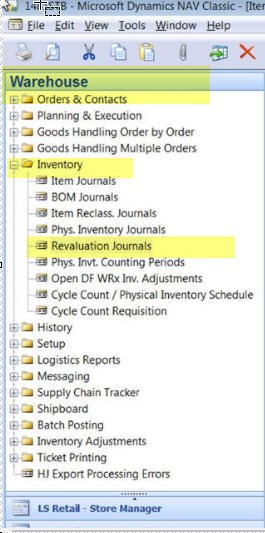
Hi all,
Our Internal Auditor recently gave us a new security requirement to remove “insert/modify/delete” access to the reevaluation journal to all users except 2 of them. What would be the best way to accomplish this task without impacting other users that have access to other Inventory functions e.g. item journal, Cycle Count/Physical Inventory schedules?
thanks in advance for your feedback,
Diana
——————————
Diana Orellano
Starboard Cruise Services
Miami FL
—————————— -
Since the table (Item Journal Line) is used by many journals it’s going to take a lot of work. The Security Filter option is still there, but I’ve never used it and always heard it never quite worked as expected.
Since you can’t really do permissions at the table level that leaves the page level. Default NAV security gives access to all pages, but restricts tables. As soon as you start restricting pages you have to keep it up to date with every new page you add, not to mention the pain of getting the roles setup properly in the first place.
My opinion, two ok options. A small modification of either a check box on the User Setup table or checking to see that a user has a specific role (doesn’t have to have permissions associated to it) before opening the Revaluation Journal.
The other option is something like Easy Security. Might not be worth it if you have one of these areas to restrict, but if you think you have more in the coming years could be worth the investment.
——————————
Matt Traxinger
NAV Developer
ArcherPoint Inc.
San Antonio TX
————————————————————————- -
Hi Diana,
In the larger scheme of things,I concur with Matt, that it might be easiest to manage with a solution like Easy Security from Mergetool.
BUT, if you would like to try it out with NAV’s security, you’d set it for/on the Item Journal Line table.
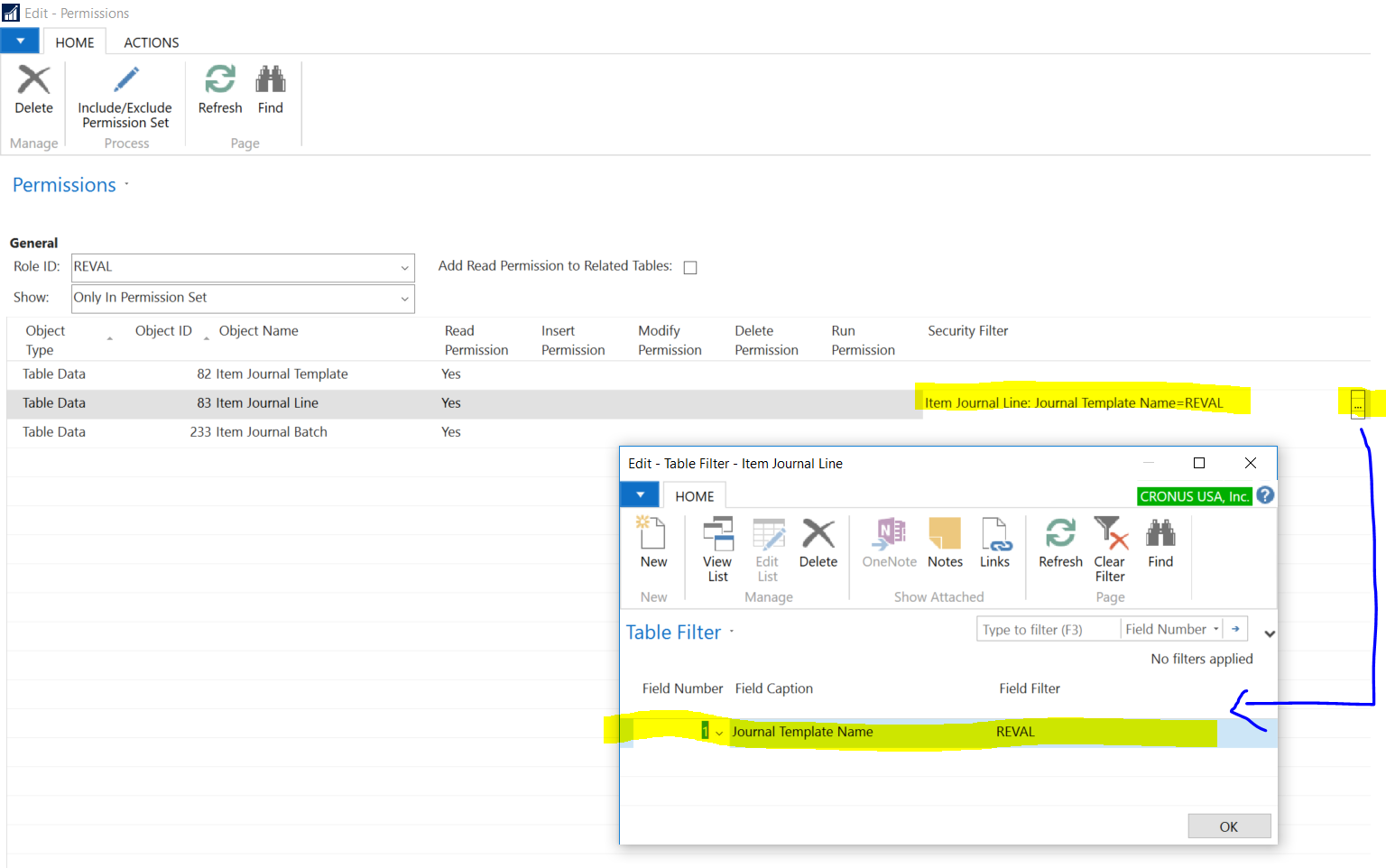
I don’t have access to a NAV 2009 environment right this moment, so I’ve taken a screenshot in NAV 2017 (below).
I created a “Permission Set” (in NAV 2009 it may still have been called “Role”, which you can get to from Tools > Security in the Classic Client) called REVAL, and added the following permissions to it. You may want to add more, but you will at least need the three lines I have in the screenshot. Notice that I’ve the Object Type to ‘Table Data’, and not to Table. And for Table Data 83 (Item Journal Line), I’ve set a Security filter to enforce this only on the Revaluation Journal (by default, it is called “REVAL”; your NAV may use a different name; you can verify this by going to the Item Journal Template form/page, and finding the NAME for the record that has Type set to Revaluation). I could have used the = sign in my Security filter, but it will work just fine without it as well.
When done, assign the Role / Permission Set to the desired User(s). You’ll want to make sure they have permissions to do basic activities in NAV (by using an out-of-the-box Role called ALL for Classic Client, or BASIC for the Role Tailored Client; or your organization may have one of its own. Without it, they won’t get very far at all in NAV.. forget modifying data in the Revaluation Journal, they wouldn’t even be able to get to the Revaluation Journal to begin with).
In NAV 2009, the user(s) will need to exit NAV and log back in after you’ve assigned new permissions to them. Keep reading below the screenshot – it’s like fine-print: boring, but important information…
You may already know this about NAV security, but just in case:
Generally speaking, you do not want to set security at the Page/Form level (Matt mentioned something to the same effect as well). This will prevent the user from opening the page/form at all, and often, this is not what you’re trying to do. You want the person to see the information but not add/change/delete it.
Also, consider what other Roles/Permission Sets you have assigned to the user. If one Role/Permission Set assigned to a user allows them to Insert, Modify, or Delete data for a certain Object Type (such as Table Date 83 – Item Journal Line), this will take precedence in NAV over any other Role/Permission Set where you restrict a user inserting, modifying, and/or deleting data for the same. Also, assigning permissions to Object ID 0 for any Object Type (such as Table Data 0, Page 0, etc.) will result in blanket permission for data in all Tables, all pages, etc.
Regarding Security Filters in NAV Permissions, you can use operators like = < > etc. but * and ? type wildcards will not work. So you could have set the field filter in the screenshot to REVAL, =REVAL, or <>REVAL, etc. but not RE* or RE?AL.
NAV’s security works, but setting it up JUST RIGHT can be quite frustrating to deal with, unless you’re painting in very broad strokes without many exceptions.
Good luck!
——————————
AJ Ansari
NAV Product Manager
InterDyn BMI
Houston TX
————————————————————————-
DSC Communities replied 9 years, 2 months ago 1 Member · 0 Replies -
-
0 Replies
Sorry, there were no replies found.
The discussion ‘How to remove a user’s right to insert, modify, delete from “Reevaluation Journal” in NAV 2009’ is closed to new replies.
