


Dynamics Business Central (NAV)
Public Group
Active 22 hours ago
Experts:




Deleting a drop ship po – No sales line exists
-
Deleting a drop ship po – No sales line exists
Posted by DSC Communities on June 19, 2017 at 9:03 am-

AJ Fizell
MemberJune 19, 2017 at 9:03 AM
Hello all,When I am trying to delete a purchase order that was created off a sales order (Drop Ship), I am getting an error that the sales line does not exist. On the purchase order lines, the sales order no. is no longer filled out. I am afraid a user has inadvertently tried to break the link, but not done it the proper way and now its hung up. Is there any way to put this link back in so I can then delete the lines? When I try and change the sales order, it said I cant because its tied to the purchase order. So I know they are linked, but its just not recognizing it on the po side.
Also, do we know what can cause this being blanked out, so I can try and prevent it in the future?
Thanks much!
——————————
AJ Fizell
CORD Financial, LLC
Temple TX
—————————— -
AJ Fizell
MemberJune 19, 2017 at 9:05 AM

——————————
AJ Fizell
CORD Financial, LLC
Temple TX
——————————
——————————————- -
Ian Ray
MemberJune 19, 2017 at 12:57 PM
I have only seen this in the case that a drop shipment is partially received on the purchase document and fully invoiced on the sales document. In this case, the sales order is removed from the purchase order because it is posted and no longer exists as a sales order. But, the purchase order persists because of the short quantity received.If you could examine the entire line, is the quantity greater than the quantity received?
I am not sure if this is the case as the screenshot you posted cuts off some of the information. Forgive me if your problem is related to something else entirely.
——————————
Ian Ray
Cypress Grove
Arcata CA
——————————
——————————————- -
AJ Fizell
MemberJune 19, 2017 at 1:39 PM
Thanks for the reply. Both the sales order and the purchase order currently have 0 received / shipped and 0 invoiced. Its really weird. They were both open as well so Im not sure why it would throw that error when trying to delete.——————————
AJ Fizell
CORD Financial, LLC
Temple TX
——————————
——————————————- -
On the Purchase Order Line you there are 2 fields called Sales Order No. and Sales Order Line No. that you need to clear out so the Purchase Order doesn’t think it is related to a Sales Order anymore. Unfortunately even through the Developer Environment these 2 fields are not editable.
So you will need to create a code unit and run it to clear these 2 fields:
Set up this variable: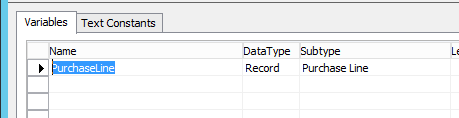
Write this code (make sure to change YourOrderNoHere and YourLineNumberHere with the actuals:
PurchaseLine.GET(PurchaseLine.”Document Type”::Order,’YourOrderNoHere’,’YourLineNumberHere’);
PurchaseLine.”Sales Order No.” := ”;
PurchaseLine.”Sales Order Line No.” := 0;
PurchaseLine.MODIFY;Run the codeunit and you should then be able to delete the Purchase Order.
——————————
Jason Wilder
Senior Application Developer
Stonewall Kitchen
York ME
——————————
——————————————- -
AJ Fizell
MemberJune 22, 2017 at 5:39 PM
Thanks Jason I will have my IT Staff try this in Test and see if we cant run in Dev after.——————————
AJ Fizell
CORD Financial, LLC
Temple TX
——————————
——————————————-
DSC Communities replied 8 years, 9 months ago 1 Member · 0 Replies -
-
0 Replies
Sorry, there were no replies found.
The discussion ‘Deleting a drop ship po – No sales line exists’ is closed to new replies.
