


Dynamics Business Central (NAV)
Public Group
Active 9 hours ago
Experts:




Customize a report
-
Customize a report
Posted by Unknown Member on August 22, 2018 at 11:52 am-
Hi,
I was wondering if anyone has the steps to customize a report from NAV using word.Thank you
Laurie——————————
Laurie Gooch
Accounting Coordinator
Creative Food Ingredients
Perry NY
—————————— -
First, what version of NAV and do you have the right version of Microsoft Office (Word) installed.
next: Does the report already exist and is there a custom report layout for Word or just RDLC. If just RDLC then you need to create a new report using an existing layout or copy an existing report.
This is a good link for a basic overview:
How to customize an existing layout:
HOW DO I – Customize Report Word Layout.Dynamics remove preview 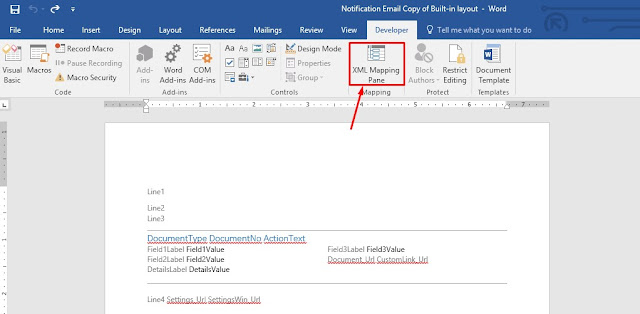
HOW DO I – Customize Report Word Layout. Hi Readers, This article is based on an email request that I received on my blog Contact form. The Request… View this on Dynamics > Or if a RDLC but you want Word layout follow this URL
Create Word Report Layout – Dynamics NAVMicrosoft remove preview 
Create Word Report Layout – Dynamics NAV Create blank Word report layout on a report from Development Environment and modify the layout to include dataset fields and define a general format. View this on Microsoft > Lastly a good tutorial and learning nuts to bolts it the Packet Publishing ebook Microsoft Dynamics NAV 2015 Professional Report and start reading chapter eight
Microsoft Dynamics NAV 2015 Professional Reporting | PACKT BooksPacktpub remove preview 
Microsoft Dynamics NAV 2015 Professional Reporting | PACKT Books Discover tips and trick for Dynamics NAV report building View this on Packtpub > How this gets you started
——————————
Ronald McVicar
IT Software Manager
National Steak Processors, Inc.
Owasso OK
——————————
——————————————- -

Franz Kalchmair
MemberAugust 23, 2018 at 5:46 AM
first start with standard reports 1304 – 1307. These are word reports.To create a word report:
* Create a new report
* add dataitem and columns (fields)
* set report property “DefaultLayout” to “Word”
* goto menu Extras/Word-Layout -> New, accept message with OK
* save the new report
* Now go again to Extras/Word-Layout -> select EXPORT to export the word template, set a filename, save the word doc.
* Now open the word doc
* In Word show the menu “Developing Tools”, select it, there click on “Xml MappingArea”
* In the xml mapping select the last xml component “urn:microsoft-dynamics-nav …”
* Under NavWordReportXmlPart you find the dataitem (record) structure.
* add needed fields by right click on a field, “add control element” -> “only text”
* save the word doc
* re-import the word doc with Extras/Word-Layout -> IMPORT in nav. dev.——————————
Franz Kalchmair
Microsoft MVP
Senior Consultant
Austria, Europe
——————————
——————————————- -
Ritu Sood
MemberAugust 23, 2018 at 8:09 AM
Hi Laurie,
To Customize a report in the word, the following steps need to be followed
- Take any report e.g. 206 -Sales – Invoice
- Open report in design mode
- Click on Tools à Word Layout à New
- Save & compile the report
- Click on tools à Word Layout à Export
- Save the word document in the desired path
- Word document will be blank
- Click on Developer tab à XML Mapping Pane
- On
Right Hand sidea XML Mapping pane will be opened - Select the desired report (urn:Microsoft-dynamics-nav/reports/Sales_Invoice/206/)
- Design whatever layout you want (Suggest to start with simple layout)
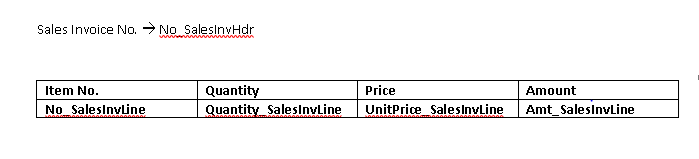
- Save the word file
- Open report design of report 206
- Click on tools à word Layout à Import
- Select the file
- Save & compile the report
- Run the report
- Choose the option à Print à Microsoft Word
- Save or open the word report
Report will display the data in the following format
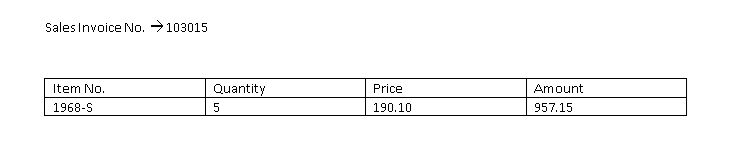
Using this method any simple to complex report can be designed.
——————————
Ritu Sood
All E Technologies Inc.
——————————
——————————————-
Unknown Member replied 7 years, 7 months ago 1 Member · 0 Replies -
-
0 Replies
Sorry, there were no replies found.
The discussion ‘Customize a report’ is closed to new replies.
