


Dynamics Business Central (NAV)
Public Group
Active 5 hours ago
Experts:




Apply Sales Return Order to a different invoice
-
Apply Sales Return Order to a different invoice
Posted by DSC Communities on August 26, 2019 at 9:57 am-

Ruth Entwistle
MemberAugust 26, 2019 at 9:57 AM
Good day!
Is there a way to NOT apply a sales return to the original return document?
Customers often take credit on different invoices than the original invoice when a credit is received.I should add we use the Applies-to to select the original so that our average costing is correct.
How can we do this? Right now it seems set up to automatically apply to the original.
Thanks!
#NAV2017??
——————————
Ruth Entwistle
Customs Broker/Vendor Relations
Heron Point Seafood
Newmarket NH
—————————— -
Cynthia Priebe
MemberAugust 26, 2019 at 10:13 AM
if you use Copy Document or Create Corrective Credit Memo (CM) NAV will automatically apply the credit to the originating invoice referenced through the Applies-to on the CM Header. You can clear this relationship on the credit memo header prior to posting. This will allow you to take advantage of the copy functionality AND allow you to post the CM without the application. You can then go to the customer ledger entries and apply the CM to another invoice.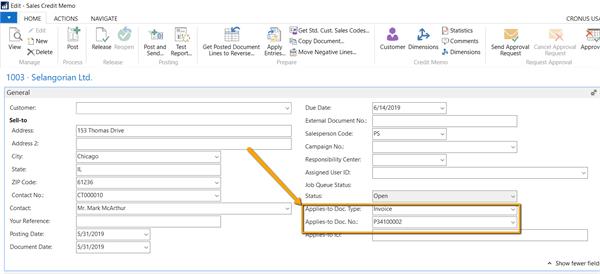
You can also unapply a credit memo that was automatically applied to an invoice on posting by going to Customer Ledger Entry of the document to unapply then reapply manually to another invoice.
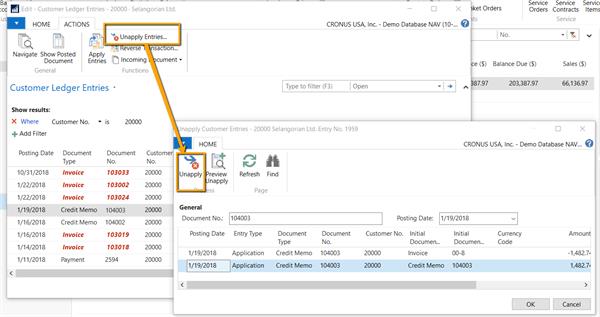
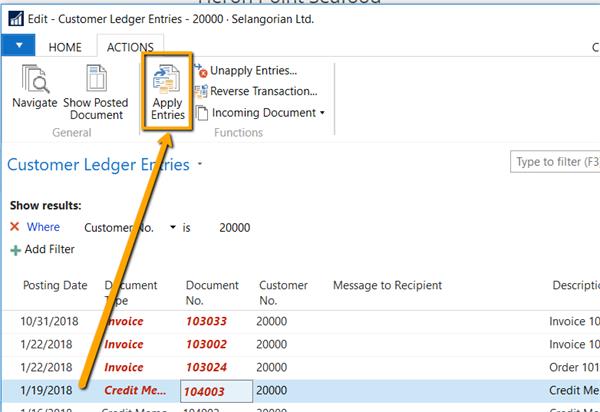
Please let me know if this answers your question.
——————————
Cynthia Priebe MCP, DCP
Senior Analyst and Project Manager
Liberty Grove SoftwareI would love to see you at Summit 2019!
GET67 – Small Changes with Big Impact: Core Application Setup and Configuration
ADM60 – Mods: Just Because Everyone Does Them Doesn’t Mean You Should
FIN58 – (with Andrea Riviezzo) My AP Person Just Left, Now What?
——————————
——————————————- -
Ruth Entwistle
MemberAugust 26, 2019 at 10:21 AM
Excellent thanks!
I think we will have to use the un-apply section of your response.
The way in which our sales team is currently creating the credit memos is by scratch.
The only way that the credit is pointed to the original is by selecting the apply-to on the lot level when selecting the item lot number.
I do not see the information filled out in the header of the credit.Thanks again!
——————————
Ruth Entwistle
Customs Broker/Vendor Relations
Heron Point Seafood
Newmarket NH
——————————
——————————————- -
Cynthia Priebe
MemberAugust 26, 2019 at 10:24 AM
Great, I was just going to append to the thread regarding that exact challenge. Thought about it when I saw the nature of your company business and realized item tracking might be in use.Thanks for letting me know.
——————————
Cynthia Priebe MCP, DCP
Senior Analyst and Project Manager
Liberty Grove SoftwareI would love to see you at Summit 2019!
GET67 – Small Changes with Big Impact: Core Application Setup and Configuration
ADM60 – Mods: Just Because Everyone Does Them Doesn’t Mean You Should
FIN58 – (with Andrea Riviezzo) My AP Person Just Left, Now What?
——————————
——————————————- -
Amanda Mayer
MemberAugust 27, 2019 at 8:05 AM
,I’d like to expand on Cynthia’s suggestion. You may want to consider using the Get Posted Document Lines to Reverse functionality in the Sales Return Order instead. It creates the same costing and item linkage you are looking for, without automatically applying it to the original invoice. It goes one step further by also ?providing a way to filter out quantities that have already been returned.
——————————
Amanda Mayer
New View Strategies
Milwaukee WI
——————————
——————————————- -
Brandon Price
MemberSeptember 18, 2019 at 1:57 PM
Related question. I’m having trouble determining where I can find the original invoice number of a posted sales return order in which I copied the posted document lines. I would hope the original invoice number would be archived into some field in the data tables but I just can’t seem to find it anywhere in any NAV table.Any help would be appreciated! Thanks!
——————————
Brandon Price
Cypress Grove Cheese
Arcata CA
——————————
——————————————- -
Alfredo Zelaya
MemberSeptember 18, 2019 at 2:38 PM
BrandonWhen creating the Sales Credit Memo you have the ability to use the Posted Sales Invoice as the source document:
1) Create the new Sales Credit Memo and pick “Get Posted Document Lines to Reverse”
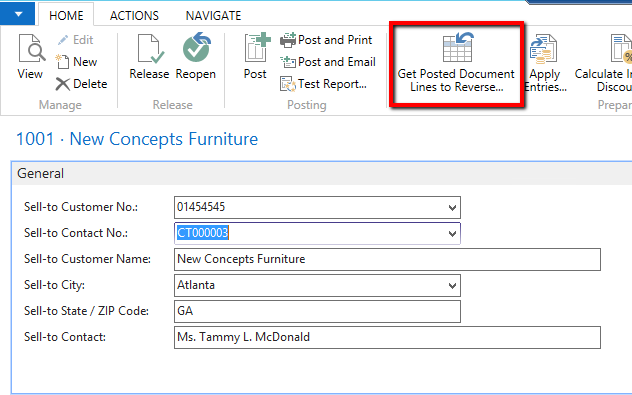 2) Pick Posted Invoices as the source document: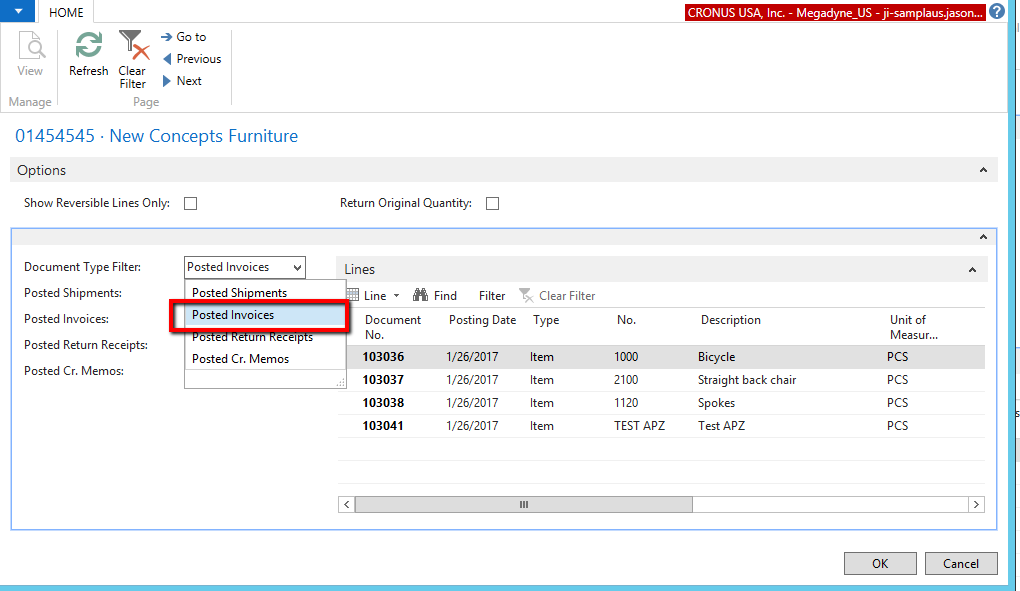
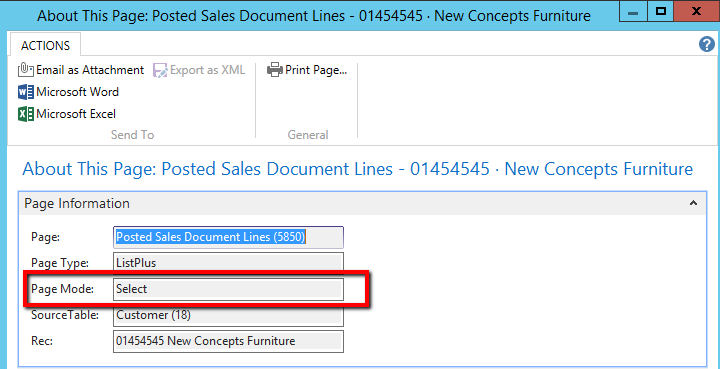
3) Bear in mind this is a “List” page with a page action of “Select”. Meaning it can look at any of the objects in the drop-down individually:
4) The Credit Memo will reflect the source document(s):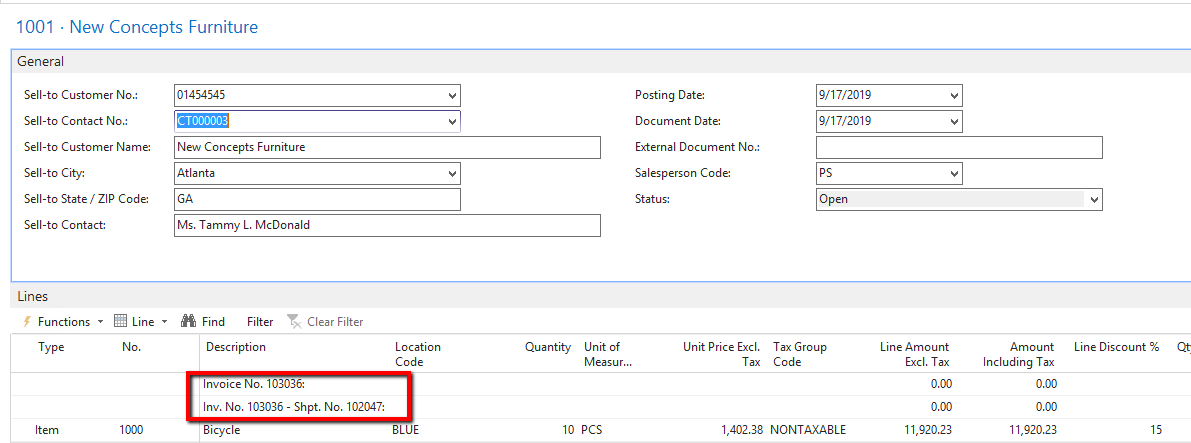
I hope this helps.
Good Luck!
——————————
Alfredo Zelaya
Sr. Systems Analyst
Megadyne Americas LLC
Fairfield NJ
——————————
——————————————- -
Alfredo Zelaya
MemberSeptember 18, 2019 at 3:30 PM
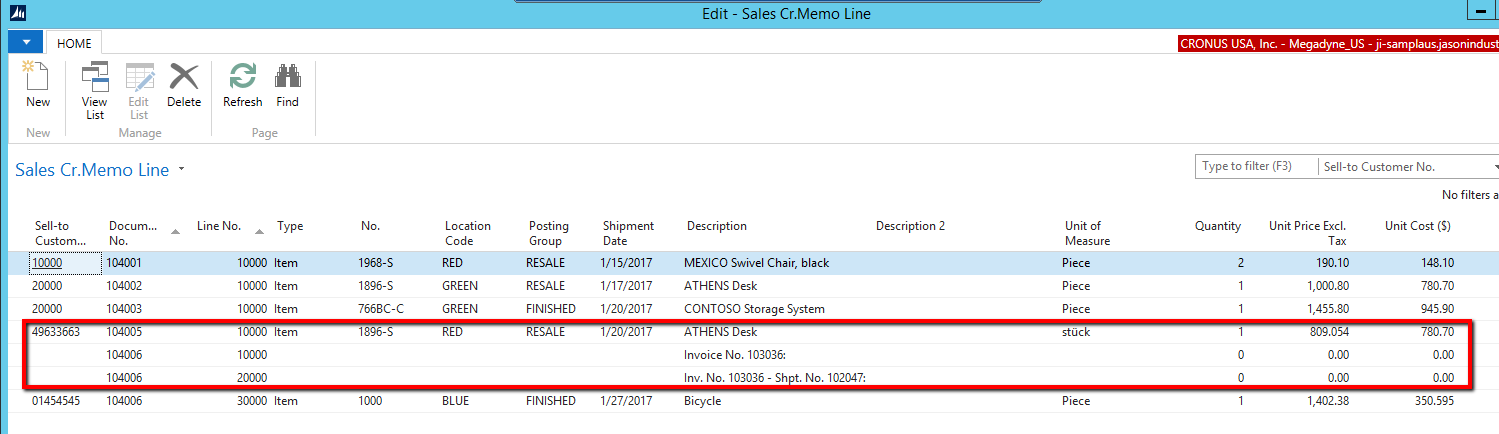
BrandonPredicated you use Posted Sales Invoice to copy your lines and you do not delete the memo lines created by NAV, the information will flow through to the Posted Sales Credit Memo.
Table/Object : 115 / Sales Cr. Memo Line
——————————
Alfredo Zelaya
Sr. Systems Analyst
Megadyne Americas LLC
Fairfield NJ
——————————
——————————————-
DSC Communities replied 6 years, 7 months ago 1 Member · 0 Replies -
-
0 Replies
Sorry, there were no replies found.
The discussion ‘Apply Sales Return Order to a different invoice’ is closed to new replies.
