


Dynamics Business Central (NAV)
Public Group
Active 10 hours ago
Experts:




Ad hoc orders
-
Ad hoc orders
Posted by DSC Communities on August 26, 2019 at 1:14 pm-

Caity Ross
MemberAugust 26, 2019 at 1:14 PM
Hello everyone!A bit of background might help first. Prominate manages our customers branded webstores, much of the time our customers also want to order items that we do not have available and we have to do ad hoc orders with our suppliers to fulfill the orders. We currently have a rough “solution” in place to handle our ad hoc orders in NAV where we have the vendor setup as an item and then for each order we manually change the description for the sales order before we convert it to a PO. This isnt ideal as its seriously messing with our gross margin percentages and we need a better way of handling these without having to constantly create new skus for each ad hoc instances.
Anyone have any advice on a better way to accomplish these instances?
——————————
Caity Ross
Prominate, Inc.
Atlanta
—————————— -
Sebastjan Leban
MemberAugust 26, 2019 at 1:47 PM
Caity,are the items ordered by the Customers existing items in NAV?
If so you can use the Purchasing Code on the Sales Line and tie the Sales Order to the Purchase Order by marking it as a Special Order.
Thank you
——————————
Sebastjan Leban
Talking Rain Beverage Company
Preston WA
——————————
——————————————- -
Caity Ross
MemberAugust 27, 2019 at 9:43 AM
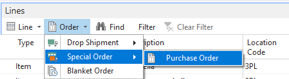
Sebastjan,Are you talking about on the lines section doing the drop down in the “order” areas like below?
——————————
Caity Ross
Prominate, Inc.
Atlanta
——————————
——————————————- -
Sebastjan Leban
MemberAugust 27, 2019 at 1:52 PM
Correct!you’ll find the whole process step by step on the below link:
https://docs.microsoft.com/en-us/dynamics-nav-app/sales-how-to-create-special-ordersThe idea is to tie a sales order to a purchase order.
Thank you
——————————
Sebastjan Leban
Talking Rain Beverage Company
Preston WA
——————————
——————————————- -
Caity Ross
MemberAugust 27, 2019 at 2:29 PM
So the logistics of getting the sales order the PO makes sense. But if we have a special purchase, how do you go about setting up the item in the item cards? Do you have to make a new card for each new item? is there a work around for this at all?——————————
Caity Ross
Prominate, Inc.
Atlanta
——————————
——————————————- -
Sebastjan Leban
MemberAugust 27, 2019 at 3:41 PM
The question is if this items become actual inventory items in your system then the answer is yes. If it’s not an inventory item you could use one item number for all the ad hoc orders.Thank you
——————————
Sebastjan Leban
Senior NAV Systems Analyst
Talking Rain Beverage Company
Preston WA
——————————
——————————————- -
The trick with not messing with confusing margins is to make sure that the inventory reduction tied to the sales order is applied directly to the associated purchase order. If you use drop shipments, the linkage is automatic. If otherwise, you’ll need to set the applied to entry on the sales order. That way the margin will be correct for that item.
——————————
David Wiser
Project Manager
Tigunia
Seattle WA
——————————
——————————————- -
Caity Ross
MemberAugust 28, 2019 at 10:34 AM
Sebastjan,The item is never actually an inventory item and its never in our warehouse. Ships direct from the supplier to the end user.
——————————
Caity Ross
Prominate, Inc.
Atlanta
——————————
——————————————-
DSC Communities replied 6 years, 7 months ago 1 Member · 0 Replies -
-
0 Replies
Sorry, there were no replies found.
The discussion ‘Ad hoc orders’ is closed to new replies.
