
Why More Manufacturers Are Turning to Configure-to-Order in 2025


Manufacturing in 2025 is more complex—and more customer-centric—than ever. Buyers expect products tailored to their needs, but few are willing to wait months for a custom design. Manufacturers are under pressure to deliver faster, stay leaner, and still offer flexibility.
That’s why more companies are embracing Configure-to-Order (CTO) manufacturing: a strategy that blends customization with efficiency. With the right tools in place—particularly Dynamics 365 Business Central and CPQ software—CTO becomes not just viable, but a powerful competitive advantage.
What Is Configure-to-Order?
Configure-to-Order is a production model where the final product is assembled only after a customer selects from a set of validated options—size, features, color, materials, and so on. The configurations are predefined, ensuring feasibility and repeatability without requiring engineering for each order.
This approach is increasingly common in industries where modularity is possible but customer needs vary. Think of an HVAC unit with different fan speeds and thermostats, or a conveyor system with adjustable belt types and lengths.
With CTO, manufacturers can meet unique requirements while keeping costs and lead times under control.
How Configure-to-Order Manufacturing Works
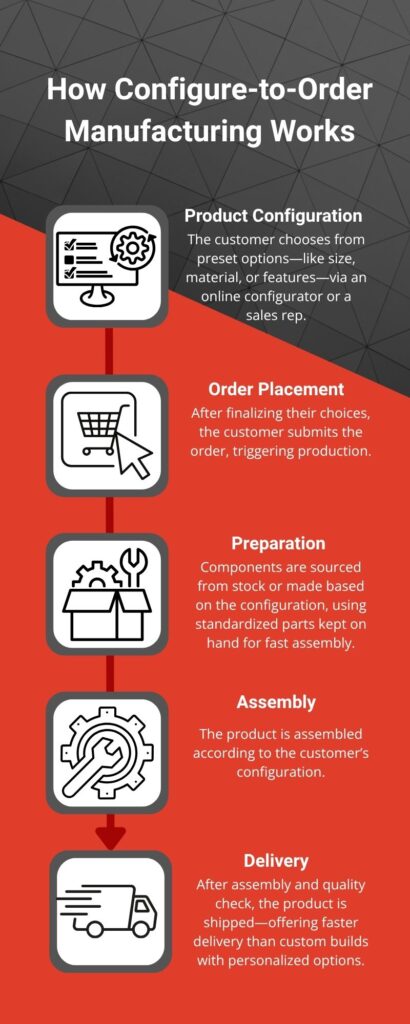
The CTO process is built around flexibility—without sacrificing control. Here’s how it typically flows:
- Configuration – Customers or sales reps choose from approved product options using a CPQ (Configure, Price, Quote) tool, also known as a product configurator.
- Validation – The system checks that all combinations are compatible and generates accurate pricing.
- Order Entry – Once confirmed, the configuration flows into the ERP system (like Dynamics 365 Business Central), which creates the BOM and routes.
- Production – Components are pulled from inventory or produced as needed, then assembled to order.
- Delivery – The product is shipped after passing quality checks—faster than a fully custom build, but still tailored.
This process streamlines quoting, ensures operational consistency, and makes it easier to scale personalized offerings.
Why Business Central and CPQ Are Core to CTO Success
Configure-to-Order only works if your systems talk to each other. That’s why ERP and CPQ integration is essential.
Dynamics 365 Business Central plays a critical role in this strategy. It manages core areas like:
- Inventory levels across warehouses
- Production planning and scheduling
- BOMs and routings for all configurable items
- Financial tracking, from raw material costs to margin analysis
When paired with a strong CPQ solution, the process becomes seamless. The CPQ handles the front-end configuration, pricing logic, and quote generation. Once a customer submits their order, all the necessary production data flows directly into Business Central—no rekeying, no errors, no delays.
This setup accelerates the sales cycle and eliminates bottlenecks between departments.
Real-World Examples of CTO Products
- Modular furniture with configurable finishes and accessories
- Control panels with different switch layouts and enclosures
- Custom windows and doors with various sizes, frames, and locking mechanisms
- Industrial machinery with variable motors or sensor options
Each of these relies on shared subassemblies and validated build paths—exactly what CTO is built for.
Business Benefits of CTO (Backed by Business Central)
Manufacturers adopting CTO with a Business Central + CPQ stack see transformative results:
1. Faster Sales Cycles
Validated configurations and real-time pricing eliminate quoting delays. Sales teams can close more deals with fewer handoffs to engineering.
2. Reduced Rework and Order Errors
Accurate, rules-based configurations ensure the product is built right the first time. This means fewer returns, less scrap, and more satisfied customers.
3. Lower Inventory Costs
Instead of stocking every possible SKU, manufacturers keep component inventory lean. Finished goods are built to order, reducing warehousing needs and cash tied up in unsold products.
4. Better Collaboration Across Teams
With one source of truth in Business Central, sales, production, purchasing, and finance are all aligned. Forecasting improves. Planning is simplified. Execution becomes repeatable.
5. Enhanced Customer Experience
Customers get more control over their product, with faster turnaround and transparent pricing. This improves satisfaction and increases the likelihood of repeat orders.
Preparing Your Manufacturing Operation for CTO
Transitioning to a Configure-to-Order (CTO) model can unlock powerful efficiencies—but only if your systems are ready to support it. CTO isn’t just a change in how products are built—it’s a shift in how your entire organization operates, from quoting to delivery. Success depends on having the right digital foundation.
Here’s what manufacturers need to modernize before making the switch:
ERP System: The Operational Backbone
At the heart of any successful CTO strategy is a modern ERP system, like Microsoft Dynamics 365 Business Central. It connects your finance, inventory, production, and supply chain operations into a unified platform—ensuring that every department is working from the same source of truth.
For CTO specifically, Business Central provides:
- Dynamic BOM and routing generation tied to customer configurations
- Real-time inventory and MRP to ensure materials are available when needed
- Shop floor management that adapts to varying builds
- Financial tools to track profitability per configuration
- Tight integration with sales orders from CPQ or eCommerce systems
With Business Central, your operations are no longer reactive. Instead, the system proactively adjusts schedules, purchasing, and production plans based on actual demand—directly tied to your configured orders.
CPQ Software: The Front-End Engine
Configure, Price, Quote (CPQ) software is the engine that drives the customer-facing part of CTO. It enables your sales reps—or your customers, through a self-service portal—to build valid product configurations in real time, get accurate pricing instantly, and generate quotes without engineering involvement.
A strong CPQ solution does more than just speed up quoting. It also:
- Prevents invalid combinations using built-in rules and logic
- Auto-generates BOMs and sends them to your ERP for production
- Ensures consistent, accurate pricing for even complex configurations
- Enables guided selling and upsell/cross-sell logic
- Offers visual or 3D configuration for products with aesthetic or spatial options
When integrated with Dynamics 365 Business Central, CPQ tools become an extension of your ERP. The result: fewer errors, faster turnaround, and a better customer experience.

Final Thoughts
As personalization becomes the new standard, Configure-to-Order manufacturing is no longer a luxury—it’s a necessity. Companies that can balance speed, flexibility, and efficiency will outperform those still relying on rigid production models.
With Microsoft Dynamics 365 Business Central and a smart CPQ solution, CTO isn’t just possible—it’s scalable, profitable, and future-ready.
Want to explore if CTO is right for your business?
At Sabre Limited, we help manufacturers implement Business Central and CPQ systems built for Configure-to-Order success. Let’s talk about how to align your ERP, streamline production, and meet today’s demand for personalized manufacturing. Contact our experts today.
