Upsert new custom entity

  • Upsert new custom entity

    Posted by DSC Communities on April 16, 2020 at 5:02 pm
    • Michael Schnell

      Member

      April 16, 2020 at 5:02 PM

      Sorry, I posted this in the wrong exchange.Ā 

      I’m brand new to flow, but have spent many years as a general .net developer, and am banging my head against a wall.

      I’m trying to create a flow, manually triggered, after a user loads an excel file into the system.Ā  The excel file contains a number of product/price list data (new and updated).Ā  For each PriceListUpdate object, I need to check to see if there is a product record with the corresponding product id. If it exists, I need to update the price.Ā  If it doesn’t exist, then I need to create a new product record with the appropriate data.Ā  Then, i need to check a variable price list to see if that product exists in that price list.Ā  If it does, then i need to update the price of the price list item.Ā  If it doesn’t exist, I need to create it.

      I have created a manually started flow, and said to list all records of type PriceListUpdate.Ā 

      I’m assuming that to go through each PriceListUpdate, I would use “Apply to Each”, but the I’m a bit confused, because all i see for the output of the previous step is “Value”.

      I’m then thinking i need to do a second List records, inside the Apply to each, where i try to get any records that match the individual “PriceListUpdate” object, and then another “Apply to each” for the record returned.Ā  I’m not sure how to test if the record returned is “null”, meaning there is no record, or if there is a record.

      At this point, if there is no record, then I would create a Product record, and then a PriceListItem record.Ā  However, if there is a record, then I need to update the product record and then look for a Price List (named to match a field in the PriceListUpdate record.Ā  I would then do the same process ((check to see if the record exists and create or update as needed.)

      Any help anyone can provide would be greatly appreciated.

      ——————————
      Michael Schnell
      Systems Consultant
      Baltimore MD
      ——————————

    • Geoff Ables

      Member

      April 17, 2020 at 9:54 AM

      Hi Michael,

      Here’s how I handled a similar need.

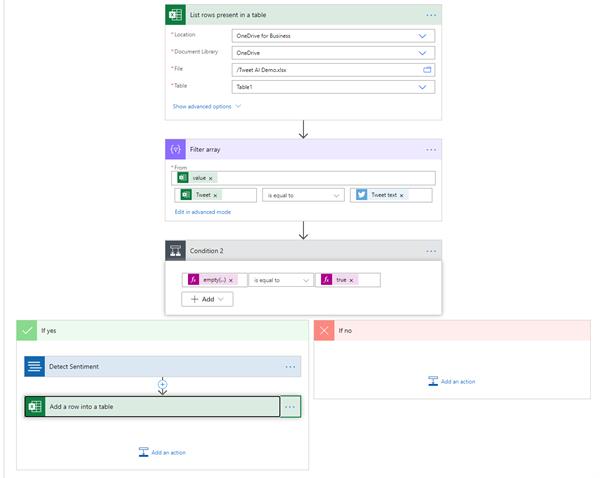
      In my case, I was checking tweet mentions every few minutes and upserting them into an Excel table. If it was already there, I didn’t want to insert a duplicate, so I had to do a search and only add new records.

      After checking for tweets (not shared here since that isn’t directly relevant to your project), I grabbed the rows in Excel into an array that I filtered to just show the tweet record that I wanted to insert. I then checked to see if the result was “empty” (i.e. no matching record found), in which case I added the record to the Excel table as I normally would.

      An image for this part of my process is below. Hope it is helpful.

      ——————————
      Geoff Ables
      Managing Partner
      C5 Insight
      Charlotte NC
      704-281-8067
      ——————————
      ——————————————-

    DSC Communities replied 5 years, 11 months ago 1 Member · 0 Replies
  • 0 Replies

Sorry, there were no replies found.

The discussion ‘Upsert new custom entity’ is closed to new replies.

Start of Discussion
0 of 0 replies June 2018
Now

Welcome to our new site!

Here you will find a wealth of information created for peopleĀ  that are on a mission to redefine business models with cloud techinologies, AI, automation, low code / no code applications, data, security & more to compete in the Acceleration Economy!