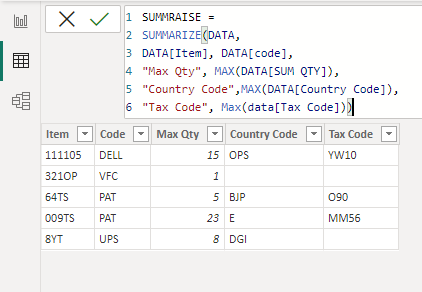
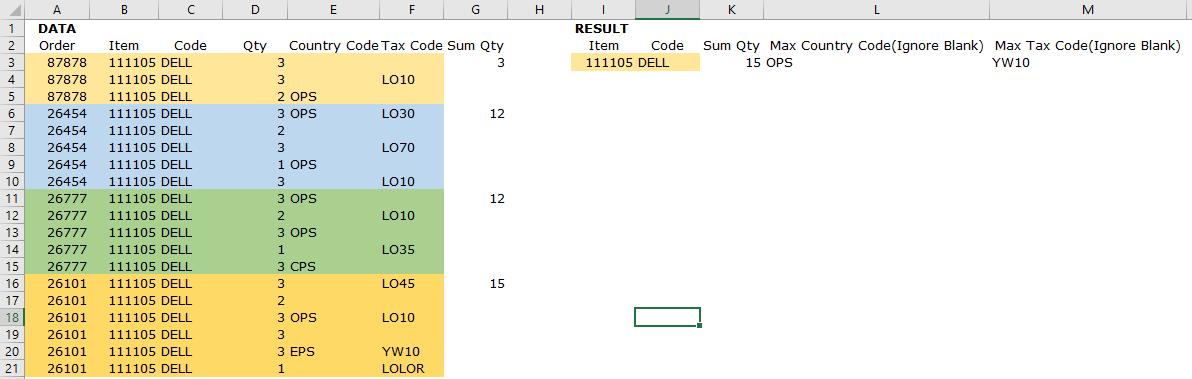
I have following columns are in data table Order, Item, Code, Qty, Country code and Tax Code. I am trying to summarise the sum of qty each order, item and code, based on the sum of qty, I am trying to get the max qty according to the item, code by using new table.Ā Also, in the new table I want get the most frequency/repeated of country and tax code according to item and code.
I want the result in New Table by using dax code (not measure) and Power Query options as well.Ā
I got the results by creating additional columns in Data Table but unable to apply the no blanks conditions in summary table for country code and tax code columns.
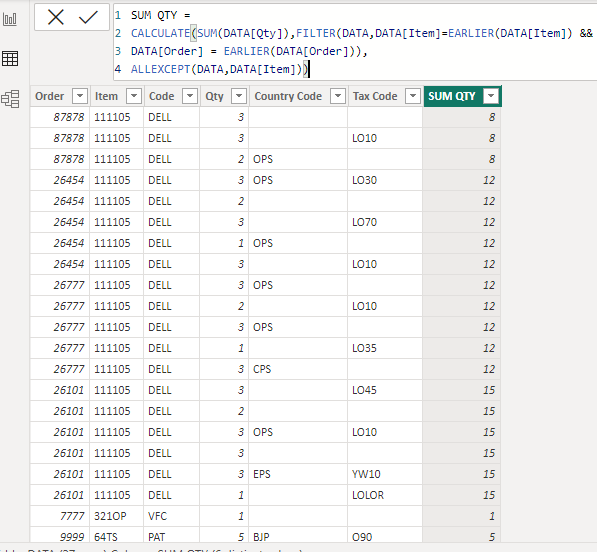
Additional column for sum qty in data table:
SUM QTY =Ā CALCULATE(SUM(DATA[Qty]),FILTER(DATA,DATA[Item]=EARLIER(DATA[Item]) && DATA[Order] = EARLIER(DATA[Order])), ALLEXCEPT(DATA,DATA[Item]))Ā
I want the same result (refer above mentioned snapshot) without maintain the additional columns in Data Table also apply non blanks conditions in summary table.Ā
Please note:
This action will also remove this member from your connections and send a report to the site admin.
Please allow a few minutes for this process to complete.

Report
You have already reported this .
Welcome to our new site!
Here you will find a wealth of information created for peopleĀ that are on a mission to redefine business models with cloud techinologies, AI, automation, low code / no code applications, data, security & more to compete in the Acceleration Economy!