Show 5 Plot in Line Chart

  • Show 5 Plot in Line Chart

    Posted by DSC Communities on December 5, 2019 at 9:17 pm
    • Junior One

      Member

      December 5, 2019 at 9:17 PM

      All experts, need helps.
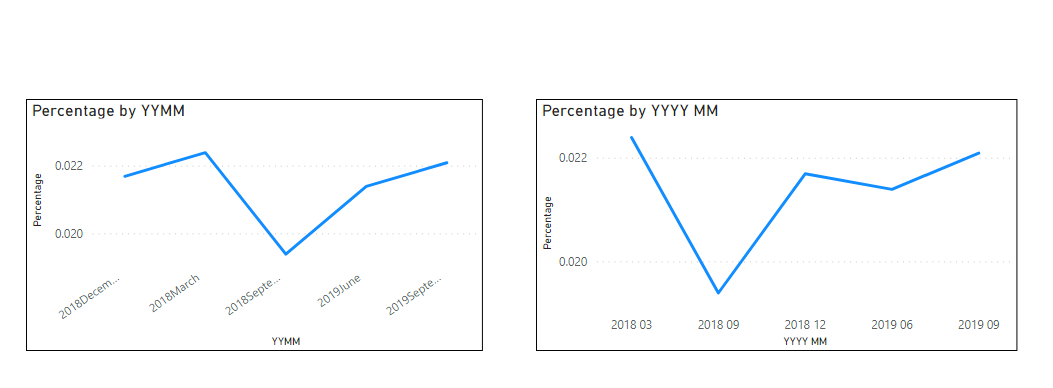
      I m able to show 5 plots in Table (2018 Sep, 2018 Dec, 2019 Mar, 2019 Jun, 2019 Sep) , but when show in Line Chart, it only show the 2 plots (2018 & 2019 only).

      How can i show the same 5 plots in Line Chart instead of 2?

      ——————————
      Junior One
      ——————————

    • Xavier Gobert

      Member

      December 6, 2019 at 3:11 AM

      Hello,

      What data did you use to setup the axis of your Line Chart ?
      You probably used Year and as you only have 2 values for that data, the graph is grouping.

      2 ways to get your 5 dots:
      – Use Month instead of year but in that case, you will not see from what year is the month.
      – Build a calculated columns concatenating Month and Year. You can then use this calculated column as your X axis.

      ——————————
      Xavier Gobert
      Head of Internal Development and BI
      Tomra
      Leuven
      ——————————
      ——————————————-

    • Ben Howard

      Member

      December 6, 2019 at 3:54 AM

      In addition to Xavier’s comments, I would look at turning the month and year back into an actual date value, or getting the actual date for each row, which might mean changing the source data.Ā  Ā That way it will sort properly, because the issue with just concatenating the Year and the Month is that it will then sort alphabetically and you will find December comes before March.Ā  Ā  As an alternative, you could just use the query editor and replace the month with a numeric value, so December becomes 12, March 03 etc.Ā  Attached is a pbix that does just that.Ā 

      ——————————
      Ben Howard
      Warrington
      ——————————
      ——————————————-

    • Vishesh Jain

      Member

      December 6, 2019 at 4:36 AM

      Hi ,

      Try changing the type of your X-axis from ‘continuous’ to ‘categorical’ and if that does not work then use the below mentioned approach.

      You need a YearMonth and YearMonthKey column in your calendar table?.
      Use the following code:

      YM = FORMAT('Calendar'[Date],"MMM") & " " & YEAR('Calendar'[Date])?
      
      YMKEY = YEAR('Calendar'[Date])*100 + MONTH('Calendar'[Date])

      Ā 
      After creating this, sort the YM column based on the YMKey column. You can even create the YMKey column directly.
      Use either of these 2 columns on your X-axis, instead of taking the dates from fact table or the date column of your calendar table.

      Hope this resolves your issue.

      Thank you,

      ——————————
      Vishesh Jain
      Owner
      VR Construction
      ——————————
      ——————————————-

    DSC Communities replied 6 years ago 1 Member · 0 Replies
  • 0 Replies

Sorry, there were no replies found.

The discussion ‘Show 5 Plot in Line Chart’ is closed to new replies.

Start of Discussion
0 of 0 replies June 2018
Now

Welcome to our new site!

Here you will find a wealth of information created for peopleĀ  that are on a mission to redefine business models with cloud techinologies, AI, automation, low code / no code applications, data, security & more to compete in the Acceleration Economy!