Replicating Excel 100% Stacked Chart in PowerBI

  • Replicating Excel 100% Stacked Chart in PowerBI
    Posted by DSC Communities on March 13, 2018 at 9:53 am
    • Maria Cotton

      Member

      March 13, 2018 at 9:53 AM

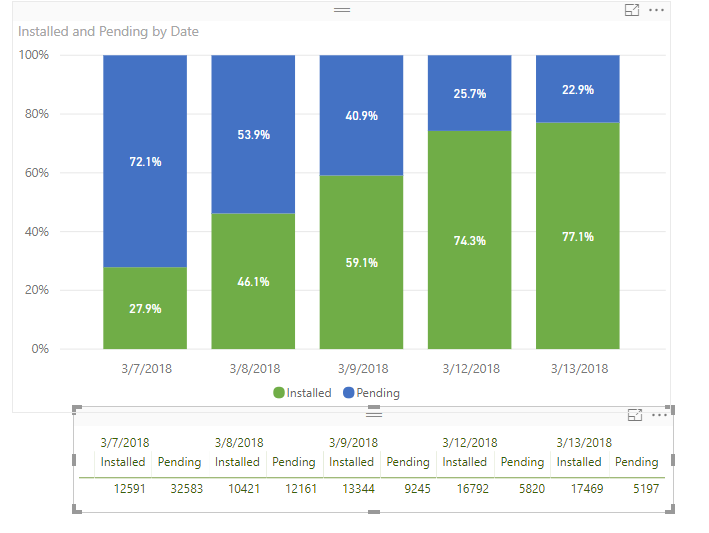
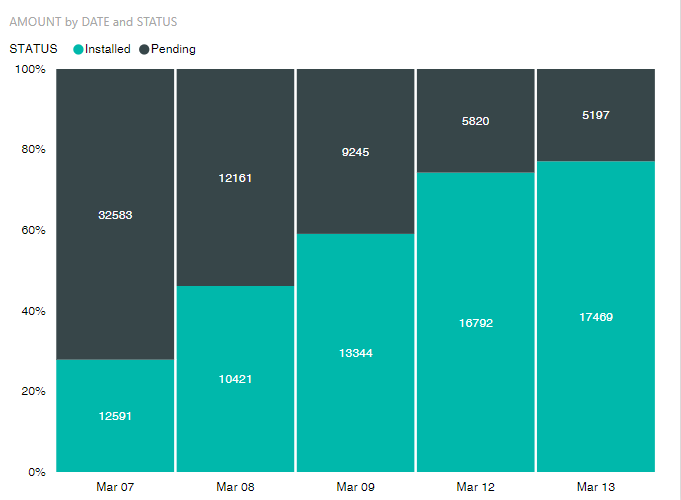
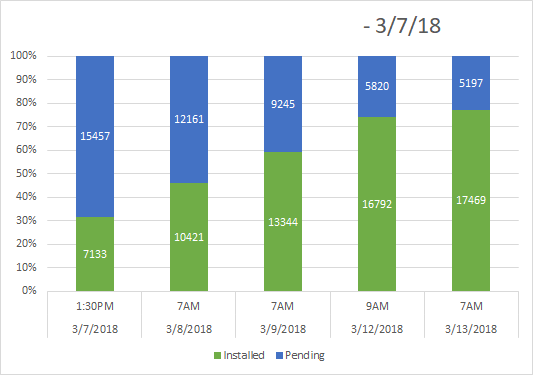
      Hoping to find out if anyone has had luck replicating the excel 100% stacked bar chart in PowerBI?Ā  The specific functionality of allowing the values to appear on the chart is something we would like to be able to continue to use.

      Excel:
      ScreenshotFromExcel
      PowerBI:
      PowerBIScreenshot
      If anyone has any feedback, it would be greatly appreciated!

      ——————————
      Maria Cotton
      Mobile Device Systems Admin
      Winter Park FL
      (321) 304-2159
      ——————————

    • William Rodriguez

      Member

      March 13, 2018 at 10:32 AM

      Greetings :

      According to this thread post, the ‘standard’ 100% graph is not capable of this functionality.

      I tried multiple iterations to complete this task – the best solution I found was with the custom visual ‘Mekko Chart’ on the ‘PBI Custom Visual Market Place‘.

      There might be a better custom visual, but I think this is the route to take to complete your task.

      Thanks!
      William??

      ——————————
      William Rodriguez
      Business Analyst
      ——————————
      ——————————————-

    DSC Communities replied 7 years, 10 months ago 1 Member · 0 Replies
  • 0 Replies

Sorry, there were no replies found.

The discussion ‘Replicating Excel 100% Stacked Chart in PowerBI’ is closed to new replies.

Start of Discussion
0 of 0 replies June 2018
Now

Welcome to our new site!

Here you will find a wealth of information created for peopleĀ  that are on a mission to redefine business models with cloud techinologies, AI, automation, low code / no code applications, data, security & more to compete in the Acceleration Economy!