


Power Platform
Public Group
Active a week ago
Power Platform
Organizer:
- JOSE Organized by
-
-

Removal of the Personal Gateway issue
-
Removal of the Personal Gateway issue
Posted by DSC Communities on April 17, 2017 at 10:56 pm-

Brian Roby
MemberApril 17, 2017 at 10:56 PM
Hello Everyone,
I am having a horrible time trying to get rid of a legacy Personal Gateway that I created some time ago now.
The machine that the Gateway was created on has long passed on to talk to the digital gods and is not going to be resurrected.
The problem I am having is that a completely new PBIX file I have just created is insisting on trying to use the old Personal Gateway, not the Enterprise GW.
I have a number of datasets that also insist on trying to use this old GW and I cannot find any way in which to remove any and all links to this old GW.
This is driving me crazy with frustration as I am having many problems trying to establish a reliable data refresh method.
I have just created a very simple Excel table and used that to test the Enterprise GW and it immediately linked up to the old Personal GW!
Can any please help?
TIA
Brian.——————————
Brian Roby
I.T. Systems Manager
Geographe Enterprises
897249618
—————————— -
Prathyush Raj
MemberApril 18, 2017 at 1:07 AM
Hi Biran,
This is surly because one of your Dataset is still trying to use the Personal GW. Please let me know the types of Data sources you are using in your PBIX. If there is any excel data source, please recreate it not by selecting locally, give the network path to get data. Hope this will work.
Regards
Prathyush
——Original Message——
Hello Everyone,
I am having a horrible time trying to get rid of a legacy Personal Gateway that I created some time ago now.
The machine that the Gateway was created on has long passed on to talk to the digital gods and is not going to be resurrected.
The problem I am having is that a completely new PBIX file I have just created is insisting on trying to use the old Personal Gateway, not the Enterprise GW.
I have a number of datasets that also insist on trying to use this old GW and I cannot find any way in which to remove any and all links to this old GW.
This is driving me crazy with frustration as I am having many problems trying to establish a reliable data refresh method.
I have just created a very simple Excel table and used that to test the Enterprise GW and it immediately linked up to the old Personal GW!
Can any please help?
TIA
Brian.——————————
Brian Roby
I.T. Systems Manager
Geographe Enterprises
897249618
—————————— -
Jimmy Gibson
MemberApril 18, 2017 at 10:43 AM
Did you remove the gateway profiles in the Power BI cloud service?
If not, log into Power BI and do the following:- Click the gear (Settings)
- Click Manage Gateways
- Find the profile for the old gateway, then click the three dots on the right (Open Menu)
- Click Remove
——————————
Jimmy Gibson
Sr. Business Analyst
7574784673
——————————
——————————————- -
Brian Roby
MemberApril 19, 2017 at 3:29 AM
The sample data that I decided to use was a simple Excel Table, 10 rows of data showing a number of types of animals and how many of each.
Not exactly rocket science. I stored this Excel file on our network and referenced it from the network.
The current Gateway is installed on the File Server that the file is stored on.
The Gateway service is up and running on the server.
Is that all that is required? I don’t really understand how the GW is supposed to work nor if there is any configurable items in there that can help.
Do you have to point the GW at some location? If so, how?
Is the GW supposed to give access to ALL the files on the server that it is installed on?
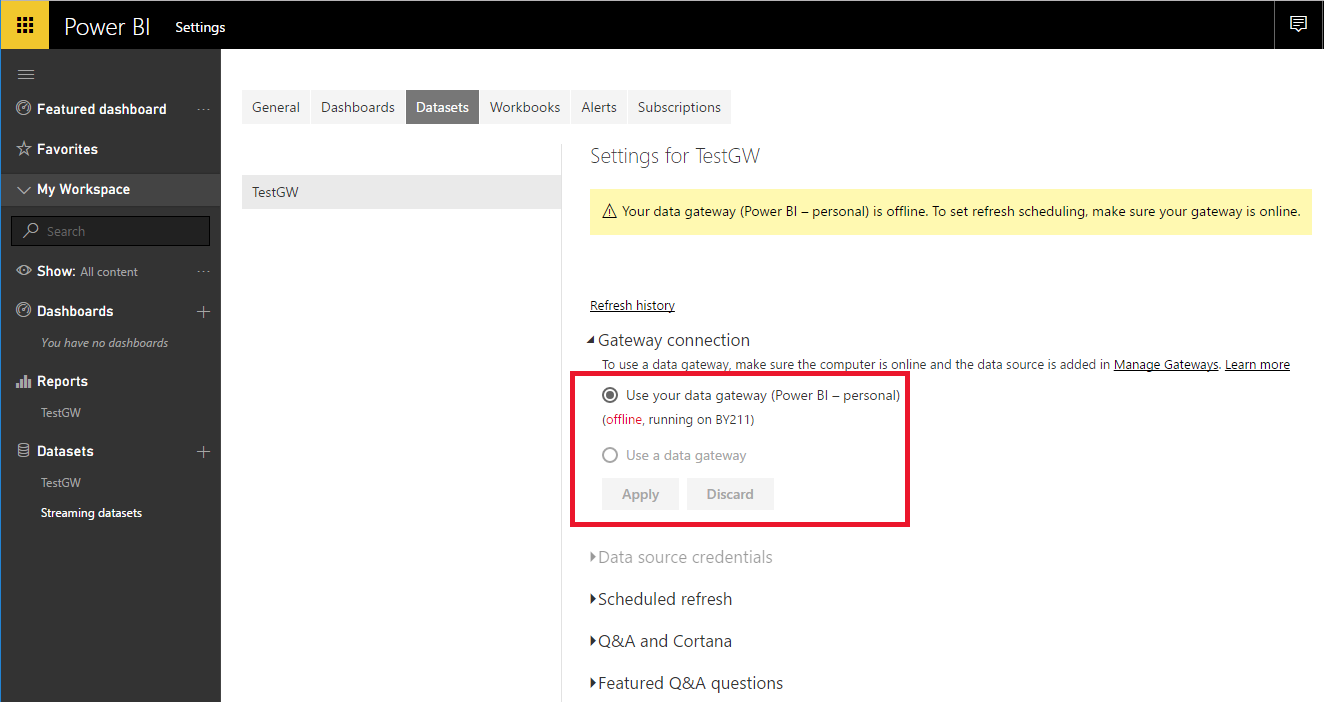
The instant I published the sample file to the PowerBI website, then checked the Refresh link, I found it trying to use the Personal GW.
There is no SQL involved.
The other recent file that I have created, only to have the same problem, was also a simple Excel spreadsheet used to track our company football (Aussie Rules) tipping competition, along with a link to the AFL football site to get a link to the Premiership table for all the teams and their ranking. This came together very easily, until that is, I hit the refresh problem again…
I have also now removed the Gateway as per the suggestion in one of the posts, but how do I now relink to the Gateway, or should I uninstall the Gateway from the server and reinstall?
This is giving me a headache!
RegardsBrian.
——————————
Brian Roby
I.T. Systems Manager
Davenport
897249618
——————————
——————————————- -
David Cresp
MemberApril 18, 2017 at 1:25 AM
This is an ongoing issue that Microsoft does not seem to have resolved. Lots of discussion on it here but there does not seem to be a final solution. How to remove personal gateway from app.powerbi.comPowerbi remove preview How to remove personal gateway from app.powerbi.com I, I successfully uninstalled personal gateway from my server. But it is still visible on app.powerbi.com, with an error saying that gateway is unavailable. I can’t refresh my datasources because of this error. Can you help me ? View this on Powerbi > ——————————
David
——————————
——————————————- -
Ian Monat
MemberApril 18, 2017 at 1:38 AM
I ran into the Personal Gateway issue and after trying a million different solutions, what finally solved the issue and got me onto my enterprise gateway was taking ALL the local files that my dashboard connected to and moving them to the Enterprise Gateway.
Put differently the Enterprise Gateway is all or nothing. If you have a local Excel file for a lookup table in addition to your SQL Server database connection or whatever, you’re gonna remain on the personal gateway.
Ian Monat
Business Sales Analyst
707-967-2245C. MONDAVI & FAMILY
FAMILY OWNED and OPERATED for FOUR GENERATIONS
charleskrug.com • thediviningrod.com • ckmondavi.com • purpleheartwines.com
——Original Message——
Hello Everyone,
I am having a horrible time trying to get rid of a legacy Personal Gateway that I created some time ago now.
The machine that the Gateway was created on has long passed on to talk to the digital gods and is not going to be resurrected.
The problem I am having is that a completely new PBIX file I have just created is insisting on trying to use the old Personal Gateway, not the Enterprise GW.
I have a number of datasets that also insist on trying to use this old GW and I cannot find any way in which to remove any and all links to this old GW.
This is driving me crazy with frustration as I am having many problems trying to establish a reliable data refresh method.
I have just created a very simple Excel table and used that to test the Enterprise GW and it immediately linked up to the old Personal GW!
Can any please help?
TIA
Brian.——————————
Brian Roby
I.T. Systems Manager
Geographe Enterprises
897249618
—————————— -
Brian Roby
MemberApril 20, 2017 at 1:15 AM
Hi Ian,
HOW do you move a file into the Gateway?
RegardsBrian.
——————————
Brian Roby
I.T. Systems Manager
Davenport
897249618
——————————
——————————————- -
Ian Monat
MemberApril 21, 2017 at 1:55 PM
Hey Brian, I didn’t see your question till now.Here’s how I connect to my On Premise Enterprise Gateway: (note: you’ll need Power BI Pro if you want to share this gateway-enabled dashboard)
1) I create dashboards in Power BI Desktop, so from an open .PBIX desktop file, click Publish, this will publish your desktop file to Power BI Web
2) You’ll land in the Report View. In the top right menu click the Gear, and select Manage Gateways
3) Next you have to add a data source (see img below), name your Gateway, fill out the fields, etc…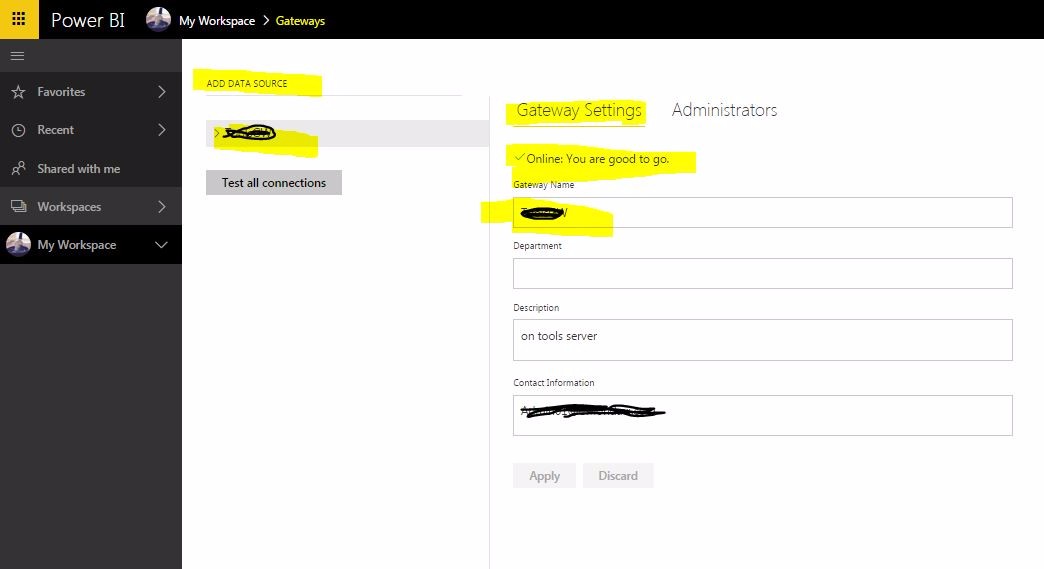
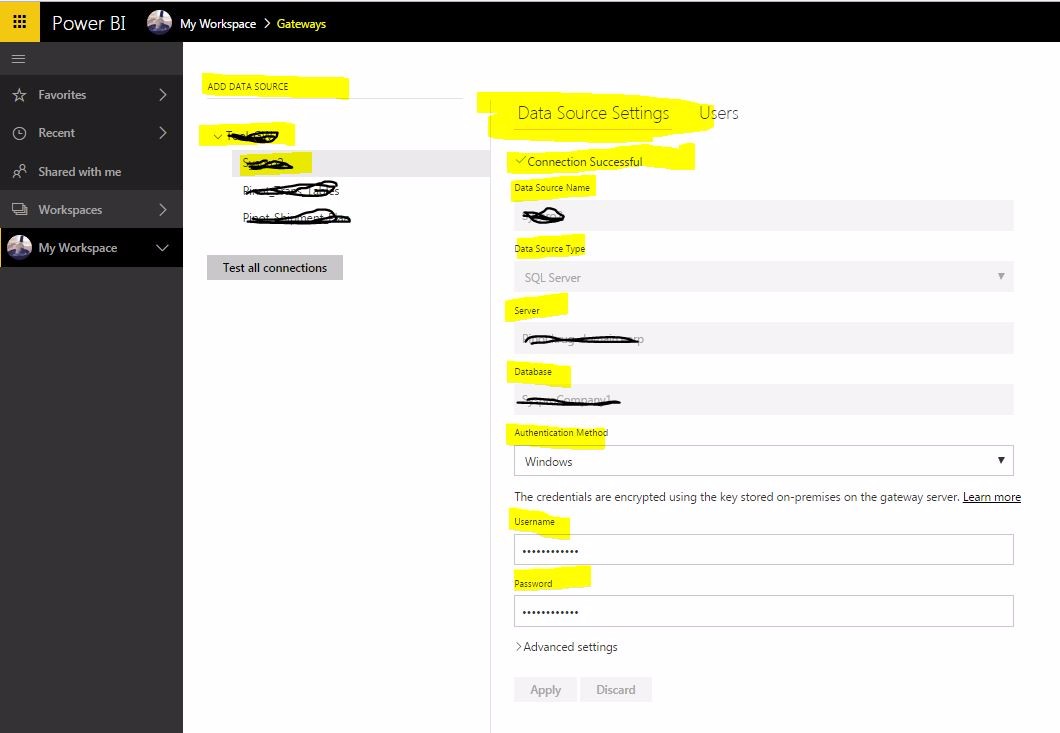
4) Here’s the trick, be sure to add every data source in your .PBIX file. These additional sources are within the main gateway, you can kinda see the hierarchy in the img below.At first I only added the SQL Server connection to my ERP system, then later realized I had to add some Excel files too that I used as lookup tables, because our database is not very clean. I re-positioned my Excel files to the same server that the ERP system is running on and away from my local machine so there would be no connectivity issues.
(Data Source 1 – ERP System)
(Data source 2 – XLS spreadsheet)
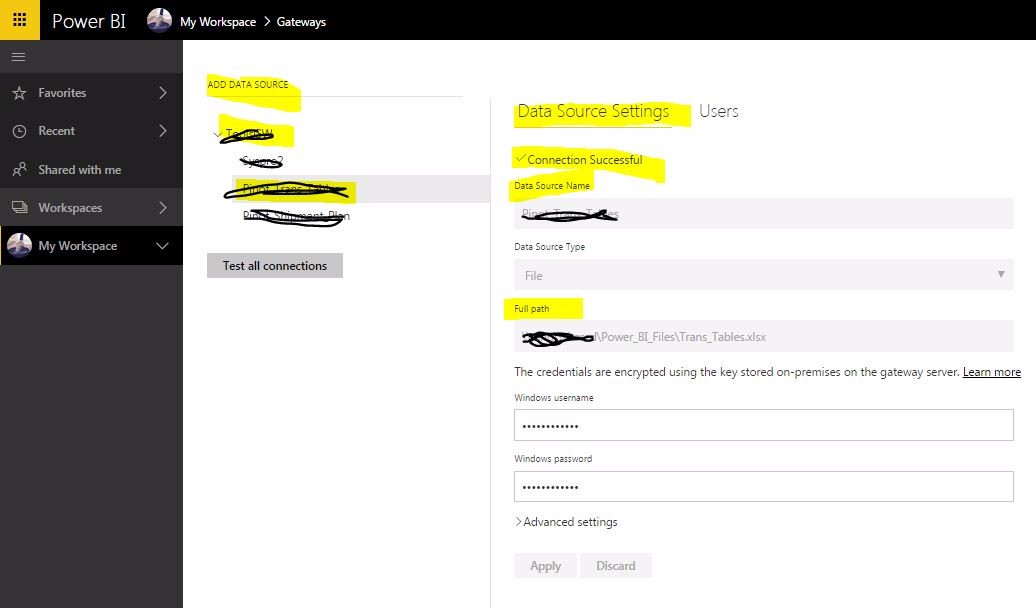
5) Lastly, you’ll know you’re good when you see all the ‘Connection Successful!’ messages and in your report > datasets > settings, you see the ‘Use a data gateway’ option available to select: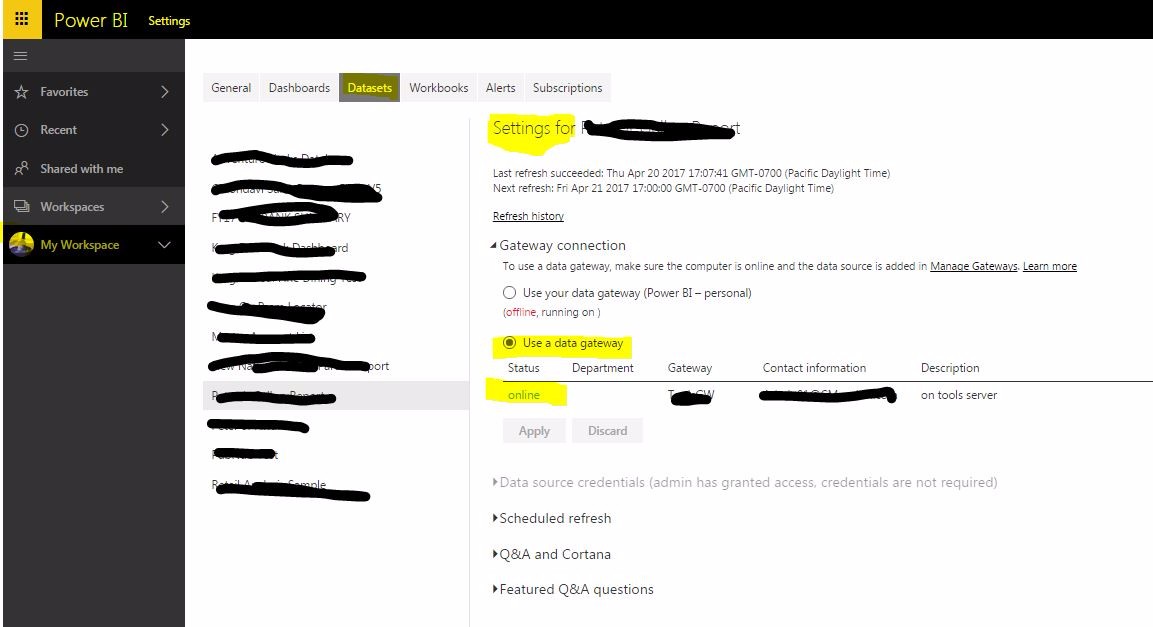
You should have the ability to set your refresh schedule there too. Good luck, let me know how it goes! -Ian——————————
Ian Monat
Business Analyst
Napa CA
7079672245
——————————
——————————————- -
Brian Roby
MemberApril 24, 2017 at 7:48 AM
Hi Ian,
Thanks for your excellent answer!
I have only just realised that I had to add in the info for each referenced data set and your information has really laid it out clearly.
I am amazed that this level of detail does not show up in searches, so many “solutions” tell you to set up/install the gateway and then move on without really explaining all the details.
Anyway, Time will tell if I can get this to work properly not.
I did successfully change one project over from the personal gateway to the enterprise gateway, but I had to make sure that everything matched up exactly, i.e. don’t reference a mapped drive in one location and then use the UNC path in another location! As soon as I made everyhting match up, I was able to swap… yay!
Thanks for your info.
Brian.——————————
Brian Roby
I.T. Systems Manager
Davenport
897249618
——————————
——————————————- -
Ian Monat
MemberApril 25, 2017 at 1:51 AM
Glad it helped!——————————
Ian Monat
Business Analyst
Napa CA
7079672245
——————————
——————————————- -
David Moss
MemberApril 25, 2017 at 3:26 AM
Ian, to enhance your great answer. i often get asked…so i need to add all the different data sources from my .pbix file to the gateway…but i can’t remember them all…Answer well simply in your .pbix file in the ‘External Data’ section of the home ribbon clcik ‘Edit Queries’ then select “Data Source Settings” and there you can see all the data sources of that .pbix file. As Ian states each of those needs adding to the gateway. But do make sure that when you configure the data source in the gateway that it has the EXACT same path as the datasource in the .pbix. They MUST match for it to work. That may sound obvious, but in the enterprise when the gateway is installed on a different server (often on a VM) then paths can change.——————————
David Moss
Power BI & Cortana Solutions Consultant
Wottabyte
London
——————————
——————————————- -
Ian Monat
MemberApril 26, 2017 at 1:42 AM
Agreed David! The gateway can be finicky.——————————
Ian Monat
Business Analyst
Napa CA
7079672245
——————————
——————————————- -
Brian Roby
MemberApril 27, 2017 at 1:19 AM
Thank you everyone for your help with this issue.
It seems like I have now fixed the problem of getting the Enterprise Gateway up and running.
Mind you… the damn messages about the “Personal Gateway” are still there, but I do think that is a bug that MS need to squash.
RegardsBrian.
——————————
Brian Roby
I.T. Systems Manager
Davenport
897249618
——————————
——————————————- -
Brandon Judge
MemberApril 28, 2017 at 3:33 PM
If your On-Prem gateway is installed on a different machine, you don’t necessarily “move a file onto a gateway”, but copy the file to the same location on that machine as on your local machine (i.e. C://Users/Documents). Both machines (i.e. the gateway and PBI Desktop) will look in the same relative places for the source, but you’ll need to maintain identical copies of the data source if you do the report authoring locally and automate refresh in the service.Re: the persistence of the Personal Gateway on a decommissioned machine, I talked to the Tier II support team about this a few months back, and they recognized the confusion around it’s persistence, but weren’t able to provide a solution to get rid of it. Hopefully a fix is on the way.
——————————
Brandon Judge
Business Analyst
Bellevue WA
406-249-6513
——————————
——————————————- -
David Moss
MemberMay 1, 2017 at 5:31 AM
For clarify & To re-iterate on Brandon’s comment.
There is only 1 physical version of the data source.
There are 2 copies of the data source path.
1st can be found in the .pbix data source settings.
the 2nd and identical is added to the gateway
When .pbix is published to the service and schedule refresh configured……then the service uses the gateway version (if data is on-premises) to access the refreshed data.——————————
David Moss
Power BI & Cortana Solutions Consultant
Wottabyte
London
——————————
——————————————-
DSC Communities replied 9 years, 4 months ago 1 Member · 0 Replies -
-
0 Replies

Sorry, there were no replies found.
The discussion ‘Removal of the Personal Gateway issue’ is closed to new replies.
