


Power Platform
Public Group
Active an hour ago
Power Platform
Organizer:
- JOSE Organized by
-
-

Refresh problems
-
Refresh problems
Posted by DSC Communities on August 15, 2017 at 4:38 pm-

Steve Kunzman
MemberAugust 15, 2017 at 4:38 PM
I have created some power bi reports and published them to our power bi service. They are pulling SQL data from a CRM 2015 on premise system. I created the queries through Excel 2016.
I have set up a data gateway to schedule the refresh. It says it updated the data, but it has not. When I am in Power BI Desktop and hit the refresh button, it acts like it is refreshing, but it stops shortly after it starts and the data is not updated.If I go into Excel 2016 and go to Data and hit Refresh, it does update the data. I save the spreadsheet and go into Power BI Desktop and hit refresh and publish and everything is good.
I would really like to automate the data refresh. Any ideas where it is broken?
Thanks. Steve
——————————
Steve Kunzman
Plymouth MN
—————————— -
Tobias Crush
MemberAugust 16, 2017 at 12:43 AM
?I’d suggest building the queries in your PowerBI Desktop report. I think the difficulty is that you are refreshing from the Excel and expecting Excel to run the data update then feed the data to PowerBI which I don’t reckon it will do.If you build the queries in your .pbix file then you’ll have a dataset that can be refreshed, assuming that your organisation will allow for the data to be accessed directly through the gateway.
Bit of a hassle, but otherwise I suspect you’ll have to update the Excel Spreadsheet first then update your PowerBI dataset.
——————————
Tobias Crush
Finance Director
Adelaide
408800324
——————————
——————————————- -
Steven Brown
MemberAugust 16, 2017 at 2:03 AM
?Tobias is absolutely right. When the Power BI gateway refreshes, it will get what is in your Excel spreadsheet, but your spreadsheet won’t refresh to get what is in the SQL Server database unless you open it yourself and refresh it. You’ll likely want to use Power BI to get data from the SQL Server directly, cutting out the Excel table. You can do this the same way you did in Excel, but there is a shortcut.In your Excel table, open the Query Editor (Data > Show Queries, Query > Edit), select your query (if there is more than one), click “Advanced Editor”, and copy the text (M language).
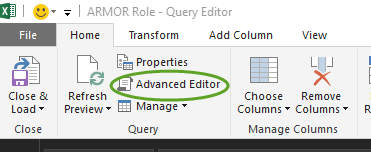 From there copy all the text. Open Power BI Desktop. When you add new data, choose “Blank Query”.
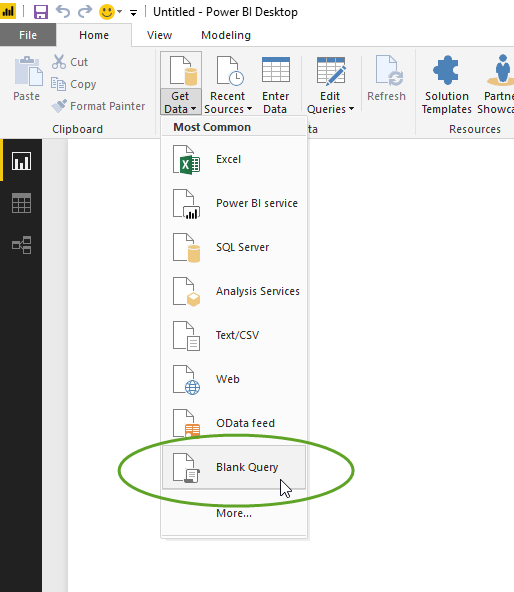 Delete the template text and paste the M script you copied from the Excel Advanced Query Editor window. You may have to provide credentials the first time. After you save and apply, your dataset is ready. You’ll have to recreate your Power BI visuals. Maybe you could replace the M script that gets data from your Excel spreadsheet instead of a new Blank Query, but I’m not sure whether that will work.
——————————
Steven Brown
Knight Transportation
Phoenix AZ
——————————
——————————————- -
David Wheeler
MemberAugust 17, 2017 at 2:51 AM
?Hi Steve,
instead of running the queries over Excel and then power bi why don´t you just connect your power bi directly via the queries to the SQL Server.
It is logical that the Excel queries only refresh when the file is opened, you would need a scheduler to open the file and refresh the data.using the ODBC Connection in power bi is the simplist and most efficient way to have your data refreshed
——————————
David
——————————
——————————————-
DSC Communities replied 8 years, 7 months ago 1 Member · 0 Replies -
-
0 Replies
Sorry, there were no replies found.
The discussion ‘Refresh problems’ is closed to new replies.
