Problem with null values when using the replace function within a compose action.

  • Problem with null values when using the replace function within a compose action.
    Posted by DSC Communities on November 26, 2019 at 1:24 pm
    • Dave Vadnais

      Member

      November 26, 2019 at 1:24 PM

      Hi All

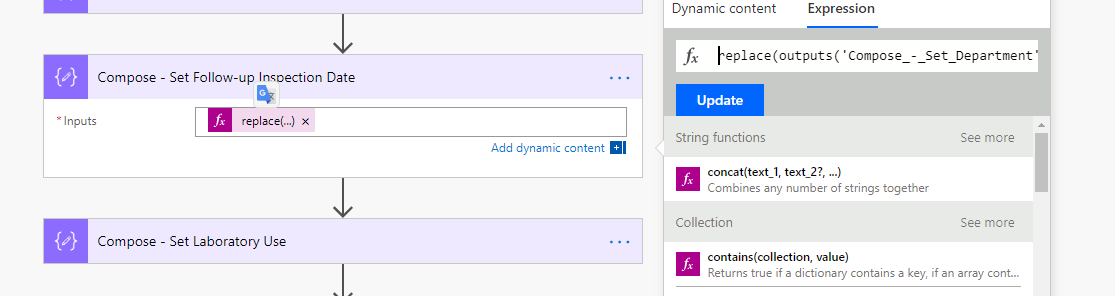
      I am having an problem dealing with ‘Null’ values in my flow that will convert a SharePoint list item (inspection data) into a pdf document (inspection report). 

      The problem is, the list item will sometimes contain null values for at least 2 dates (i.e. a follow-up inspection date) that have yet to be scheduled and therefore cannot be entered into the SharePoint list yet.  However, I need to generate a report that will show either the null values or the dates, whichever is relevant.


      The code I am using to replace the values in the HTML file is as follows:


      replace(outputs(‘Compose_-_Set_Department’),'{followupdate}’,outputs(‘Get_item_-_Issue_Item’)?[‘body/Follow_x002d_upInspectionDate’])


      Any help would be greatly appreciated.

      Thanks in advance.


      Dave A. Vadnais, PhD.

      Laboratory Safety Coordinator

      Office of the Dean of Arts and Science

      Nipissing University

      100 College Drive

      North Bay, ON P1B 8L7

      davev@nipissingu.ca

      Office: (705) 474-3450 ext. 4180

      25AnniversaryLogo


    • Will Page

      Member

      November 27, 2019 at 3:09 AM

      You’d probably be better off with something like if(equals(outputs(‘Get_item_-_Issue_Item’)?[‘body/Follow_x002d_upInspectionDate’],null),’Placeholder Text’,outputs(‘Get_item_-_Issue_Item’)?[‘body/Follow_x002d_upInspectionDate’])

      ——————————
      Will Page
      Technical consultant
      Christchurch
      ——————————
      ——————————————-

    • EMMANUEL GALLIS

      Member

      November 27, 2019 at 5:18 AM

      Hi ,
      It is true that Automate does not know how to handle a date field that is blank. So what you need to do (that’s what I do in my flows and it works) is that you have to check if your date field is empty or not. So your formula should look like this:?

      replace(outputs('Compose_-_Set_Department'),'{followupdate}',if(empty(outputs('Get_item_-_Issue_Item')?['body/Follow_x002d_upInspectionDate']),'',outputs('Get_item_-_Issue_Item')?['body/Follow_x002d_upInspectionDate']))?

      Hope this helps,
      Emmanuel (Twitter: @R3dKap)
      ?

      ——————————
      Emmanuel GALLIS
      Office 365 Consultant
      Ai3
      TOULOUSE
      ——————————
      ——————————————-

    • Dave Vadnais

      Member

      November 27, 2019 at 9:24 AM

      Hello
      That worked perfectly and has solved my problem.Ā  Thanks very much.
      ?

      ——————————
      Dave Vadnais
      Laboratory Safety Coordinator
      Nipissing University
      North Bay, ON
      davev@nipissingu.ca
      ——————————
      ——————————————-

    • Mark Pearson

      Member

      November 27, 2019 at 10:00 PM

      Not sure where you are doing this in Flow,Ā  but I use the select action before creating the HTML. . This allows for expressions to be used.Ā  In you case in the Column where you want a date I would look at an if Statement like:

      if(not(Date Field,null),Date Field,null)

      The above is very simplified but basically if Date not null, then insert date,Ā  else leave as null)

      ——————————
      Mark Pearson
      National Operations Manager
      61409321547
      ——————————
      ——————————————-

    DSC Communities replied 6 years, 4 months ago 1 Member · 0 Replies
  • 0 Replies

Sorry, there were no replies found.

The discussion ‘Problem with null values when using the replace function within a compose action.’ is closed to new replies.

Start of Discussion
0 of 0 replies June 2018
Now

Welcome to our new site!

Here you will find a wealth of information created for peopleĀ  that are on a mission to redefine business models with cloud techinologies, AI, automation, low code / no code applications, data, security & more to compete in the Acceleration Economy!