Power BI/Hosted ERP

  • Power BI/Hosted ERP

    Posted by tdestefano@phigenics.com on June 14, 2018 at 10:13 am
    • Tamara DeStefano

      Member

      June 14, 2018 at 10:13 AM

      Good morning all!

      I am new to Power BI and trying to get up to speed.Ā  We have, what appears to be, a unique situation and are having some issues deploying Power Bi to our users. Our ERP system (Dynamics GP) is hosted in Azure. Only the Accounting team has logins/access to this server. Power BI sits on this server as well. We want to provide our sales team with access to Power BI dashboards. (None of them would be visualizations, only viewing dashboards and possibly filtering based on splicers already provided.)Ā 

      Since our Sales Team does not have Azure log ins, what options do we have for rolling the data out to them with Power BI?Ā 

      Ideally, it would be real time, but it is not a show stopper if that is not any option. We also need to secure the data they have access to based on the Customer accounts that are assigned to them.Ā 

      I should also mention, that this was working at one point. Our company’s Power BI expert is unavailable until December and it seems the consultant we worked with has left our Partner’s firm. From what I understand there was some type of “Gateway” created to make this work, but I have no notes or details about what this is or how to work it.

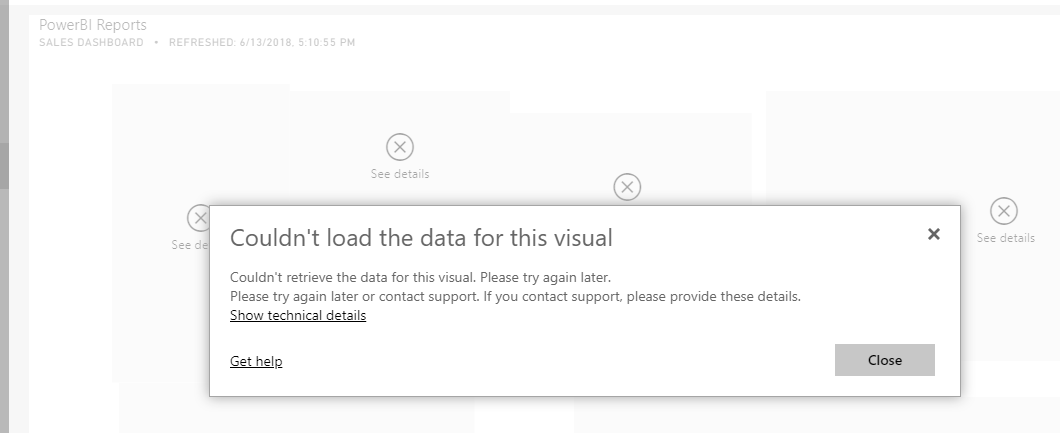
      We recently had a change in Office licensing and since then we are having issues with access to the data. When they log in (and when I log in as admin (admin@company.onmicrosoft.com)), they get this:

      For some reason, I now have two accounts. One (tdestefano@company.com) gets the same as above. The other (tdestefano@company.onmicrosoft.com) I am able to get data.Ā 

      Any guidance, recommendations or suggested training would be greatly appreciated!!
      -Tammy

      ——————————
      Tamara DeStefano
      Senior Accountant
      Phigenics, LLC

      ——————————

    • Anthony Merriwether

      Member

      June 15, 2018 at 9:36 AM

      Tamara,
      It appears that your office email domain tamara@yourcompany.com is no longer associated with the Azure Active Directory Tenant.Ā  You may need to add your respective users to the AAD Tenant again.Ā  This could have occurred as a result of the o365 licensing change.Ā Ā 

      Are you having the same issue when you access the dashboard and connect to the data source from the power bi desktop?

      Anthony

      ——————————
      Anthony Merriwether
      Power BI for Dynamics GP Architect
      ETL Source LLC
      Marietta GA
      (770) 510-6655
      https://www.etlsource.com
      ——————————
      ——————————————-

    tdestefano@phigenics.com replied 8 years, 4 months ago 1 Member · 0 Replies
  • 0 Replies

Sorry, there were no replies found.

The discussion ‘Power BI/Hosted ERP’ is closed to new replies.

Start of Discussion
0 of 0 replies June 2018
Now

Welcome to our new site!

Here you will find a wealth of information created for peopleĀ  that are on a mission to redefine business models with cloud techinologies, AI, automation, low code / no code applications, data, security & more to compete in the Acceleration Economy!