Power BI Activity Log Extract

  • Power BI Activity Log Extract

    Posted by DSC Communities on October 1, 2020 at 11:23 am
    • Arifhusen Ansari

      Member

      October 1, 2020 at 11:23 AM

      Hi Team,Ā 

      I need help. I tried my best but didn’t get solution. I think this would be good platform for the discussion.Ā 

      I need to analyze Power BI usage. I can do this using Power BI usage report provided in the app.powerbi.com. But there are some limitation and my client ask me to extract the data from Power BI Activity log and store in the database so we can build custom report.Ā 

      I successfully extracted the data and stored in the file. But I found some differences in the report provided by power bi platform and audit log.Ā 
      I can see views on Report Level as well as views by each report page, in a usage report provided on power bi platform.Ā 
      E.g. Power biĀ  report named like “Sales” has two pages “Summary Sales” and “Detail Sales”. I can see views on Report “Sales” and also I can see views on each page” Summary sales” and “Detail Sales”. This information is available on usage report provided on Power bi platform.Ā 

      While I am extracting audit data using PowerBI Activity Log in csv file. I can see view on report level e.g. “Sales” but not able to get view by page in Audit data.Ā 

      Do anyone can help me on this ?? How can I get page level audit data in Audit log extracted using PowerBI Activity log API.

      ThanksĀ 
      Arif

      ——————————
      Arifhusen Ansari
      ——————————

    • Lutz Bendlin

      Member

      October 2, 2020 at 11:54 AM

      The Audit log does not go down to report page level. If you need that granularity you need to continue to use the in-workspace usage reports.

      ——————————
      Lutz
      ——————————
      ——————————————-

    • John Mansfield

      Member

      October 5, 2020 at 9:35 AM

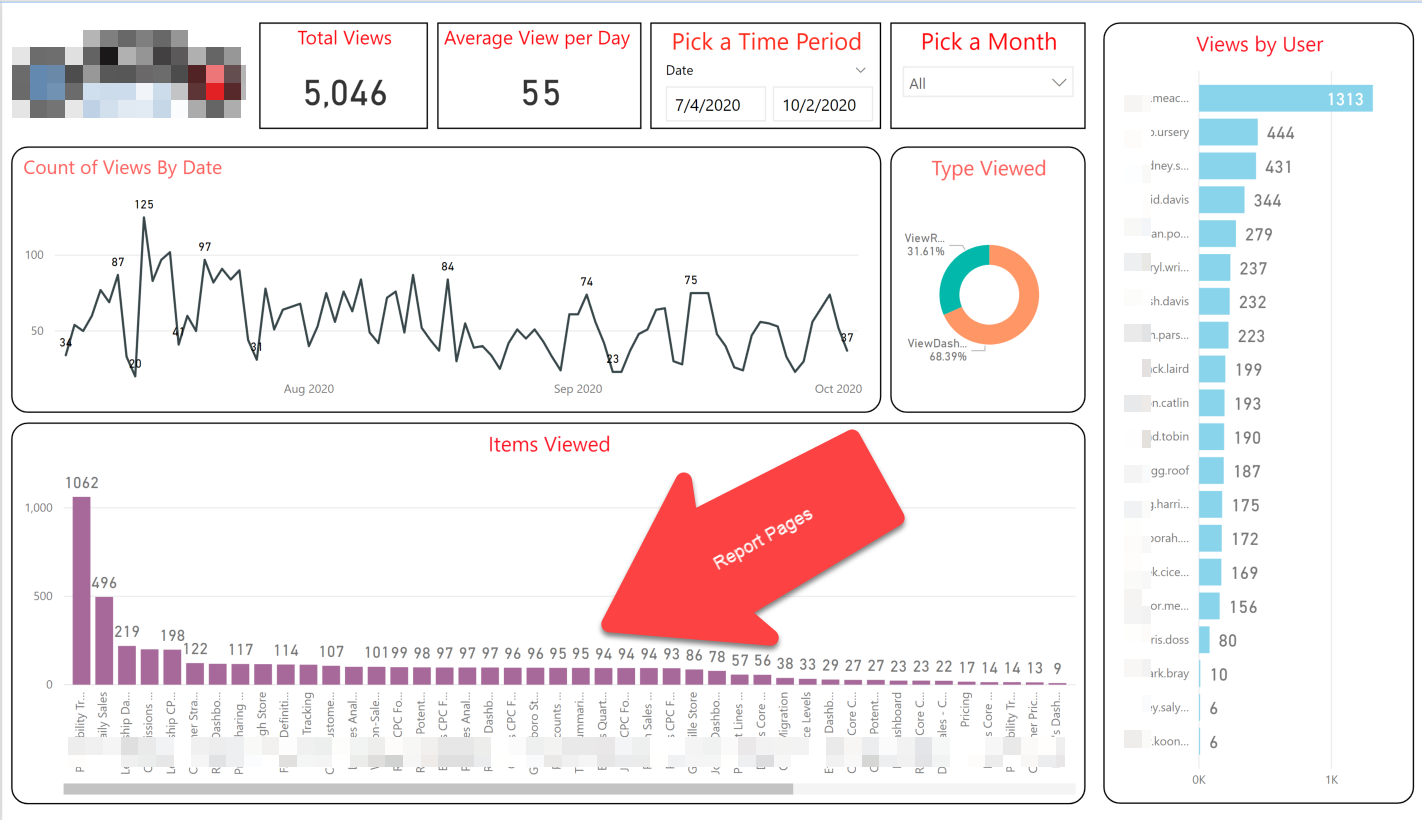
      I am not sure if this will help you or not, but I use the standard PBI audit download, where I select Viewed Report and Viewed Dashboard. I then download the complete results. There are three columns in the results: CreationDate, Userids, Operations, AuditData. Within the AuditData field is ItemName which is the name of the page in the report or the dashboard. I delete most of the rest of the AuditData and then I can create a report that shows me the usage by user, date, and what they viewed like this:

      Report built based upon audit data from Power BI

      ——————————
      John Mansfield
      Consultant
      StratMax
      Chapel Hill NC
      ——————————
      ——————————————-

    • Arifhusen Ansari

      Member

      October 5, 2020 at 9:57 AM

      John Mansfield,Ā 

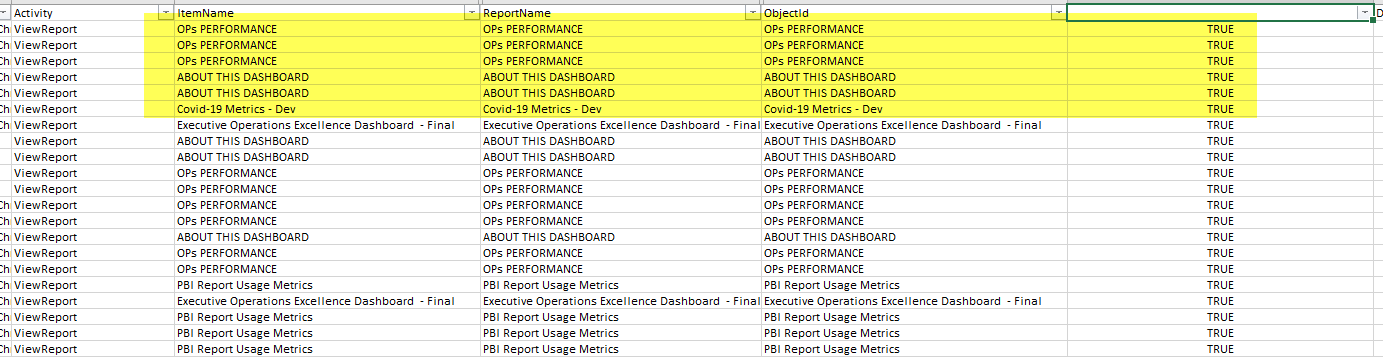
      Thanks for the update. I did the same this. but when I parsed my audit data. I got the itemname same as the report name.Ā 

      Find below screenshot.Ā 

      ——————————
      Arifhusen Ansari
      ——————————
      ——————————————-

    • Lutz Bendlin

      Member

      October 5, 2020 at 9:54 AM

      In our Audit logs ItemName, ReportName, and ObjectIdĀ  all contain the name of the report. None of the fields indicate report page granularity. YMMV

      ——————————
      Lutz
      ——————————
      ——————————————-

    • Arifhusen Ansari

      Member

      October 5, 2020 at 9:59 AM

      No. These columns have same information

      ——————————
      Arifhusen Ansari
      ——————————
      ——————————————-

    DSC Communities replied 5 years, 3 months ago 1 Member · 0 Replies
  • 0 Replies

Sorry, there were no replies found.

The discussion ‘Power BI Activity Log Extract’ is closed to new replies.

Start of Discussion
0 of 0 replies June 2018
Now

Welcome to our new site!

Here you will find a wealth of information created for peopleĀ  that are on a mission to redefine business models with cloud techinologies, AI, automation, low code / no code applications, data, security & more to compete in the Acceleration Economy!